







Question: Python programming question about GUI's. I have done a lot of the work, however, some of my code my not be correct. I am stuck
 Python programming question about GUI's. I have done a lot of the work, however, some of my code my not be correct. I am stuck on the class ATM() section to create the GUI. Any help would be greatly appreciated.
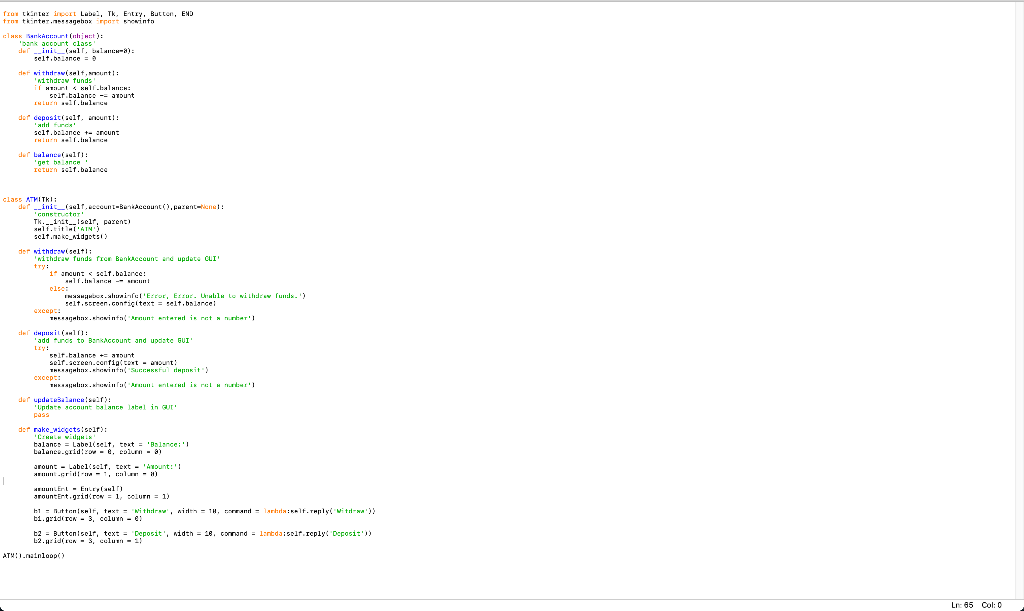
from tkinter import Label, Tk, Entry, Button, END from tkinter.messagebox import showinfo
class BankAccount(object): 'bank account class' def __init__(self, balance=0): self.balance = 0
def withdraw(self,amount): 'withdraw funds' if amount
def deposit(self, amount): 'add funds' self.balance += amount return self.balance def balance(self): 'get balance ' return self.balance
class ATM(Tk): def __init__(self,account=BankAccount(),parent=None): 'constructor' Tk.__init__(self, parent) self.title('ATM') self.make_widgets()
def withdraw(self): 'withdraw funds from BankAccount and update GUI' try: if amount
def deposit(self): 'add funds to BankAccount and update GUI' try: self.balance += amount self.screen.config(text = amount) messagebox.showinfo('Successful deposit') except: messagebox.showinfo('Amount entered is not a number')
def updateBalance(self): 'Update account balance label in GUI' pass
def make_widgets(self): 'Create widgets' balance = Label(self, text = 'Balance:') balance.grid(row = 0, column = 0)
amount = Label(self, text = 'Amount:') amount.grid(row = 1, column = 0)
amountEnt = Entry(self) amountEnt.grid(row = 1, column = 1)
b1 = Button(self, text = 'Withdraw', width = 10, command = lambda:self.reply('Witdraw')) b1.grid(row = 3, column = 0)
b2 = Button(self, text = 'Deposit', width = 10, command = lambda:self.reply('Deposit')) b2.grid(row = 3, column = 1)
ATM().mainloop()
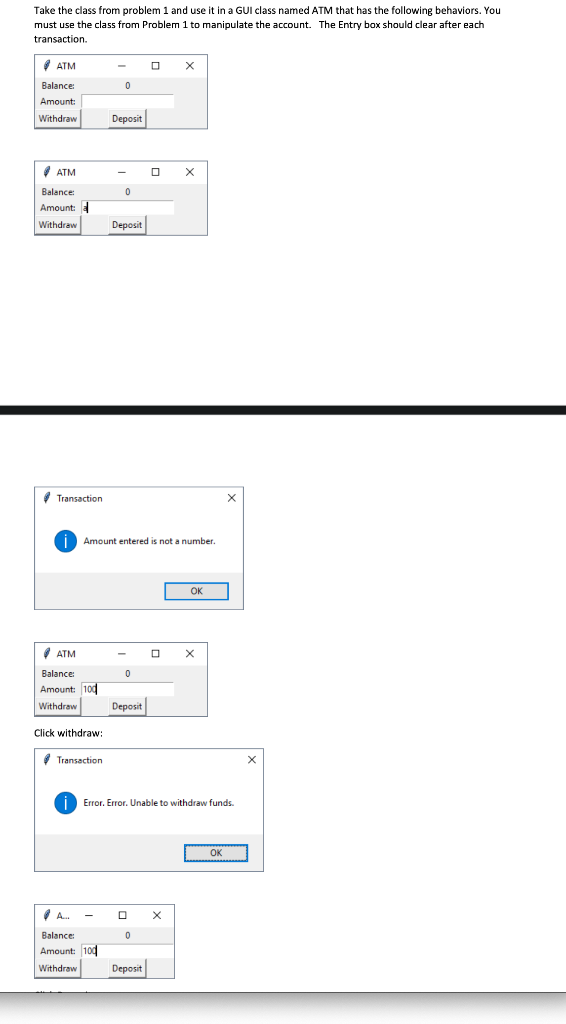
Take the class from problem 1 and use it in a GUI class named ATM that has the following behaviors. You must use the class from Problem 1 to manipulate the account. The Entry box should clear after each transaction. 0 ATM Balance: Amount Withdraw Deposit X 0 ATM Balance Amount: Withdraw Deposit Transaction X Amount entered is not a number. OK ATM 0 Balance: Amount: 1od Withdraw Deposit Click withdraw: Transaction Error. Error. Unable to withdraw funds. OK 0 A. Balance: Amount: 100 Withdraw Deposit fror tkantex inport Leben, Tk, Entry, Button, END tros tentat. Sagebox port syninto cla Sankce. (t): 'bank account class de ini mwa): selt.blance det withiiselt, nunti: withdraw funds iT 1. ll. self balance -- aunt In un mereu der deposit ill. nel! fuck ' self. balance + aroun Hun.ll.la der Lulullri: return self. balance class ATMITKI: der __init__(self.cccunt-Bonaccount().entenel! concretari Tk. inst Iseir, payent Hlf.tit HTAINS self.: kc_widgetsi der withdrsviseltli withdraw funds for Bank Account and update CLI try: : 1 ancuns scl.bolerce: 11. NACH -- eram clie INI. fol, Erru. Until te wille w funds.') selt.screen.conicitext = telt.balarcel except: TAKLAGAN..howinta runt Ant This returi HHX (uli 'adduros to Baraccount and update GUI LIY: solt talange + amount seirasyon.confiatext - aut! THREAGAY.howinta Suchful thinkit X. X. infus? Ar writinul is not that's der update3. Lancer): Update account balance label in cur pass der rake wiccetsiselt: CH WIX talants = Labeliselt teat = 'Balance: Lalanewside - e, column -a around - Label(self, TeK - ' Aunt:'! Ar-Grill-ul luun. Er - Epl) arountert.gidrow = 1, selurn 1) 11 - Wittenkit, taxt = Withole, with = 1H, DANH = lahat. Tuple vitra) ti.gidin - 3 column -e: t2 = B.ttoniselt, text = Deposit', width = 28. command = linda seir reply Deposit)) L2.id = 3 column- ATHI.nainloop() Lrc 05 Col: 0 Take the class from problem 1 and use it in a GUI class named ATM that has the following behaviors. You must use the class from Problem 1 to manipulate the account. The Entry box should clear after each transaction. 0 ATM Balance: Amount Withdraw Deposit X 0 ATM Balance Amount: Withdraw Deposit Transaction X Amount entered is not a number. OK ATM 0 Balance: Amount: 1od Withdraw Deposit Click withdraw: Transaction Error. Error. Unable to withdraw funds. OK 0 A. Balance: Amount: 100 Withdraw Deposit fror tkantex inport Leben, Tk, Entry, Button, END tros tentat. Sagebox port syninto cla Sankce. (t): 'bank account class de ini mwa): selt.blance det withiiselt, nunti: withdraw funds iT 1. ll. self balance -- aunt In un mereu der deposit ill. nel! fuck ' self. balance + aroun Hun.ll.la der Lulullri: return self. balance class ATMITKI: der __init__(self.cccunt-Bonaccount().entenel! concretari Tk. inst Iseir, payent Hlf.tit HTAINS self.: kc_widgetsi der withdrsviseltli withdraw funds for Bank Account and update CLI try: : 1 ancuns scl.bolerce: 11. NACH -- eram clie INI. fol, Erru. Until te wille w funds.') selt.screen.conicitext = telt.balarcel except: TAKLAGAN..howinta runt Ant This returi HHX (uli 'adduros to Baraccount and update GUI LIY: solt talange + amount seirasyon.confiatext - aut! THREAGAY.howinta Suchful thinkit X. X. infus? Ar writinul is not that's der update3. Lancer): Update account balance label in cur pass der rake wiccetsiselt: CH WIX talants = Labeliselt teat = 'Balance: Lalanewside - e, column -a around - Label(self, TeK - ' Aunt:'! Ar-Grill-ul luun. Er - Epl) arountert.gidrow = 1, selurn 1) 11 - Wittenkit, taxt = Withole, with = 1H, DANH = lahat. Tuple vitra) ti.gidin - 3 column -e: t2 = B.ttoniselt, text = Deposit', width = 28. command = linda seir reply Deposit)) L2.id = 3 column- ATHI.nainloop() Lrc 05 Col: 0
Step by Step Solution
There are 3 Steps involved in it

Get step-by-step solutions from verified subject matter experts
 Study Help