







Question: python project Storage Application Create the Storage Application which determines how many images can be stored on a given size USB (flash) drive. The size
python project
Storage Application
Create the Storage Application which determines how many images can be stored on a given size USB (flash) drive. The size of the USB drive is to be entered by the user in gigabytes (GB). The number of images that can be stored must be calculated for GIF, JPEG, PNG, and TIFF image file formats. The program output should be formatted as shown in the Sample Run.
The ultimate file size of a given image depends not only on the image format used, but also on the image itself. In addition, formats such as JPEG allow the user to select the degree of compression for the image quality desired. For this program, we assume the image compression ratios given in Table 1. Also assume that all the images have a resolution of 800 X 600 pixels.
Thus, for example, a 800 X 600 resolution image with 16-bit (2 bytes) color depth would have a total number of bytes of 800 X 600 X 2 = 960,000. For a compression rate of 25:1, the total number of bytes needed to store the image would be 960000/25 = 38400.
Finally, assume that a GB (gigabyte) equals 1,000,000,000 bytes.
Format Full Name Color Depth Compression
| GIF | Graphics Interchange Format | 256 colors | 8 bits | lossless | 5:1 |
| JPEG | Joint Photographic Experts Group | 16 million colors | 24 bits | lossy | 25:1 |
| PNG | Portable Network Graphics | 16 million colors | 24 bits | lossless | 8:1 |
| TIFF | Tagged Image File Format | 280 trillion colors | 48 bits | lossless | n/a |
Table 1
Note that a lossless compression is one in which no information is lost. A lossy compression does lose some of the original information.
SAMPLE RUN
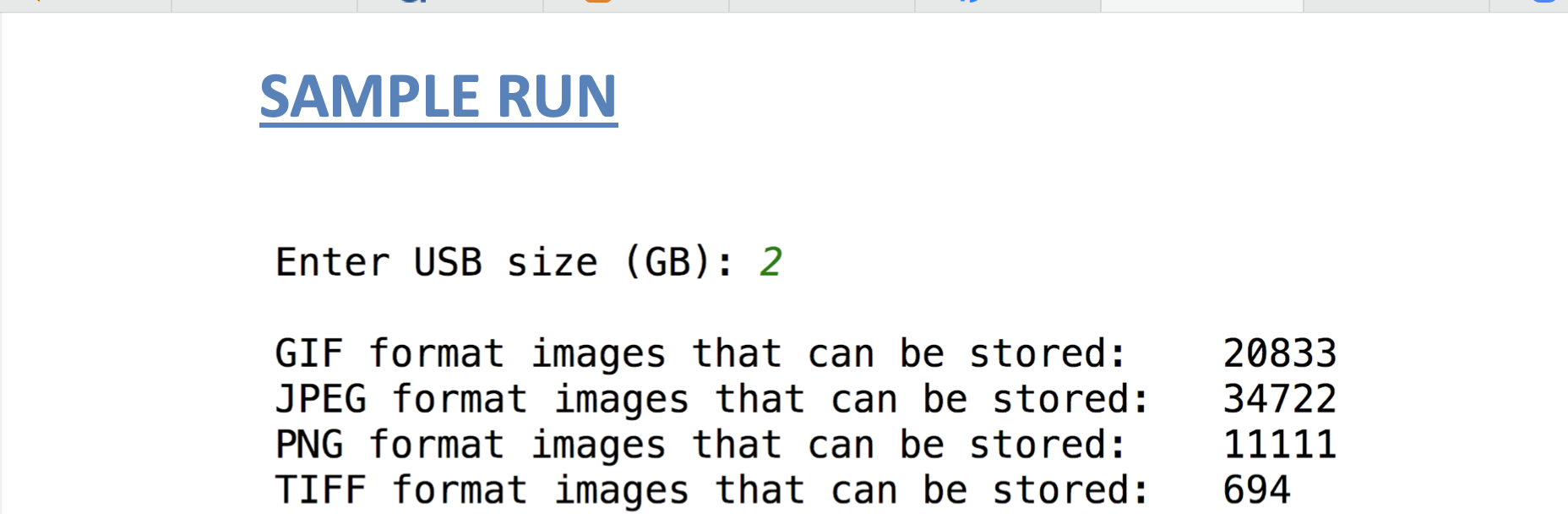
SAMPLE RUN Enter USB size (GB): 2 GIF format images that can be stored: JPEG format images that can be stored: PNG format images that can be stored: TIFF format images that can be stored: 20833 34722 11111 694
Step by Step Solution
There are 3 Steps involved in it

Get step-by-step solutions from verified subject matter experts
 Study Help