







Question: python Q2: GRO to PDB Format Conversion - 20 points The file associated with this question is q2_gro2pdb.py and the input file is q2_water.gro. The
 python
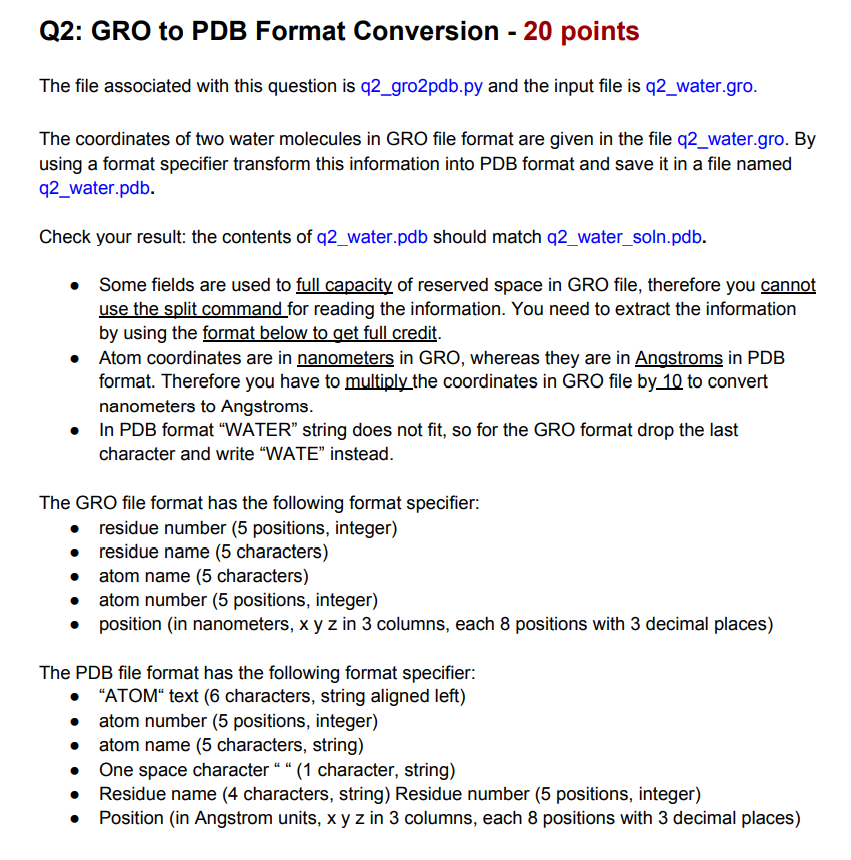
Q2: GRO to PDB Format Conversion - 20 points The file associated with this question is q2_gro2pdb.py and the input file is q2_water.gro. The coordinates of two water molecules in GRO file format are given in the file q2_water.gro. By using a format specifier transform this information into PDB format and save it in a file named q2_water.pdb. Check your result: the contents of q2_water.pdb should match q2_water_soln.pdb. Some fields are used to full capacity of reserved space in GRO file, therefore you cannot use the split command for reading the information. You need to extract the information by using the format below to get full credit. Atom coordinates are in nanometers in GRO, whereas they are in Angstroms in PDB format. Therefore you have to multiply the coordinates in GRO file by 10 to convert nanometers to Angstroms. In PDB format WATER string does not fit, so for the GRO format drop the last character and write WATE instead. The GRO file format has the following format specifier: residue number (5 positions, integer) residue name (5 characters) atom name (5 characters) atom number (5 positions, integer) position (in nanometers, x y z in 3 columns, each 8 positions with 3 decimal places) The PDB file format has the following format specifier: "ATOM text (6 characters, string aligned left) atom number (5 positions, integer) atom name (5 characters, string) One space character " " (1 character, string) Residue name (4 characters, string) Residue number (5 positions, integer) Position (in Angstrom units, x y z in 3 columns, each 8 positions with 3 decimal places) Q2: GRO to PDB Format Conversion - 20 points The file associated with this question is q2_gro2pdb.py and the input file is q2_water.gro. The coordinates of two water molecules in GRO file format are given in the file q2_water.gro. By using a format specifier transform this information into PDB format and save it in a file named q2_water.pdb. Check your result: the contents of q2_water.pdb should match q2_water_soln.pdb. Some fields are used to full capacity of reserved space in GRO file, therefore you cannot use the split command for reading the information. You need to extract the information by using the format below to get full credit. Atom coordinates are in nanometers in GRO, whereas they are in Angstroms in PDB format. Therefore you have to multiply the coordinates in GRO file by 10 to convert nanometers to Angstroms. In PDB format WATER string does not fit, so for the GRO format drop the last character and write WATE instead. The GRO file format has the following format specifier: residue number (5 positions, integer) residue name (5 characters) atom name (5 characters) atom number (5 positions, integer) position (in nanometers, x y z in 3 columns, each 8 positions with 3 decimal places) The PDB file format has the following format specifier: "ATOM text (6 characters, string aligned left) atom number (5 positions, integer) atom name (5 characters, string) One space character " " (1 character, string) Residue name (4 characters, string) Residue number (5 positions, integer) Position (in Angstrom units, x y z in 3 columns, each 8 positions with 3 decimal places)
Step by Step Solution
There are 3 Steps involved in it

Get step-by-step solutions from verified subject matter experts
 Study Help