







Question: Python; REMEMBER: The itertools and copy libraries in Python are banned. Overview This project is your first one to work with Linked Lists. You will
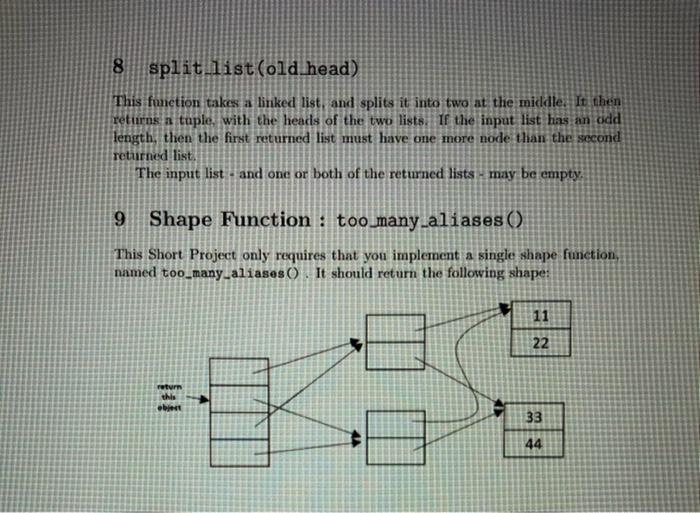
REMEMBER: The itertools and copy libraries in Python are banned. Overview This project is your first one to work with Linked Lists. You will be writing a handful of functions that manipulate lists, you will also be writing one function which implements a shape, to match a reference diagram that I've given you 2 Required Files You will need to submit two Python files. The first, named proj05_short_lists.py. will contain several functions: list_to_array(), array_to_list(), list_length(), and split_list(). The second, named projos_short_refs.py. will contain a single function, too many_aliases() Except for the last one, all of them manipulate lists - traversing them, ehang ing them around, or creating them. In most of them, you will be given a list as a parameter and return the head of a new list (but read the details for each, because some are different). As always in this class, we will represent a linked list using a reference to the head node. Empty lists are allowed; they are represented by a reference to None. Except in array_to_list(). none of the functions are allowed to create new list nodes: you must simply change the references between them. Likewise, you must not move values around between list nodes, or change the value stored in any node. 3 List Class All of the code in this project must import the file list_node.py, which I have provided. You must not modify this file. All of the list node objects that I provide you will be of the ListNode class, which is defined in that file Likewise, in the one function that created new linked list nodes you must create nodes of type ListNode as well. Students soutietimes copy-paste the code for ListNode into their own file This is forbidden, and will likely result in your failing testet. Instead, import the code from listanode.py 3.1 Debug Information Printouts are wonderful, for helping you debug! The LastNode cins that we've provided has a str_0 method; that means that we can automatically convert the list into a string representation of it. You can, in fact, print out the contents of the entire list with a single line of code: head print (f "Example printout: {head}"> Of course, Python doesn't automatically know how to print out a linked list but because we've implemented --str. Python will automatically call this funcion when we ask it to print out the object. I strongly recommend that you add a lot of debug code for your programs. (But make sure to turn it off when you're done!) 4 Design and Debug Hints Struggling how to get started with the code? Struggling how to debug a nasty problem? Check out these hints! Use a Reference Diagram. Don't waste time trying to write code particularly, code that modifies a list - if you cannot draw the reference diagram first. Like we did in class start by drawing a specific picture; that is, give yourself a simple input, and draw exactly what the code ought to do. But then, make sure to write a "generic" reference dingram. tool Show exactly what the code will look like, many iterations into the loop. What variables will you need? What can you assume about the state of the variables, and the input? What small change can you make, to make just a tiny bit of progress toward the solution? Print Your List I Print out the contents of every list you have - and all the temporary variables - on every pass of the loop. Draw a reference diagram of the "before" and "after" states, on each iteration of the loop. Is the function doing what you expect it to? Breaking the List Sometimes, your code will remove a node from the list you change some next pointers (or, you advanced the "head" pointer past it). But often, you keep the old node around, stored in a temporary variable, because you plan to use it later When you do this, it isn't necessary to strictly "remove it from the list, but it's often useful: try setting the next pointer in the removed node, so that it's no longer connected to rest of the list. 2 If you don't do this, then (usually) it doesn't break anything, but some times you get confused - for instance, if you try to print the old node. you'll end up printing the entire list even though this node has been Fremoved. Worse, it's easy to make mistakes with such a mode, and accidentally create a cycle. Can you find the bug in the code below head ListNode(10) head.next - ListNode (20) head. next next - ListNode (30) # as of this point, the list has 3 elements: 10,20,30 # remove the head tmp = head head head.next # move the head back to the end of the list head.next next = tmp Draw this up carefully in a reference diagram. What is the bug? 5 list to array (head) This function converts a linked list to an array containing the same values. The parameter is a linked list (perhaps empty); the return value must be an array. with the same values, in the same order. Do not change the list that you were passed. 6 array_to_list(data) This function converts an array to a linked list. The parameter is an array of values (perhaps zero length); it must return a linked list, containing the same todes, in the same order, This is the only function (as part of this Short Project) where you will create new nodes: remember, you can create a new ListNode object like this: obj ListNode (val) where the parameter is the value that will be stored inside the node: Do not change the array that you were passed. 7 list length(head) This function returns the length of a linked list (which might be empty). 3 8 split list(old head) This function takes a linked list, and splits it into two at the middle. It then returns a tuple, with the heads of the two lists. If the input list has an add length, then the first returned list must have one more node than the second returned list The input list - and one or both of the returned lists - may be empty 9 Shape Function : too many_aliases() This Short Project only requires that you implement a single shape function, named too many_aliases. It should return the following shape: 11 22 obert 33 44
Step by Step Solution
There are 3 Steps involved in it

Get step-by-step solutions from verified subject matter experts
 Study Help