







Question: (Python) This program should allow the user to see the cost of buying some products for given quantity. Create a class named Product at the
(Python)
This program should allow the user to see the cost of buying some products for given quantity. Create a class named Product at the top of file. This class will have following members:
__init__
o The initializer should receive 3 parameters for product name, price and quantity. It should assign the received parameters to appropriate field variables.
o If the quantity parameter is not provided, it should assign the value 1 to the field variable. Hint: use default value for quantity parameter similar to default values in methods
calculateCost() method
o This method will calculate the cost for product by multiplying price and quantity. Also, apply 13% tax on the calculated price. The method must return the cost from the function
__str__ method
o This method will display the product name, price, quantity and cost in the output. Consider the sample input-output provided at the end of this document for reference.
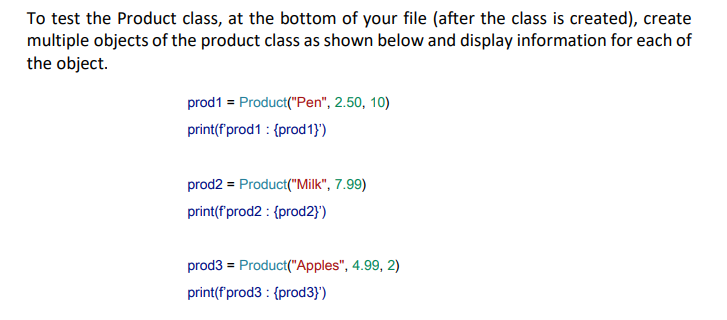
Sample Output:
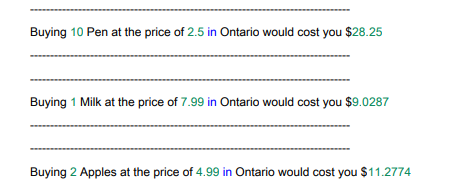
To test the Product class, at the bottom of your file (after the class is created), create multiple objects of the product class as shown below and display information for each of the object. prod1 = Product("Pen", 2.50, 10) print(f'prod1 : \{prod1\}') prod2 = Product("Milk", 7.99) print(f'prod2 : \{prod2\}') prod3 = Product("Apples", 4.99, 2) print(f'prod3 : \{prod3\}') Buying 10 Pen at the price of 2.5 in Ontario would cost you $28.25 Buying 1 Milk at the price of 7.99 in Ontario would cost you $9.0287 Buying 2 Apples at the price of 4.99 in Ontario would cost you $11.2774
Step by Step Solution
There are 3 Steps involved in it

Get step-by-step solutions from verified subject matter experts
 Study Help