







Question: Python tkinter how to hide labels? I have the following program which allows a user to enter their username and password in a GUI using
Python tkinter how to hide labels?
I have the following program which allows a user to enter their username and password in a GUI using a tkinter window. It then adds the username/password to a pandas dataframe.
The program prevents duplicate usernames, however when a user types in a duplicate username, the message (label) "Username Taken" stays showing in the window until the program is closed. I want this Username Taken label to disappear once the button is clicked with a valid (non-duplicate) username. How can I do this?
Here is my code:
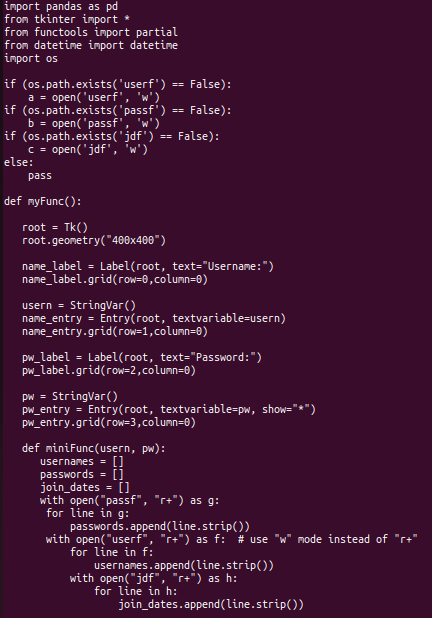
import pandas as pd from tkinter import * from functools import partial from datetime import datetime import os
if (os.path.exists('userf') == False): a = open('userf', 'w') if (os.path.exists('passf') == False): b = open('passf', 'w') if (os.path.exists('jdf') == False): c = open('jdf', 'w') else: pass
def myFunc():
root = Tk() root.geometry("400x400")
name_label = Label(root, text="Username:") name_label.grid(row=0,column=0)
usern = StringVar() name_entry = Entry(root, textvariable=usern) name_entry.grid(row=1,column=0)
pw_label = Label(root, text="Password:") pw_label.grid(row=2,column=0)
pw = StringVar() pw_entry = Entry(root, textvariable=pw, show="*") pw_entry.grid(row=3,column=0)
def miniFunc(usern, pw): usernames = [] passwords = [] join_dates = [] with open("passf", "r+") as g: for line in g: passwords.append(line.strip()) with open("userf", "r+") as f: # use "w" mode instead of "r+" for line in f: usernames.append(line.strip()) with open("jdf", "r+") as h: for line in h: join_dates.append(line.strip())
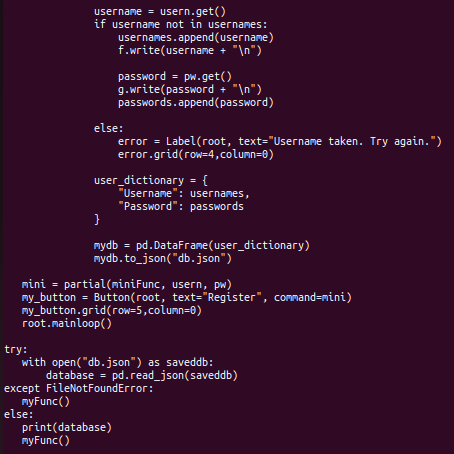
username = usern.get() if username not in usernames: usernames.append(username) f.write(username + " ")
password = pw.get() g.write(password + " ") passwords.append(password)
else: error = Label(root, text="Username taken. Try again.") error.grid(row=4,column=0)
user_dictionary = { "Username": usernames, "Password": passwords }
mydb = pd.DataFrame(user_dictionary) mydb.to_json("db.json")
mini = partial(miniFunc, usern, pw) my_button = Button(root, text="Register", command=mini) my_button.grid(row=5,column=0) root.mainloop()
try: with open("db.json") as saveddb: database = pd.read_json(saveddb) except FileNotFoundError: myFunc() else: print(database) myFunc()
Step by Step Solution
There are 3 Steps involved in it

Get step-by-step solutions from verified subject matter experts
 Study Help