







Question: python2.7 1. (20 points) Write a function processTropicalStorms() that takes the name of a file as a parameter. Each line of the file corresponds to
python2.7 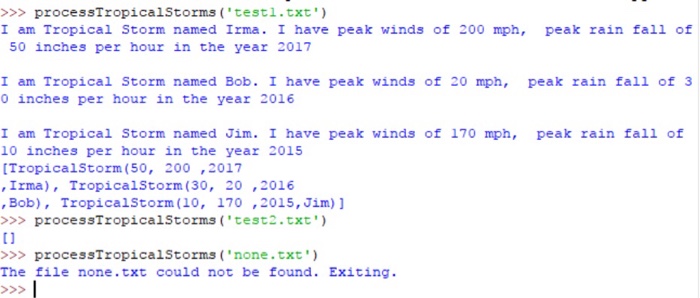
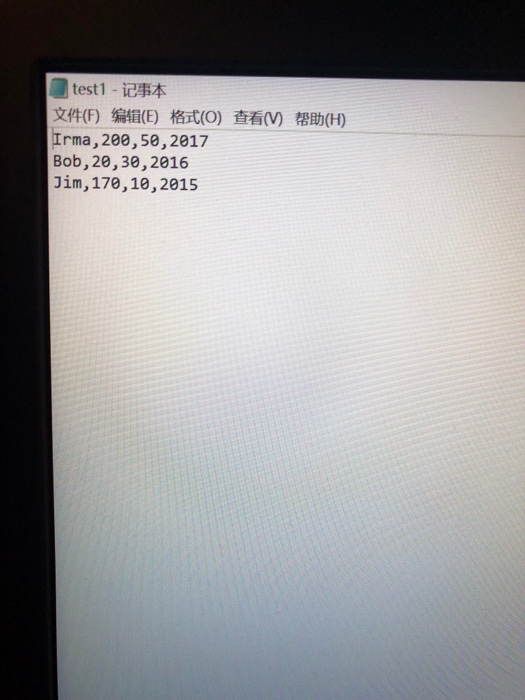
1. (20 points) Write a function processTropicalStorms() that takes the name of a file as a parameter. Each line of the file corresponds to information about a tropical storm. In particular a line contains a name, wind speed, rain fall amount and year. The function will process the file, creating a TropicalStorm object for each line in the file. The function will print information about each line as it processes it, as well as appending the new TropicalStorm object into a list. Make sure to use TropicalStorm methods to display information rather than recreating the work you did for the first problem. Once the entire file has been processed, the function returns the list of TropicalStorm objects created from the file. If the file is empty, the function should return an empty list. If the input file cannot be opened, the function should print a message to that effect and then return an empty list. The following shows what would be displayed for two example files which have been provided in the homework zip file posted to D2L. The file none.txt does not exist. Please note that your function must work on an arbitrary file that consists of valid lines. You cannot assume anything about the file except that it contains lines that have the format described above.
>>processTropicalStorms ('testl.txt' I am Tropical Storm named Irma. I have peak winds of 200 mph, peak rain fall of 50 inches per hour in the year 2017 I am Tropical Storm named Bob. I have peak winds of 20 mph, peak rain fall of 3 0 inches per hour in the year 2016 I am Tropical Storm named Jim. I have peak winds of 170 mph, peak rain fall of 10 inches per hour in the year 2015 [TropicalStorm (50, 200,2017 , Irma), Tropicalstorm (30, 20 ,2016 'Bob), TropicalStorm ( 10, 170 ,2015, Jim)] >>processTropicalStorms ('test2.txt') ti >>processTropicalStorms ('none.txt') The file none.txt could not be found. Exiting
Step by Step Solution
There are 3 Steps involved in it
1 Expert Approved Answer
Step: 1 Unlock

Question Has Been Solved by an Expert!
Get step-by-step solutions from verified subject matter experts
Step: 2 Unlock
Step: 3 Unlock
 Study Help