







Question: Python3 First 5 pics are main.py Last 3 are string_funcs.py 2 This is the MAIN part of your homework assignment. On Mimir, run python3 main.py
Python3 First 5 pics are main.py Last 3 are string_funcs.py
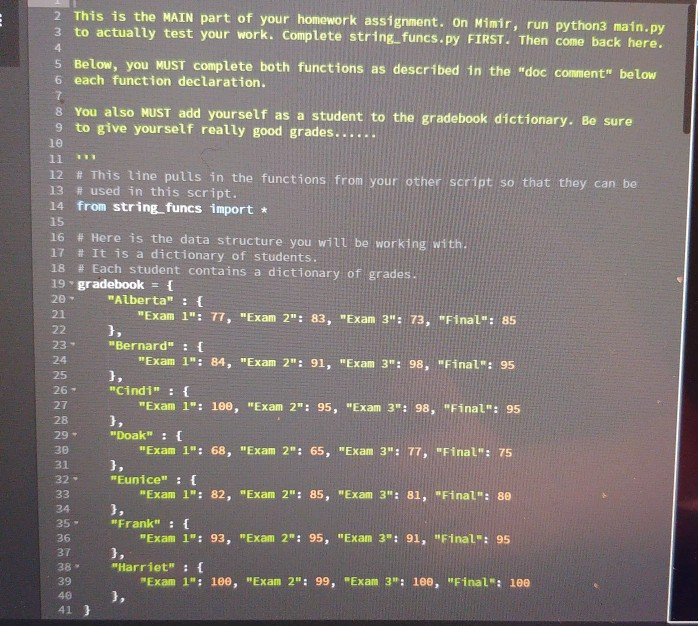
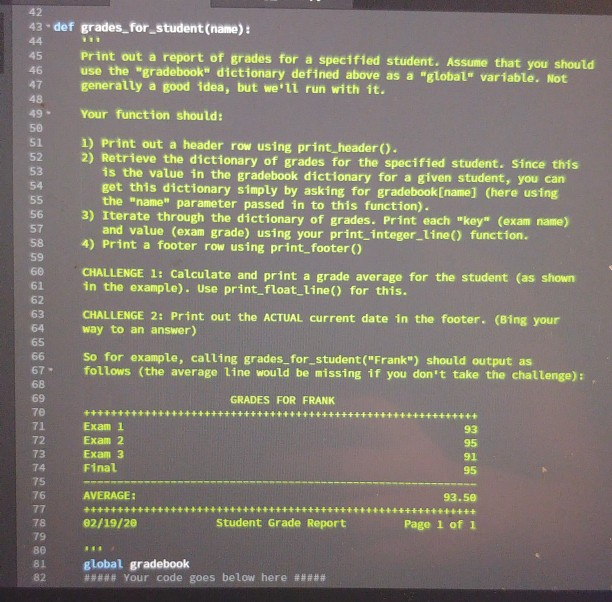
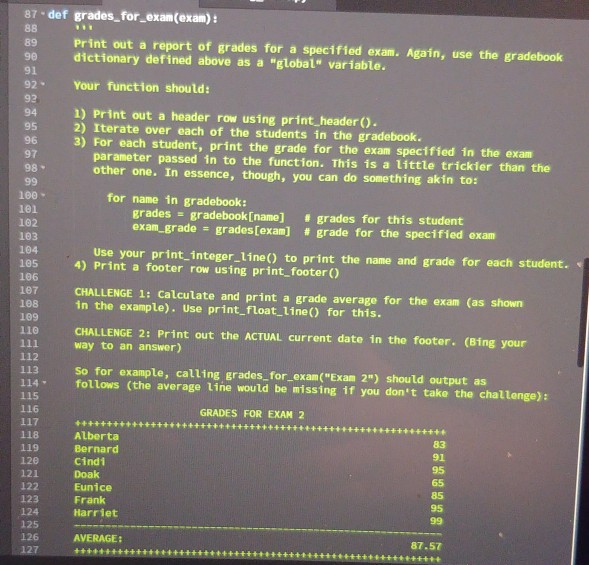
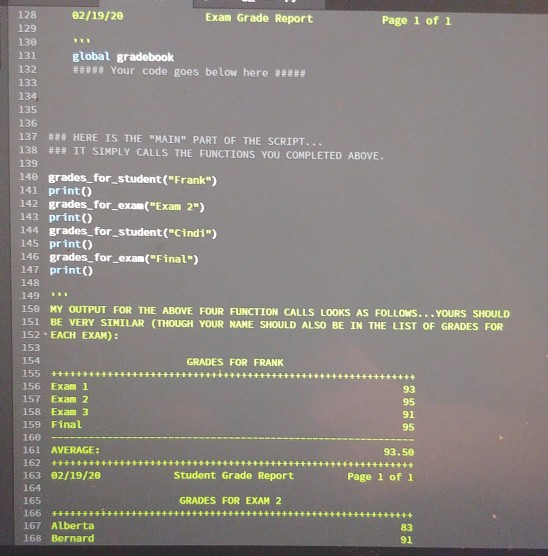
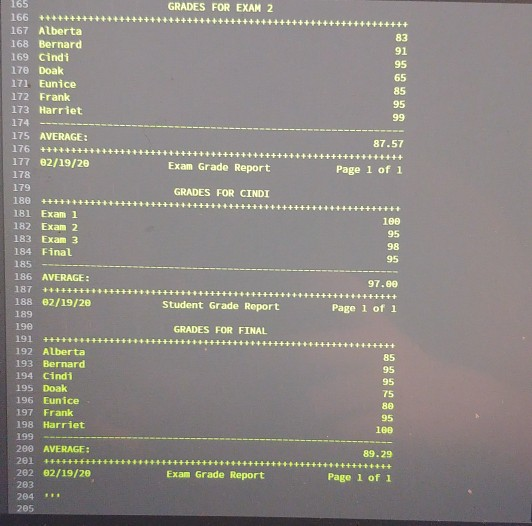
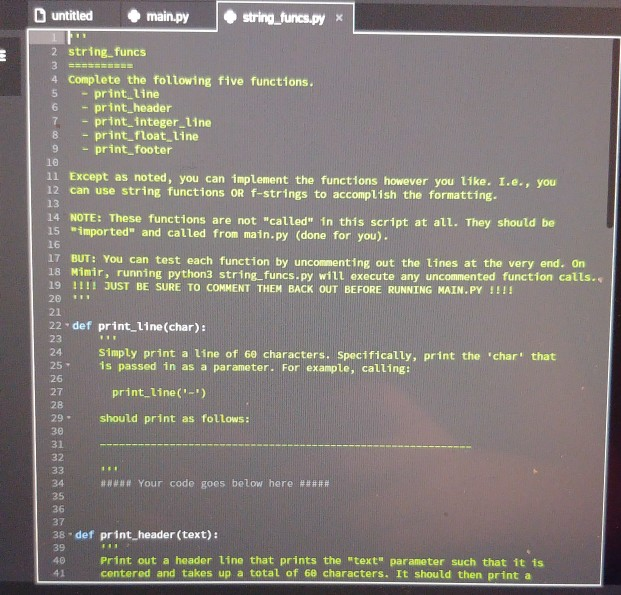
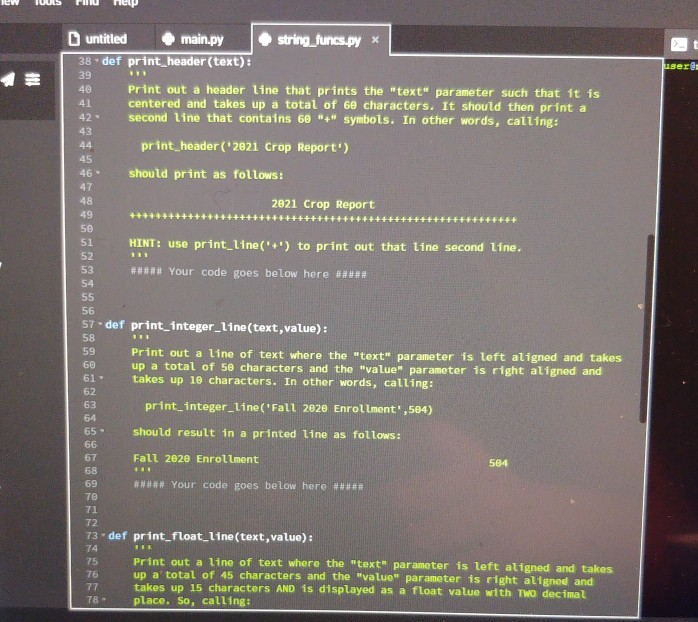
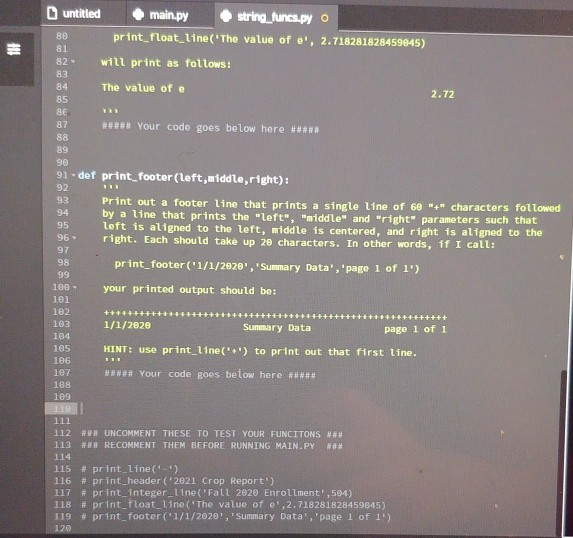
2 This is the MAIN part of your homework assignment. On Mimir, run python3 main.py 3 to actually test your work. Complete string_funcs.py FIRST. Then come back here. 5 Below, you MUST complete both functions as described in the "doc comment below 6 each function declaration. 8 You also MUST add yourself as a student to the gradebook dictionary. Be sure 9 to give yourself really good grades... 12 # This line pulls in the functions from your other script so that they can be 13 # used in this script. 14 from string_funcs import * 15 16 # Here is the data structure you will be working with 17 # It is a dictionary of students. 18 #Each student contains a dictionary of grades. 19 gradebook = { Alberta" : { 21 "Exam 1": 77, "Exam 2": 83, "Exam 3": 73, "Final". 85 20- 22 23 "Bernard" : { "Exam 1: 84, "Exam 2": 91, "Exam 3". 98, "Final: 95 25 26 - 27 28 29 - 30 "Cindi" : { "Exam 1": 100, "Exam 2": 95, "Exam 3": 98, "Final": 95 "Doak" : { "Exam 1": 68, "Exam 2": 65, "Exam 3": 77, "Final": 75 31 32 - "Eunice" : { "Exam 1": 82, "Exam 2": 85, "Exam 3": 81, "Final: 80 33 34 35 - 36 "Frank" : { "Exam 1": 93, "Exam 2": 95, "Exam 3": 91, "Final: 95 37 "Harriet" : { "Exam 1": 100, "Exam 2": 99, "Exam 3: 100, "Final: 100 41} 13. def grades for student (name): 46 Print out a report of grades for a specified student. Assume that you should use the "gradebook" dictionary defined above as a "global" variable. Not generally a good idea, but we'll run with it. Your function should: 1) Print out a header row using print_header(). 2) Retrieve the dictionary of grades for the specified student. Since this 1s the value in the gradebook dictionary for a given student, you can get this dictionary simply by asking for gradebook [name] (here using the "name" parameter passed in to this function). 3) Iterate through the dictionary of grades. Print each "key" (exam name) and value (exam grade) using your print integer_line() function. 1) Print a footer row using print_footer() CHALLENGE 1: Calculate and print a grade average for the student (as shown in the example). Use print float_Line() for this. CHALLENGE 2: Print out the ACTUAL current date in the footer. (Bing your way to an answer) So for example, calling grades for student("Frank") should output as follows (the average line would be missing if you don't take the challenge) GRADES FOR FRANK ++++++++++ 93 Exam 1 Exam 2 Exam 3 Final 91 95 AVERAGE: 93.50 02/19/20 Student Grade Report Page 1 of 1 global gradebook 8 Your code goes below here a s 87. def grades_for_exan(exam): Print out a report of grades for a specified exam. Again, use the gradebook dictionary defined above as a "global" variable. Your function should: 1) Print out a header row using print_header(). 2) Iterate over each of the students in the gradebook. 3) For each student, print the grade for the exam specified in the exam parameter passed in to the function. This is a little trickler than the other one. In essence, though, you can do something akin to: 100 lel for name in gradebook: grades = gradebook [name] exam_grade = grades[exam] grades for this student # grade for the specified exam Use your print_Integer_line() to print the name and grade for each student. 4) Print a footer row using print_footer() CHALLENGE 1: Calculate and print a grade average for the exam (as shown in the example). Use print float_line() for this. 102 103 104 105 106 107 108 109 110 111 112 113 14 115 116 CHALLENGE 2: Print out the ACTUAL current date in the footer. (Bing your way to an answer) So for example, calling grades_for_exam("Exam 2") should output as follows (the average Line would be missing 11 you don't take the challenge) GRADES FOR EXAM 2 117 118 119 120 121 122 Alberta Bernard Cind1 Doak Eunice Frank Harriet 123 124 125 126 AVERAGE: ++ ++++++++ 87.57 +++++++ 128 129 02/19/20 Exam Grade Report Page 1 of 1 131 130 global gradebook 132 ####Your code goes below here ##### 133 134 135 136 137 ## HERE IS THE "MAIN" PART OF THE SCRIPT.. 138 ### IT SIMPLY CALLS THE FUNCTIONS YOU COMPLETED ABOVE. 139 140 grades_for_student("Frank") 141 print) 142 grades_for_exan("Exam 2") 143 print 144 grades_for_student("Cindi") 145 print 146 grades_for_exam("Final) 147 print 148 149 ** 150 MY OUTPUT FOR THE ABOVE FOUR FUNCTION CALLS LOOKS AS FOLLOWS... YOURS SHOULD 151 BE VERY SIMILAR (THOUGH YOUR NAME SHOULD ALSO BE IN THE LIST OF GRADES FOR 152 EACH EXAM) : 153 154 GRADES FOR FRANK 155 +++++++ 156 Exam 1 157 Exam 2 158 Exam 3 159 Final 95 160 161 AVERAGE: 93.50 162 ++++++++ 163 02/19/20 Student Grade Report Page 1 of 1 164 165 GRADES FOR EXAM 2 166 ++++++++ 167 Alberta 168 Bernard 91 +++++++++++++++++++++ GRADES FOR EXAM 2 +++++++++++++++++ 165 166 ++++++++ 167 Alberta 168 Bernard 169 Cindi 170 Doak 171 Eunice 172 Frank 173 Harriet 174 175 AVERAGE: 176 +++++ 177 02/19/28 178 87.57 +++++++++++++++++++++++++++++++++++++++++ Exam Grade Report Page 1 of 1 179 GRADES FOR CINDI +++++ 100 97.00 Student Grade Report Page 1 of 1 GRADES FOR FINAL 180 ++++ + 181 Exam 1 182 Exam 2 183 Exam 3 184 Final 185 - 186 AVERAGE : 187 444+++ 188 02/19/20 189 190 191 ++++++++ 192 Alberta 193 Bernard 194 Cindi 195 Doak 196 Eunice 197 Frank 198 Harriet 199 200 AVERAGE: 201404+++++++ 202 02/19/20 203 204 ** 205 100 89.29 Exam Grade Report Page 1 of 1 untitled main.py string_funcs.py 2 string_funcs Complete the following five functions. - print_line 6 - print_header 7 - print integer_line 8 - print_float_line 9 - print footer le 11 Except as noted, you can implement the functions however you like. I.e., you can use string functions OR f-strings to accomplish the formatting. 14 NOTE: These functions are not "called" in this script at all. They should be 15 imported and called from main.py (done for you). 12 BUT You can test each function by uncommenting out the lines at the very end, on 18 Nimir, running python3 string funcs.py will execute any uncommented function calls. 19 !!!! JUST BE SURE TO COMMENT THEM BACK OUT BEFORE RUNNING MAIN.PY !!!! 20 21 22.def print_line (char): 25 Simply print a line of 60 characters. Specifically, print the 'char' that 1s passed in as a parameter. For example, calling: print_line('-') should print as follows: #### Your code goes below here ##### 36 37 38 def print_header(text): 40 Print out a header Line that prints the "text" parameter such that it is centered and takes up a total of 60 characters. It should then print a lew UUS FHU Help untitled main.py 38. def print_header(text): string_funcs.py * gere 39 40 Print out a header line that prints the "text" parameter such that it is centered and takes up a total of 60 characters. It should then print a second line that contains 60 "4" symbols. In other words, calling: 42 - print_header('2021 Crop Report) 45 46- should print as follows: 2021 Crop Report +++++++++++++++++++++++++++ HINT: use print_line('+') to print out that line second line. #***# Your code goes below here ##### 57 def print_integer_line (text, value): Print out a line of text where the text parameter is left aligned and takes up a total of 50 characters and the value parameter 1s right aligned and takes up 10 characters. In other words, calling: print integer_line (Fall 2020 Enrollment,564) should result in a printed line as follows: Fall 2020 Enrollment 564 69 #### Your code goes below here ##### 73 def print_float_line (text, value): 76 77 Print out a line of text where the text parameter is left aligned and takes up a total of 45 characters and the value parameter is right atigned and takes up 15 characters AND 1S displayed as a Tloat value with Two decimal place. So, calling: 81 untitled main.py string_funcs.py o 88 print_float_line('The value of e', 2.718281828459045) will print as follows: The value of e 2.72 # Your code goes below here *** 91def print_footer(left,middle,right): Print out a footer line that prints a single line of 60 "+" characters followed by a line that prints the "left","middle" and "right" parameters such that left is aligned to the left, middle is centered, and right is aligned to the right. Each should take up 2e characters. In other words, if I call: 96 98 print_footer('1/1/2020', 'Summary Data', 'page 1 of 1') 99 100- 101 102 your printed output should be: 103 1/1/2020 Summary Data ++++++ page 1 of 1 104 105 106 1e7 HINT: use print_line('') to print out that first line. ***** Your code goes below here #### 188 169 11 112 R UNCOMMENT THESE TO TEST YOUR FUNCITONS #** 113 ### RECOMMENT THEM BEFORE RUNNING MAIN.PY ### 114 115 # print line('_') 116 # print_header('2821 Crop Report") 117 # print_integerLine("Fall 2020 Enrollment',504) 118 # print_float_line ('The value of ',2.718281828459845) 119 # print_footer (1/1/2020, Summary Data', 'page 1 of 1 120 2 This is the MAIN part of your homework assignment. On Mimir, run python3 main.py 3 to actually test your work. Complete string_funcs.py FIRST. Then come back here. 5 Below, you MUST complete both functions as described in the "doc comment below 6 each function declaration. 8 You also MUST add yourself as a student to the gradebook dictionary. Be sure 9 to give yourself really good grades... 12 # This line pulls in the functions from your other script so that they can be 13 # used in this script. 14 from string_funcs import * 15 16 # Here is the data structure you will be working with 17 # It is a dictionary of students. 18 #Each student contains a dictionary of grades. 19 gradebook = { Alberta" : { 21 "Exam 1": 77, "Exam 2": 83, "Exam 3": 73, "Final". 85 20- 22 23 "Bernard" : { "Exam 1: 84, "Exam 2": 91, "Exam 3". 98, "Final: 95 25 26 - 27 28 29 - 30 "Cindi" : { "Exam 1": 100, "Exam 2": 95, "Exam 3": 98, "Final": 95 "Doak" : { "Exam 1": 68, "Exam 2": 65, "Exam 3": 77, "Final": 75 31 32 - "Eunice" : { "Exam 1": 82, "Exam 2": 85, "Exam 3": 81, "Final: 80 33 34 35 - 36 "Frank" : { "Exam 1": 93, "Exam 2": 95, "Exam 3": 91, "Final: 95 37 "Harriet" : { "Exam 1": 100, "Exam 2": 99, "Exam 3: 100, "Final: 100 41} 13. def grades for student (name): 46 Print out a report of grades for a specified student. Assume that you should use the "gradebook" dictionary defined above as a "global" variable. Not generally a good idea, but we'll run with it. Your function should: 1) Print out a header row using print_header(). 2) Retrieve the dictionary of grades for the specified student. Since this 1s the value in the gradebook dictionary for a given student, you can get this dictionary simply by asking for gradebook [name] (here using the "name" parameter passed in to this function). 3) Iterate through the dictionary of grades. Print each "key" (exam name) and value (exam grade) using your print integer_line() function. 1) Print a footer row using print_footer() CHALLENGE 1: Calculate and print a grade average for the student (as shown in the example). Use print float_Line() for this. CHALLENGE 2: Print out the ACTUAL current date in the footer. (Bing your way to an answer) So for example, calling grades for student("Frank") should output as follows (the average line would be missing if you don't take the challenge) GRADES FOR FRANK ++++++++++ 93 Exam 1 Exam 2 Exam 3 Final 91 95 AVERAGE: 93.50 02/19/20 Student Grade Report Page 1 of 1 global gradebook 8 Your code goes below here a s 87. def grades_for_exan(exam): Print out a report of grades for a specified exam. Again, use the gradebook dictionary defined above as a "global" variable. Your function should: 1) Print out a header row using print_header(). 2) Iterate over each of the students in the gradebook. 3) For each student, print the grade for the exam specified in the exam parameter passed in to the function. This is a little trickler than the other one. In essence, though, you can do something akin to: 100 lel for name in gradebook: grades = gradebook [name] exam_grade = grades[exam] grades for this student # grade for the specified exam Use your print_Integer_line() to print the name and grade for each student. 4) Print a footer row using print_footer() CHALLENGE 1: Calculate and print a grade average for the exam (as shown in the example). Use print float_line() for this. 102 103 104 105 106 107 108 109 110 111 112 113 14 115 116 CHALLENGE 2: Print out the ACTUAL current date in the footer. (Bing your way to an answer) So for example, calling grades_for_exam("Exam 2") should output as follows (the average Line would be missing 11 you don't take the challenge) GRADES FOR EXAM 2 117 118 119 120 121 122 Alberta Bernard Cind1 Doak Eunice Frank Harriet 123 124 125 126 AVERAGE: ++ ++++++++ 87.57 +++++++ 128 129 02/19/20 Exam Grade Report Page 1 of 1 131 130 global gradebook 132 ####Your code goes below here ##### 133 134 135 136 137 ## HERE IS THE "MAIN" PART OF THE SCRIPT.. 138 ### IT SIMPLY CALLS THE FUNCTIONS YOU COMPLETED ABOVE. 139 140 grades_for_student("Frank") 141 print) 142 grades_for_exan("Exam 2") 143 print 144 grades_for_student("Cindi") 145 print 146 grades_for_exam("Final) 147 print 148 149 ** 150 MY OUTPUT FOR THE ABOVE FOUR FUNCTION CALLS LOOKS AS FOLLOWS... YOURS SHOULD 151 BE VERY SIMILAR (THOUGH YOUR NAME SHOULD ALSO BE IN THE LIST OF GRADES FOR 152 EACH EXAM) : 153 154 GRADES FOR FRANK 155 +++++++ 156 Exam 1 157 Exam 2 158 Exam 3 159 Final 95 160 161 AVERAGE: 93.50 162 ++++++++ 163 02/19/20 Student Grade Report Page 1 of 1 164 165 GRADES FOR EXAM 2 166 ++++++++ 167 Alberta 168 Bernard 91 +++++++++++++++++++++ GRADES FOR EXAM 2 +++++++++++++++++ 165 166 ++++++++ 167 Alberta 168 Bernard 169 Cindi 170 Doak 171 Eunice 172 Frank 173 Harriet 174 175 AVERAGE: 176 +++++ 177 02/19/28 178 87.57 +++++++++++++++++++++++++++++++++++++++++ Exam Grade Report Page 1 of 1 179 GRADES FOR CINDI +++++ 100 97.00 Student Grade Report Page 1 of 1 GRADES FOR FINAL 180 ++++ + 181 Exam 1 182 Exam 2 183 Exam 3 184 Final 185 - 186 AVERAGE : 187 444+++ 188 02/19/20 189 190 191 ++++++++ 192 Alberta 193 Bernard 194 Cindi 195 Doak 196 Eunice 197 Frank 198 Harriet 199 200 AVERAGE: 201404+++++++ 202 02/19/20 203 204 ** 205 100 89.29 Exam Grade Report Page 1 of 1 untitled main.py string_funcs.py 2 string_funcs Complete the following five functions. - print_line 6 - print_header 7 - print integer_line 8 - print_float_line 9 - print footer le 11 Except as noted, you can implement the functions however you like. I.e., you can use string functions OR f-strings to accomplish the formatting. 14 NOTE: These functions are not "called" in this script at all. They should be 15 imported and called from main.py (done for you). 12 BUT You can test each function by uncommenting out the lines at the very end, on 18 Nimir, running python3 string funcs.py will execute any uncommented function calls. 19 !!!! JUST BE SURE TO COMMENT THEM BACK OUT BEFORE RUNNING MAIN.PY !!!! 20 21 22.def print_line (char): 25 Simply print a line of 60 characters. Specifically, print the 'char' that 1s passed in as a parameter. For example, calling: print_line('-') should print as follows: #### Your code goes below here ##### 36 37 38 def print_header(text): 40 Print out a header Line that prints the "text" parameter such that it is centered and takes up a total of 60 characters. It should then print a lew UUS FHU Help untitled main.py 38. def print_header(text): string_funcs.py * gere 39 40 Print out a header line that prints the "text" parameter such that it is centered and takes up a total of 60 characters. It should then print a second line that contains 60 "4" symbols. In other words, calling: 42 - print_header('2021 Crop Report) 45 46- should print as follows: 2021 Crop Report +++++++++++++++++++++++++++ HINT: use print_line('+') to print out that line second line. #***# Your code goes below here ##### 57 def print_integer_line (text, value): Print out a line of text where the text parameter is left aligned and takes up a total of 50 characters and the value parameter 1s right aligned and takes up 10 characters. In other words, calling: print integer_line (Fall 2020 Enrollment,564) should result in a printed line as follows: Fall 2020 Enrollment 564 69 #### Your code goes below here ##### 73 def print_float_line (text, value): 76 77 Print out a line of text where the text parameter is left aligned and takes up a total of 45 characters and the value parameter is right atigned and takes up 15 characters AND 1S displayed as a Tloat value with Two decimal place. So, calling: 81 untitled main.py string_funcs.py o 88 print_float_line('The value of e', 2.718281828459045) will print as follows: The value of e 2.72 # Your code goes below here *** 91def print_footer(left,middle,right): Print out a footer line that prints a single line of 60 "+" characters followed by a line that prints the "left","middle" and "right" parameters such that left is aligned to the left, middle is centered, and right is aligned to the right. Each should take up 2e characters. In other words, if I call: 96 98 print_footer('1/1/2020', 'Summary Data', 'page 1 of 1') 99 100- 101 102 your printed output should be: 103 1/1/2020 Summary Data ++++++ page 1 of 1 104 105 106 1e7 HINT: use print_line('') to print out that first line. ***** Your code goes below here #### 188 169 11 112 R UNCOMMENT THESE TO TEST YOUR FUNCITONS #** 113 ### RECOMMENT THEM BEFORE RUNNING MAIN.PY ### 114 115 # print line('_') 116 # print_header('2821 Crop Report") 117 # print_integerLine("Fall 2020 Enrollment',504) 118 # print_float_line ('The value of ',2.718281828459845) 119 # print_footer (1/1/2020, Summary Data', 'page 1 of 1 120
Step by Step Solution
There are 3 Steps involved in it

Get step-by-step solutions from verified subject matter experts
 Study Help