







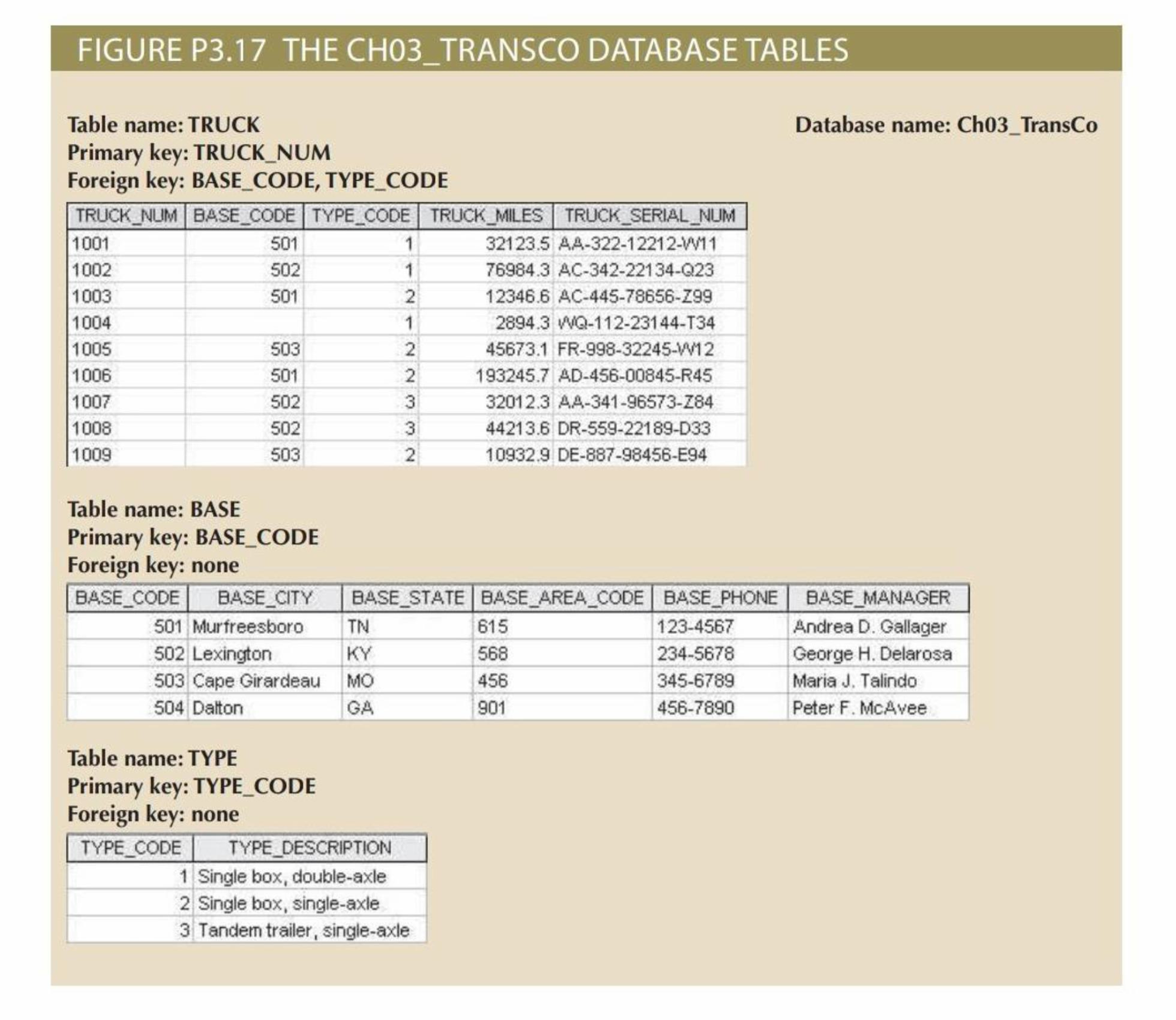
Question: Q 1 . Create the ERD for this database. You can create the ERD ( Entity - Relationship Diagram ) as follows: Entities: TRUCK BASE
Q Create the ERD for this database.
You can create the ERD EntityRelationship Diagram as follows:
Entities:
TRUCK
BASE
TYPE
Relationships:
The TRUCK table has a manytoone relationship with both the BASE and TYPE tables via the foreign keys BASECODE and TYPECODE.
Q Create the relational diagram for this database.
The relational diagram would look like this:
TRUCK Table: Contains TRUCKNUM, BASECODE, TYPECODE, TRUCKMILES, TRUCKSERIALNUM.
o BASECODE references BASEBASECODE
o TYPECODE references TYPETYPECODE
BASE Table: Contains BASECODE, BASECITY, BASESTATE, BASEAREACODE, BASEPHONE, BASEMANAGER.
TYPE Table: Contains TYPECODE, TYPEDESCRIPTION.
Step by Step Solution
There are 3 Steps involved in it
1 Expert Approved Answer
Step: 1 Unlock

Question Has Been Solved by an Expert!
Get step-by-step solutions from verified subject matter experts
Step: 2 Unlock
Step: 3 Unlock
 Study Help