







Question: Q 3 . Create a NEW Jupyter Notebook file with the name PT 1 Q 3 . Copy the content of the source
Q Create a NEW Jupyter Notebook file with the name PTQ Copy the content of the source file in Q to a source file in this project. Modify the program developed for Q to perform the following tasks:
Rewrite the function showMenu such that if the user enters c it will display "Please enter value of x : The function calcos is called with a float data type number and an integer value from functions boldsymbolg e tmathbftmathbfx and boldsymbolg e tmathbfk respectively as the input parameter values. The function calcos returns a value of type float, which is the approximated cosine function value calculated by using equation on page This returned result should be printed by showMenu Inside the function calCos you must call the function calTerm in Q to compute the approximated cosine function value.
You may use math. cos library function to compare with your result.
By default, print with : g format will only show a floatingpoint number with significant digits. Hence, the result under different k may be the same owing to inadequate precision. To see the difference, you need to show a floatingpoint number with more significant figures. Modify your program such that you can show the result as a digit number. This is achieved by using the following statement to show the value of variable mathbff :
text print:f formatf
Finally, implement a new better function calCosNew which performs the same task of calCos without using the function calTerm You may use Horner's rule only n multiplications are needed for polynomial evaluation, ie
Pxan xnan xncdotsaleftleftcdotsleftan xanright xanright xcdotsaright
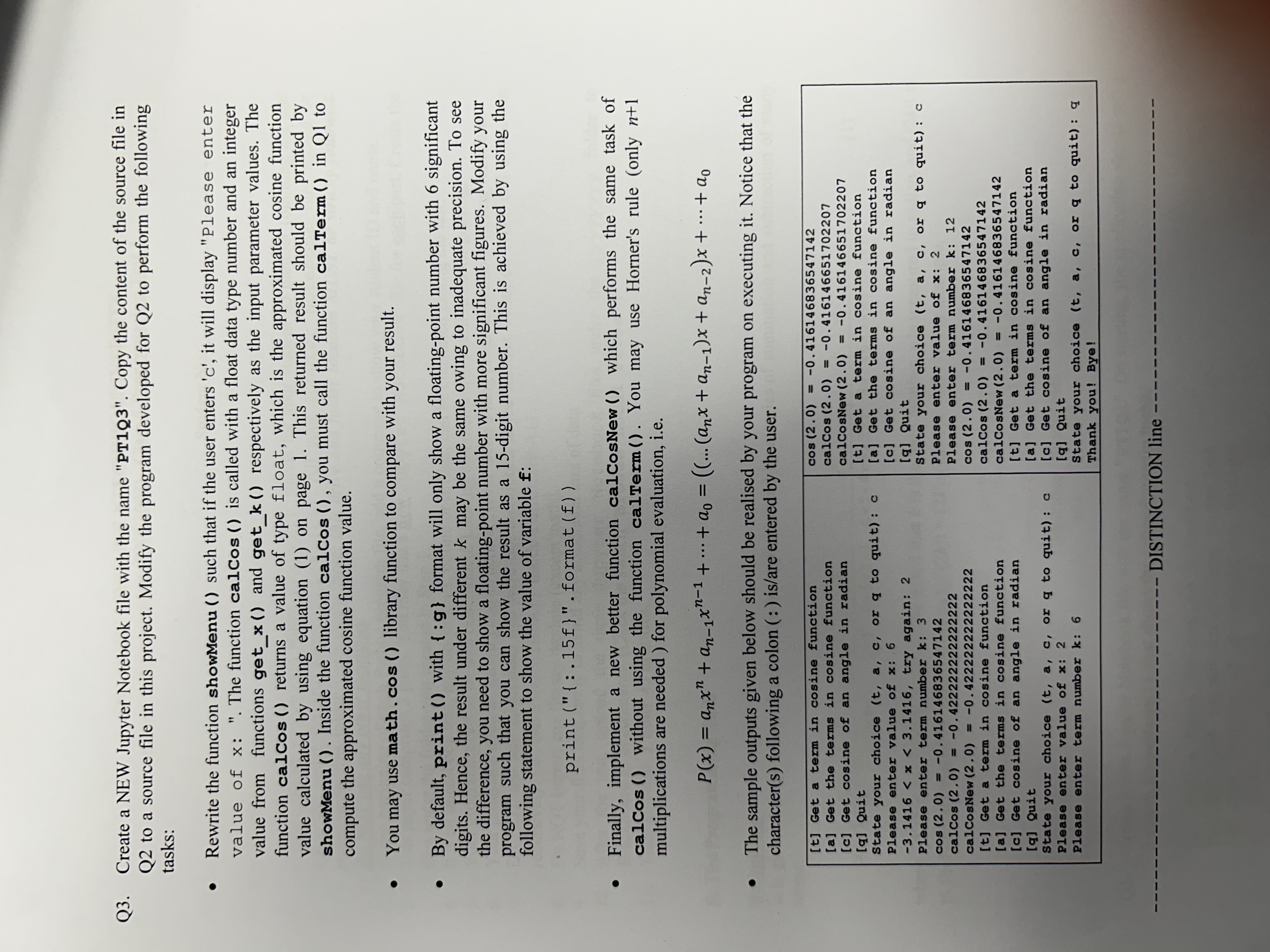
The sample outputs given below should be realised by your program on executing it Notice that the characters following a colon : isare entered by the user.
t Get a term in cosine function
a Get the terms in cosine function
c Get cosine of an angle in radian
q Quit
State your choice tacmathrm or q to quit: c
Please enter value of x:
Step by Step Solution
There are 3 Steps involved in it
1 Expert Approved Answer
Step: 1 Unlock

Question Has Been Solved by an Expert!
Get step-by-step solutions from verified subject matter experts
Step: 2 Unlock
Step: 3 Unlock
 Study Help