







Question: Q1: Make a program to show the waveform that can continuously change with increasing animation time (python) Q2:Add buttons or scroll bars to change the
Q1: Make a program to show the waveform that can continuously change with increasing animation time (python)
 Q2:Add buttons or scroll bars to change the range of x or y axis as shown in the below figures.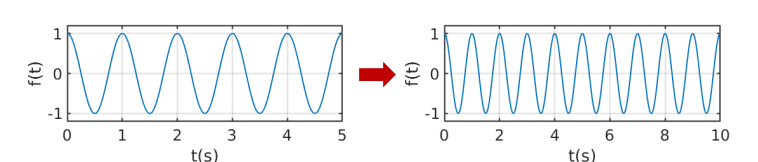
# -*- coding: utf-8 -*- """ Created on Fri Jan 27 15:36:33 2023
@author: nicklas """
import tkinter as tk from matplotlib.figure import Figure from matplotlib.ticker import (MultipleLocator) from matplotlib.backends.backend_tkagg import(FigureCanvasTkAgg) import numpy as np window = tk.Tk() window.title('GUI1') window.geometry('500x400') window.resizable(False,False)
fig=Figure(figsize=(5,4),dpi=100) t=np.arange(0,10,.01) ax1=fig.add_subplot(111) ax1.plot(t,2*np.sin(0.5*np.pi*t)) ax1.grid() ax1.tick_params(direction='in',length=6,width=1.5,colors='k',grid_color='k',grid_alpha=0.5) ax1.set_xlabel("t") ax1.set_ylabel("y(t)") ax1.xaxis.set_major_locator(MultipleLocator(1))
axes=fig.gca() axes.set_xlim([0,10]) axes.set_ylim([-2,2])
canvas=FigureCanvasTkAgg(fig,master=window) canvas.draw() canvas.get_tk_widget().pack(side=tk.TOP,fill=tk.BOTH,expand=1)
window.mainloop()
Step by Step Solution
There are 3 Steps involved in it

Get step-by-step solutions from verified subject matter experts
 Study Help