







Question: Q1. rewrite the exercise on March 28 by adding the following operations: 1) In the php script, add a selection based on the following rules:
Q1. rewrite the exercise on March 28 by adding the following operations:
1) In the php script, add a selection based on the following rules:
(1) if the total cost of an order is greater than $30 and less than or equal to $50, the customer will be given 5% discount. For example, if the total cost is $40, the customer will need to pay $40 x (1-5%)= $38.
(2) if the total cost of an order is greater than $50 and less than or equal to $75, the customer will be given 10% discount.
(3) if the total cost of an order is greater than $75 and less than or equal to $100, the customer will be given 15% discount.
(4) if the total cost of an order is greater than $100 the customer will be given 20% discount.
2) after calculating the total cost for an order, the result will be printed out as a table. The text alignment, font size, and text color will be specified by a embedded css script that is generated by the php script.
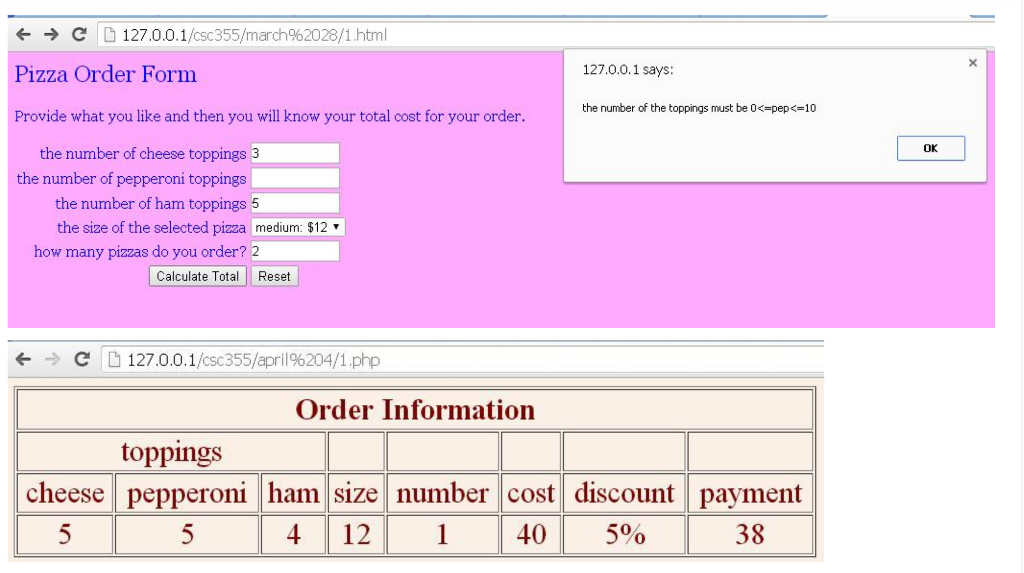
exercise on March 28
//1.html
html> head> title>Pizzatitle> link rel="stylesheet" href="style.css"> head> body> h2>Pizza Order Formh2>br> form id="pizzaform" action="1.php" method="post"> p>Provide what you like and then you will know your total cost for your order.p>br> label for="cheese">the number of cheese toppingslabel> input id="cheese" type="text" name="cheese">br>br> label for="pepperoni">the number of pepperoni toppingslabel> input id="pepperoni" type="text" name="pepperoni">br>br> label for="ham">the number of ham toppingslabel> input id="ham" type="text" name="ham">br>br> label for="size">the size of the selected pizzalabel> select id="size" name="size"> option value="small">Smalloption> option value="medium">Mediumoption> option value="large">Largeoption> select>br>br> label for="pizzas">how many pizzas do your order?label> input id="pizzas" type="text" name="pizzas">br>br> button id="total" onclick="return validate()" name="calculate">Calculate Totalbutton> button onclick="clear()">Resetbutton> form> script> function validate() { var value = true; var cheese = document.getElementById("cheese"); if(cheese.valuevalue>10) { alert("the number of the toppings must be 0); value = false; } var pep = document.getElementById("pepperoni"); if(pep.valuevalue>10) { alert("the number of the toppings must be 0); value = false; } var ham = document.getElementById("ham"); if(ham.valuevalue>10) { alert("the number of the toppings must be 0); value = false; } var pizzas = document.getElementById("pizzas"); if(pizzas.valuevalue>=10) { alert("the number of the toppings must be 1); value = false; } return value; } function clear() { document.getElementById("pizzaform").reset(); } script> body> html>//1.php
if(isset($_POST['calculate'])) { $cheese = $_POST['cheese']; $pepperoni = $_POST['pepperoni']; $ham = $_POST['ham']; $size = $_POST['size']; if($size=="small") $size = 10; elseif ($size=="medium") $size = 12; elseif ($size=="large") $size = 14; $pizzas = $_POST['pizzas']; $total = $pizzas*($size+$cheese*2+$pepperoni*2+$ham*2); } ?> html> head> link rel="stylesheet" href="main.css"> title>Ordertitle> head> body> p class="large">We have received your order, thank you!p> p class="large">The detail of your order is below:p> ul> li>the number of cheese toppings=$cheese;?>li> li>the number of pepperoni toppings=$pepperoni; ?>li> li>the number of ham toppings=$ham; ?>li> li>the size of the ordered pizza=$size; ?>li> li>the number of the ordered pizza=$pizzas?>li> ul> h1>Your total cost is: $total; ?>h1> body> html> //style.css
body { background-color: pink; } label,p,h2 { color: blue; } #total { margin-left: 80px; } h1 { color: red; } .large { color: black; font-size: 105%; } //webpage screenshots
? ? c D 127.0.01/csc355 march%2028/1.html Pizza Order Form Provide what you like and then you will know your total cost for your order. 127.0.0.1 says the number of the toppings must be o
Step by Step Solution
There are 3 Steps involved in it

Get step-by-step solutions from verified subject matter experts
 Study Help