







Question: Q1 Your tasks is to create a Payroll Management System for ABC Company Sdn Bhd. The system provides administrators and employees for entering and maintaining
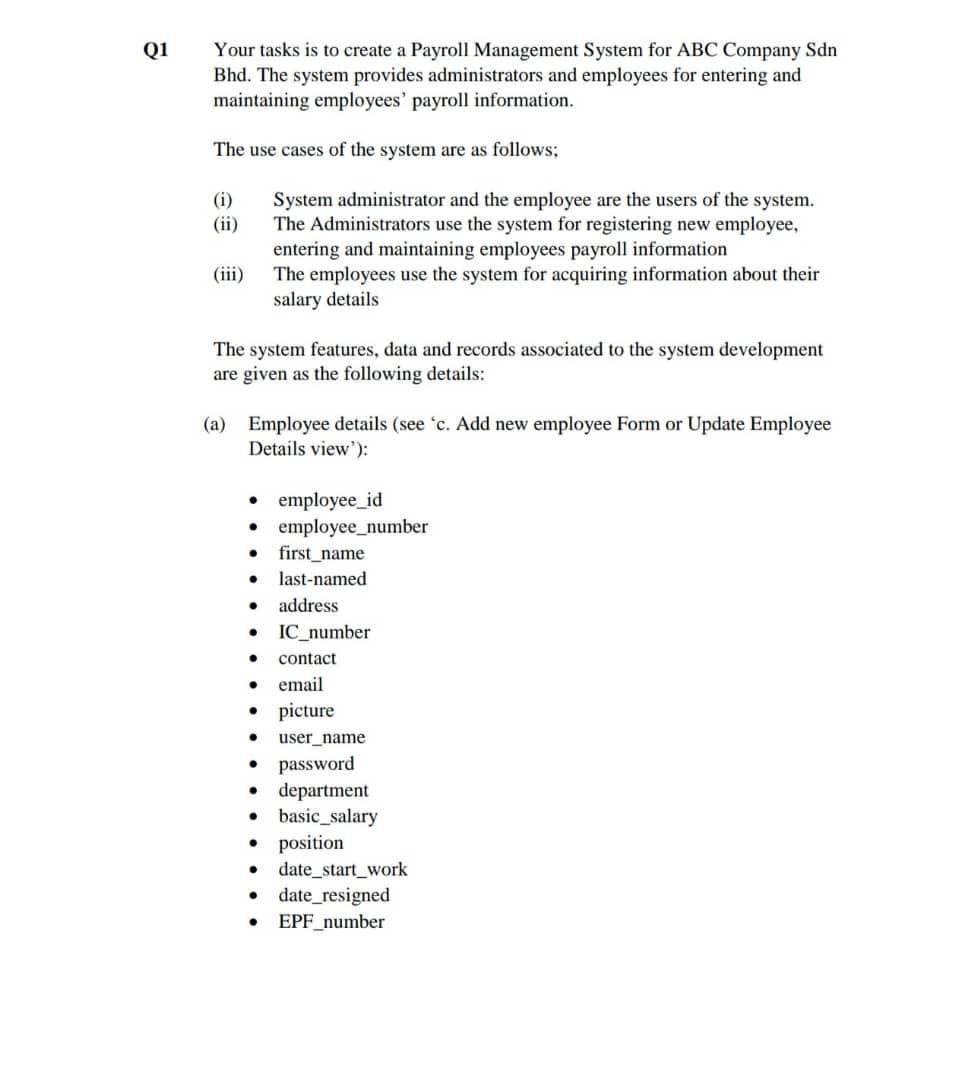
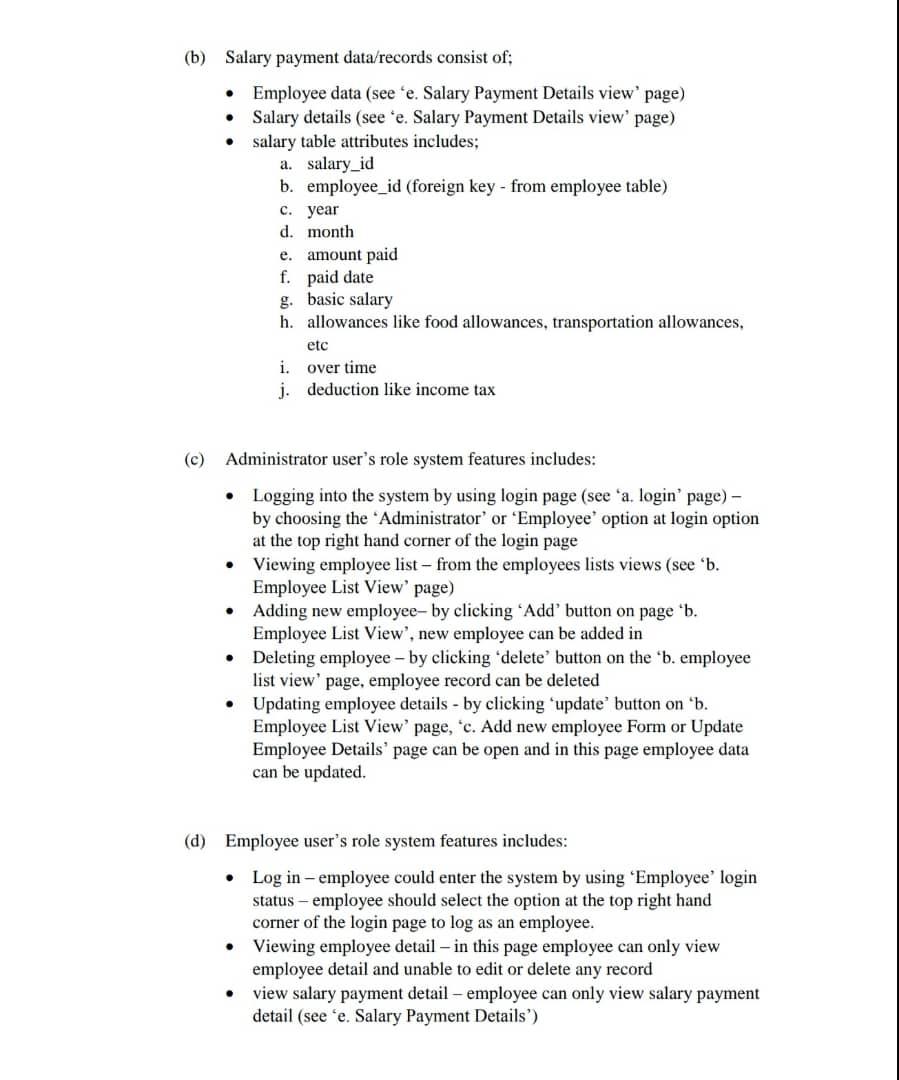
Q1 Your tasks is to create a Payroll Management System for ABC Company Sdn Bhd. The system provides administrators and employees for entering and maintaining employees' payroll information. The use cases of the system are as follows: (i) (ii) System administrator and the employee are the users of the system. The Administrators use the system for registering new employee, entering and maintaining employees payroll information The employees use the system for acquiring information about their salary details (iii) The system features, data and records associated to the system development are given as the following details: (a) Employee details (see c. Add new employee Form or Update Employee Details view'); . . . . employee_id employee_number first_name last-named address IC_number contact email picture user_name password department basic_salary position date_start_work date_resigned EPF_number . . . . . (b) Salary payment data/records consist of: Employee data (see 'e. Salary Payment Details view page) Salary details (see 'e. Salary Payment Details view page) salary table attributes includes; a. salary_id b. employee_id (foreign key - from employee table) c. year d. month e. amount paid f. paid date g. basic salary h. allowances like food allowances, transportation allowances, etc i. over time j. deduction like income tax (c) Administrator user's role system features includes: . Logging into the system by using login page (see 'a. login' page) - by choosing the Administrator' or 'Employee' option at login option at the top right hand corner of the login page Viewing employee list - from the employees lists views (see 'b. Employee List View page) Adding new employee- by clicking 'Add' button on page 'b. Employee List View', new employee can be added in Deleting employee - by clicking 'delete' button on the b. employee list view' page, employee record can be deleted Updating employee details - by clicking update' button on 'b. Employee List View page, c. Add new employee Form or Update Employee Details' page can be open and in this page employee data can be updated. . . (d) Employee user's role system features includes: Log in -employee could enter the system by using 'Employee' login status - employee should select the option at the top right hand corner of the login page to log as an employee. Viewing employee detail - in this page employee can only view employee detail and unable to edit or delete any record view salary payment detail - employee can only view salary payment detail (see 'e. Salary Payment Details') (e) Payroll management system interface pages designs- the system interfaces pages designs is outlined as of the following layout. You may use any web page CSS style you wish however Bootstrap styles is most preferable. Q1 Your tasks is to create a Payroll Management System for ABC Company Sdn Bhd. The system provides administrators and employees for entering and maintaining employees' payroll information. The use cases of the system are as follows: (i) (ii) System administrator and the employee are the users of the system. The Administrators use the system for registering new employee, entering and maintaining employees payroll information The employees use the system for acquiring information about their salary details (iii) The system features, data and records associated to the system development are given as the following details: (a) Employee details (see c. Add new employee Form or Update Employee Details view'); . . . . employee_id employee_number first_name last-named address IC_number contact email picture user_name password department basic_salary position date_start_work date_resigned EPF_number . . . . . (b) Salary payment data/records consist of: Employee data (see 'e. Salary Payment Details view page) Salary details (see 'e. Salary Payment Details view page) salary table attributes includes; a. salary_id b. employee_id (foreign key - from employee table) c. year d. month e. amount paid f. paid date g. basic salary h. allowances like food allowances, transportation allowances, etc i. over time j. deduction like income tax (c) Administrator user's role system features includes: . Logging into the system by using login page (see 'a. login' page) - by choosing the Administrator' or 'Employee' option at login option at the top right hand corner of the login page Viewing employee list - from the employees lists views (see 'b. Employee List View page) Adding new employee- by clicking 'Add' button on page 'b. Employee List View', new employee can be added in Deleting employee - by clicking 'delete' button on the b. employee list view' page, employee record can be deleted Updating employee details - by clicking update' button on 'b. Employee List View page, c. Add new employee Form or Update Employee Details' page can be open and in this page employee data can be updated. . . (d) Employee user's role system features includes: Log in -employee could enter the system by using 'Employee' login status - employee should select the option at the top right hand corner of the login page to log as an employee. Viewing employee detail - in this page employee can only view employee detail and unable to edit or delete any record view salary payment detail - employee can only view salary payment detail (see 'e. Salary Payment Details') (e) Payroll management system interface pages designs- the system interfaces pages designs is outlined as of the following layout. You may use any web page CSS style you wish however Bootstrap styles is most preferable
Step by Step Solution
There are 3 Steps involved in it

Get step-by-step solutions from verified subject matter experts
 Study Help