







Question: Q2. (50 Points) Use the following table from Access, students table, to only fill the below query forms for each question: Note: for this question,
Q2. (50 Points) Use the following table from Access, students table, to only fill the below query forms for each question: Note: for this question, your answer should be handwritten to fill the query forms below as you apply it on Access.
A. (10 Pts.) Apply normalization on the data given in previews sheet, in Microsoft Access perspective. (You can do it handwritten (Make it clear), or on the software and add you screen shot)
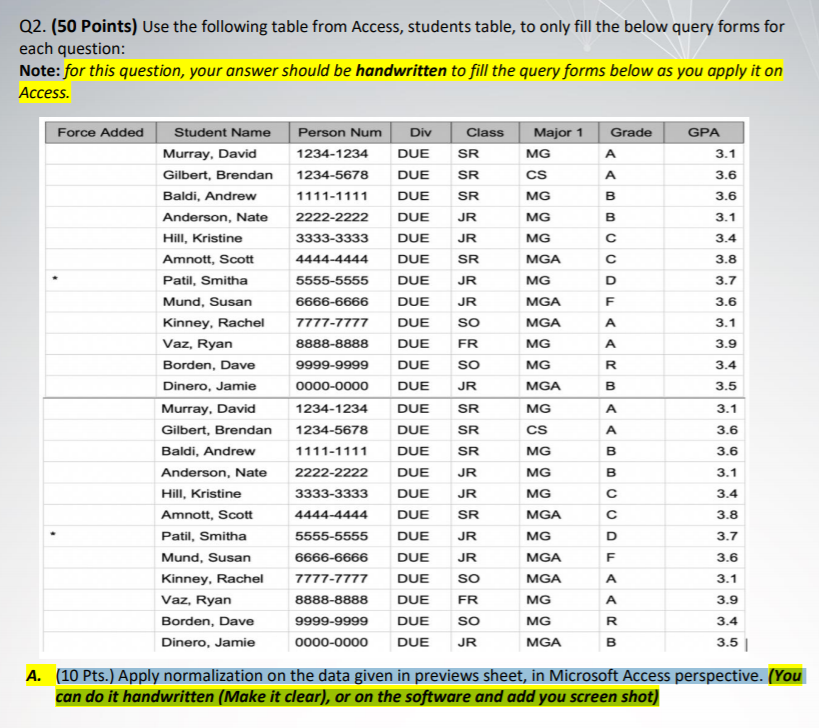
Q2. (50 Points) Use the following table from Access, students table, to only fill the below query forms for each question: Note: for this question, your answer should be handwritten to fill the query forms below as you apply it on Access. Force Added Class Grade A GPA 3.1 SR 3.6 Major 1 MG CS MG MG MG B 3.6 B 3.1 3.4 MGA 3.8 TI U OO 3.7 3.6 MG MGA MGA MG SR SR JR JR SR JR JR so FR so JR SR SR SR 3.1 3.9 R Student Name Murray, David Gilbert, Brendan Baldi, Andrew Anderson, Nate Hill, Kristine Amnott, Scott Patil, Smitha Mund, Susan Kinney, Rachel Vaz, Ryan Borden, Dave Dinero, Jamie Murray, David Gilbert, Brendan Baldi, Andrew Anderson, Nate Hill, Kristine Amnott, Scott Patil, Smitha Mund, Susan Kinney, Rachel Vaz, Ryan Borden, Dave Dinero, Jamie 3.4 Person Num Div 1234-1234 DUE 1234-5678 DUE 1111-1111 DUE 2222-2222 DUE 3333-3333 DUE 4444-4444 DUE 5555-5555 DUE 6666-6666 DUE 7777-7777 DUE 8888-8888 DUE 9999-9999 DUE 0000-0000 DUE 1234-1234 DUE 1234-5678 DUE 1111-1111 DUE 2222-2222 DUE 3333-3333 DUE 4444-4444 DUE 5555-5555 DUE 6666-6666 DUE 7777-7777 DUE 8888-8888 DUE 9999-9999 DUE 0000-0000 DUE B 3.5 MG MGA MG CS MG 3.1 3.6 3.6 JR OOOWW >> 3.1 3.4 3.8 3.7 JR SR JR JR so FR SO MG MG MGA MG MGA MGA MG MG MGA F 3.6 3.1 > 3.1 3.4 3.8 3.7 JR SR JR JR so FR SO MG MG MGA MG MGA MGA MG MG MGA F 3.6 3.1
Step by Step Solution
There are 3 Steps involved in it

Get step-by-step solutions from verified subject matter experts
 Study Help