







Question: Q2c Write a function that meets the following specifications. Function name question_2c Parameter(s)/ argument(s) This function does not take in any parameters Return value
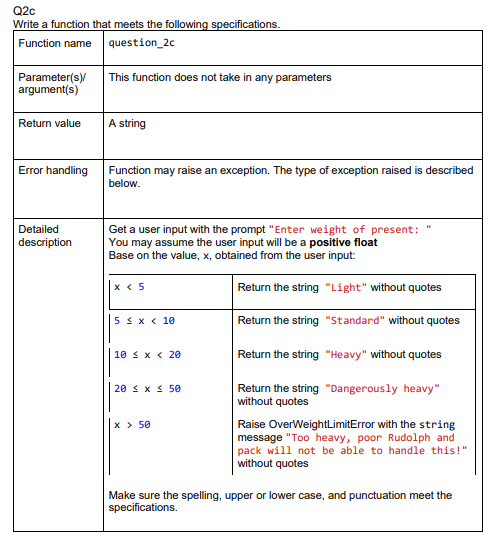
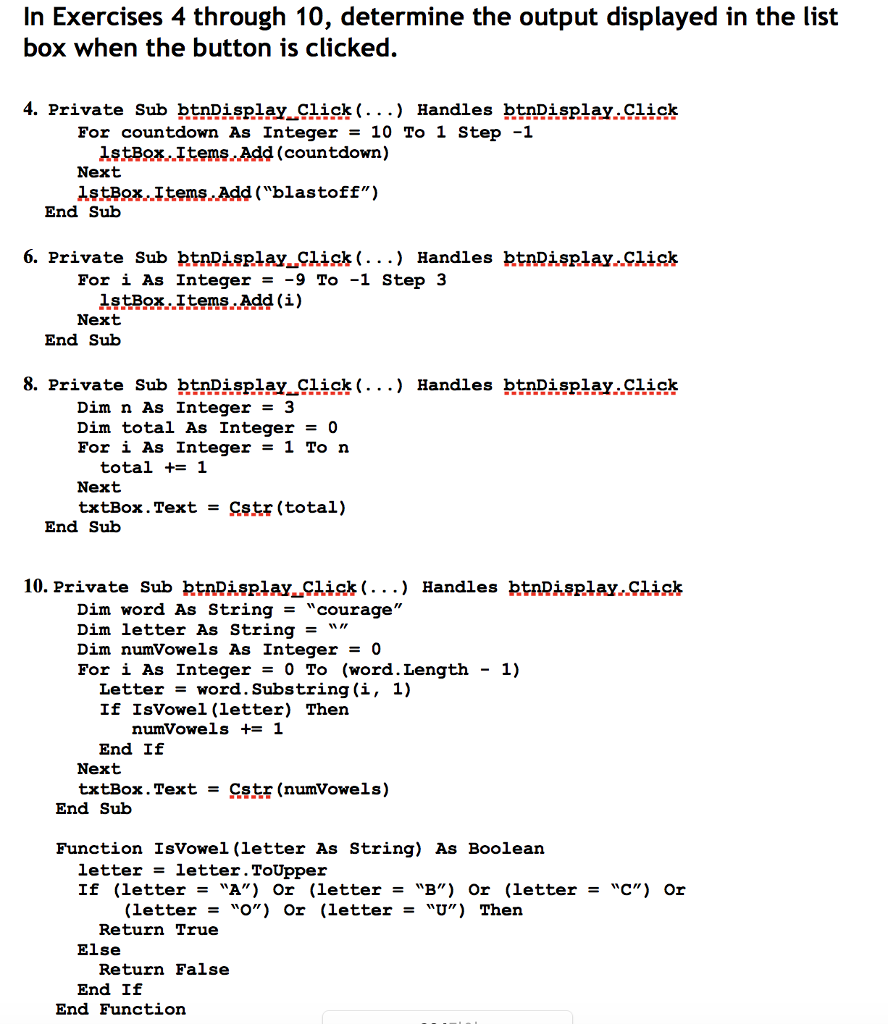
Q2c Write a function that meets the following specifications. Function name question_2c Parameter(s)/ argument(s) This function does not take in any parameters Return value A string Error handling Detailed description Function may raise an exception. The type of exception raised is described below. Get a user input with the prompt "Enter weight of present: You may assume the user input will be a positive float Base on the value, x, obtained from the user input: x < 5 Return the string "Light" without quotes 5 < x < 10 Return the string "Standard" without quotes 10 < x < 20 20 x 50 x > 50 Return the string "Heavy" without quotes Return the string "Dangerously heavy" without quotes Raise OverWeightLimitError with the string message "Too heavy, poor Rudolph and pack will not be able to handle this!" without quotes Make sure the spelling, upper or lower case, and punctuation meet the specifications. In Exercises 4 through 10, determine the output displayed in the list box when the button is clicked. 4. Private Sub btnDisplay Click (...) Handles btnDisplay. Click For countdown As Integer = 10 To 1 Step -1 1stBox Items Add (countdown) Next 1stBox.Items.Add("blastoff") End Sub 6. Private Sub btnDisplay Click (...) Handles btnDisplay Click For i As Integer = -9 To -1 Step 3 1stBox.Items.Add(i) Next End Sub 8. Private Sub btnDisplay Click (...) Handles btnDisplay. Click Dim n As Integer = 3 Dim total As Integer = 0 For i As Integer = 1 To n total += 1 Next txtBox.Text = str(total) End Sub 10. Private Sub btnDisplay Click (...) Handles btn Display,Click Dim word As String = "courage" Dim letter As String = \\ // Dim numVowels As Integer = 0 For i As Integer = 0 To (word. Length Letter word. Substring(i, 1) If IsVowel (letter) Then numVowels += 1 End If Next txtBox.Text = Ctr (numVowels) End Sub - 1) Function IsVowel (letter As String) As Boolean letter letter. ToUpper If (letter = "A") Or (letter = "B") Or (letter = "C") Or (letter = "O") Or (letter = "U") Then Return True Else Return False End If End Function
Step by Step Solution
There are 3 Steps involved in it

Get step-by-step solutions from verified subject matter experts
 Study Help