







Question: Q4. (8pts) Introduction to VisUAL Complete the following assembly program that read characters given at address src, (i.e., 'a', 'b', 'c','d', 'e','f,'g', 'h', 'i', 'j',
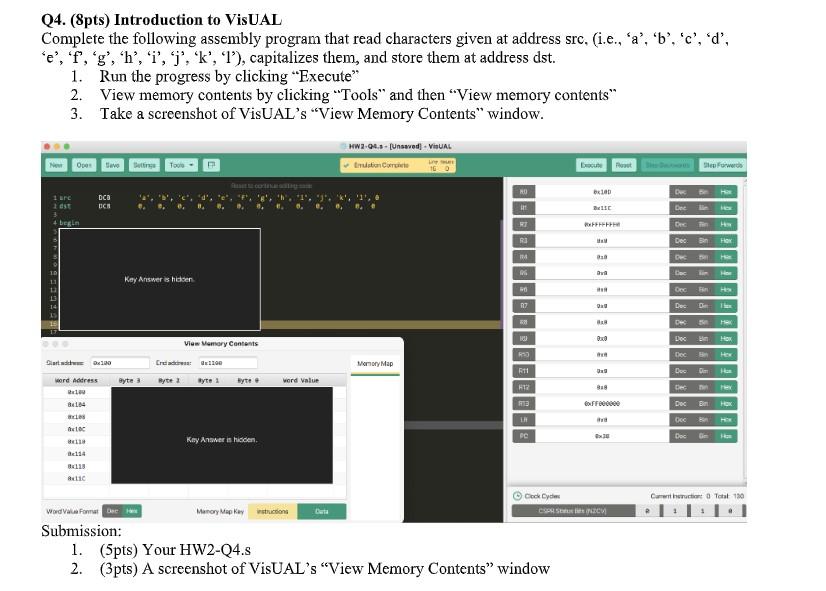
Q4. (8pts) Introduction to VisUAL Complete the following assembly program that read characters given at address src, (i.e., 'a', 'b', 'c','d', 'e','f,'g', 'h', 'i', 'j', 'k', '1'), capitalizes them, and store them at address dst. 1. Run the progress by clicking "Execute" 2. View memory contents by clicking "Tools" and then View memory contents" 3. Take a screenshot of VisUAL's "View Memory Contents" window. HW2-94. - [Unsaved] - ViUAL divuston Cercise 16 Now O Toon Doce Post Die Forward GINE 100 Dube DCO UCH 1 are est 4 begin HIE FE De R Dec. Her B Dha Her Key Answer is hidden DOGCEBO G Dec 13 HU BO Doc How View Memory Contents Dec Darth Ox100 Nomory Map Crews: 1100 Byte Ryte 1 11 Byte byte. word Value 112 Cler word Address 100 8184 RIB Dec HOK IH ABC DocG- Kay Answer is hidden PC But Current hortin T130 Cook Cydim CSS CM Memory Map Kay strictions Word Vau Forma Der Submission: 1. (5pts) Your HW2-24.s 2. (3pts) A screenshot of VisUAL's "View Memory Contents" window Q4. (8pts) Introduction to VisUAL Complete the following assembly program that read characters given at address src, (i.e., 'a', 'b', 'c','d', 'e','f,'g', 'h', 'i', 'j', 'k', '1'), capitalizes them, and store them at address dst. 1. Run the progress by clicking "Execute" 2. View memory contents by clicking "Tools" and then View memory contents" 3. Take a screenshot of VisUAL's "View Memory Contents" window. HW2-94. - [Unsaved] - ViUAL divuston Cercise 16 Now O Toon Doce Post Die Forward GINE 100 Dube DCO UCH 1 are est 4 begin HIE FE De R Dec. Her B Dha Her Key Answer is hidden DOGCEBO G Dec 13 HU BO Doc How View Memory Contents Dec Darth Ox100 Nomory Map Crews: 1100 Byte Ryte 1 11 Byte byte. word Value 112 Cler word Address 100 8184 RIB Dec HOK IH ABC DocG- Kay Answer is hidden PC But Current hortin T130 Cook Cydim CSS CM Memory Map Kay strictions Word Vau Forma Der Submission: 1. (5pts) Your HW2-24.s 2. (3pts) A screenshot of VisUAL's "View Memory Contents" window
Step by Step Solution
There are 3 Steps involved in it

Get step-by-step solutions from verified subject matter experts
 Study Help