


Question: QBA 337 Applied Business Statistics 1. The Data A. Here is the set-up: The Professional Golfers Association (PGA) maintains data on performance and earnings for
QBA 337 Applied Business Statistics 1. The Data
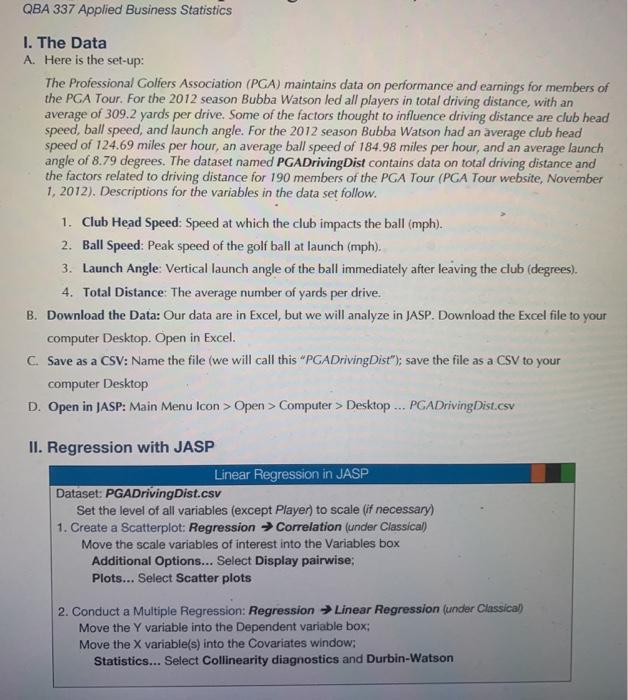
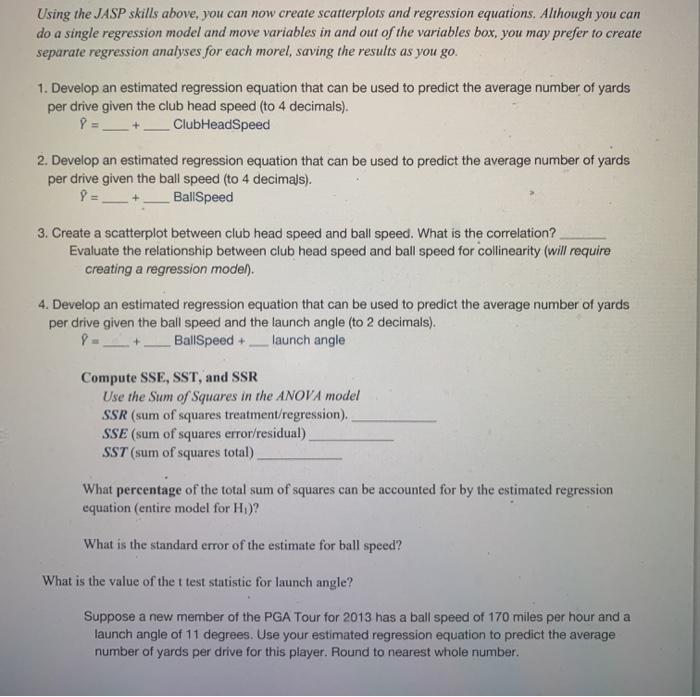
QBA 337 Applied Business Statistics 1. The Data A. Here is the set-up: The Professional Golfers Association (PGA) maintains data on performance and earnings for members of the PGA Tour. For the 2012 season Bubba Watson led all players in total driving distance, with an average of 309.2 yards per drive. Some of the factors thought to influence driving distance are club head speed, ball speed, and launch angle. For the 2012 season Bubba Watson had an average club head speed of 124.69 miles per hour, an average ball speed of 184.98 miles per hour, and an average launch angle of 8.79 degrees. The dataset named PGADriving Dist contains data on total driving distance and the factors related to driving distance for 190 members of the PGA Tour (PGA Tour website, November 1, 2012). Descriptions for the variables in the data set follow. 1. Club Head Speed: Speed at which the club impacts the ball (mph). 2. Ball Speed: Peak speed of the golf ball at launch (mph). 3. Launch Angle: Vertical launch angle of the ball immediately after leaving the club (degrees). 4. Total Distance: The average number of yards per drive. B. Download the Data: Our data are in Excel, but we will analyze in JASP. Download the Excel file to your computer Desktop. Open in Excel. C. Save as a CSV: Name the file (we will call this "PGADriving Dist"); save the file as a CSV to your computer Desktop D. Open in JASP: Main Menu Icon>Open > Computer > Desktop ... PGADriving Dist.csv II. Regression with JASP Linear Regression in JASP Dataset: PGADriving Dist.csv Set the level of all variables (except Player) to scale (if necessary) 1. Create a Scatterplot: Regression Correlation (under Classical) Move the scale variables of interest into the Variables box Additional Options... Select Display pairwise; Plots... Select Scatter plots 2. Conduct a Multiple Regression: Regression Linear Regression (under Classical) Move the Y variable into the Dependent variable box: Move the X variable(s) into the Covariates window; Statistics... Select Collinearity diagnostics and Durbin-Watson Using the JASP skills above, you can now create scatterplots and regression equations. Although you can do a single regression model and move variables in and out of the variables box, you may prefer to create separate regression analyses for each morel, saving the results as you go. 1. Develop an estimated regression equation that can be used to predict the average number of yards per drive given the club head speed (to 4 decimals). P = __+_ ClubHeadSpeed 2. Develop an estimated regression equation that can be used to predict the average number of yards per drive given the ball speed (to 4 decimals). P = ___+___ BallSpeed 3. Create a scatterplot between club head speed and ball speed. What is the correlation? Evaluate the relationship between club head speed and ball speed for collinearity (will require creating a regression model). 4. Develop an estimated regression equation that can be used to predict the average number of yards per drive given the ball speed and the launch angle (to 2 decimals). BallSpeed +_launch angle Compute SSE, SST, and SSR Use the Sum of Squares in the ANOVA model SSR (sum of squares treatment/regression). SSE (sum of squares error/residual) SST (sum of squares total) What percentage of the total sum of squares can be accounted for by the estimated regression equation (entire model for H.)? What is the standard error of the estimate for ball speed? What is the value of the t test statistic for launch angle? Suppose a new member of the PGA Tour for 2013 has a ball speed of 170 miles per hour and a launch angle of 11 degrees. Use your estimated regression equation to predict the average number of yards per drive for this player. Round to nearest whole number

Step by Step Solution

There are 3 Steps involved in it

1 Expert Approved Answer
Step: 1 Unlock blur-text-image

Question Has Been Solved by an Expert!

Get step-by-step solutions from verified subject matter experts

Step: 2 Unlock
Step: 3 Unlock

Students Have Also Explored These Related General Management Questions!