







Question: Question 1) On the tab labeled CPM Network , you will find a skeleton AON network. The layout includes the activities required to complete
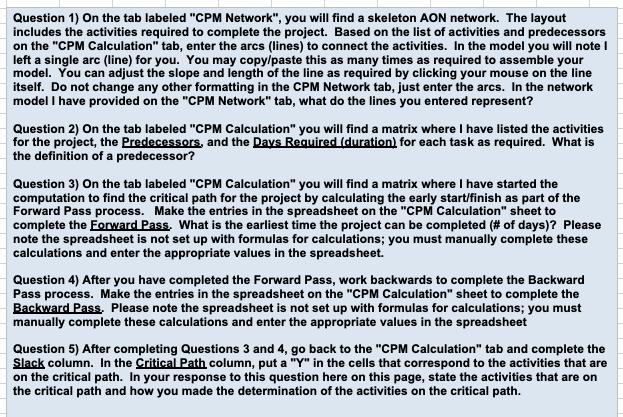
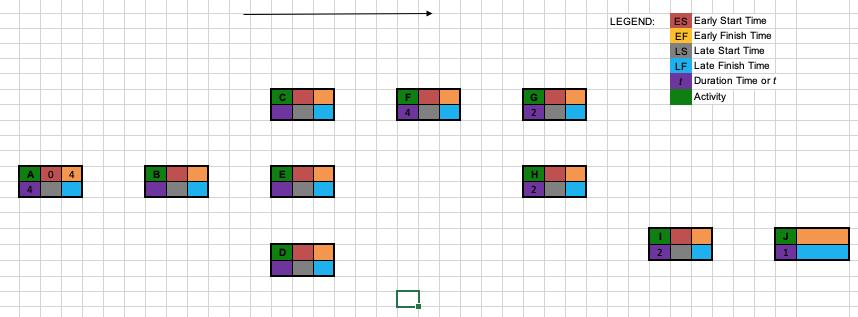
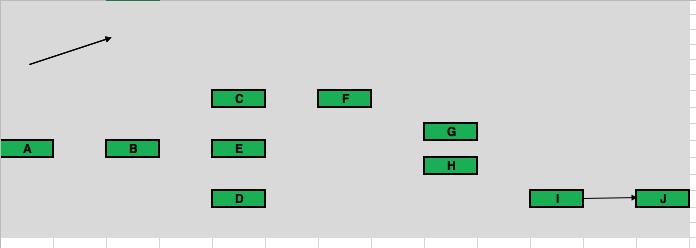
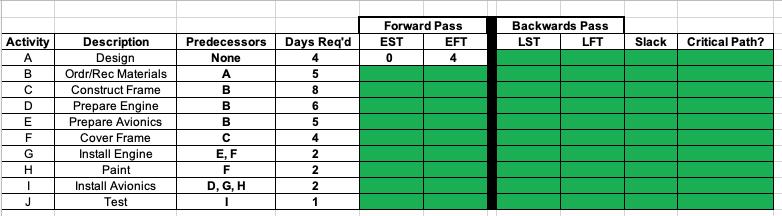
Question 1) On the tab labeled CPM Network , you will find a skeleton AON network. The layout includes the activities required to complete the project. Based on the list of activities and predecessors on the CPM Calculation tab, enter the arcs (lines) to connect the activities. In the model you will note I left a single arc (line) for you. You may copy/paste this as many times as required to assemble your model. You can adjust the slope and length of the line as required by clicking your mouse on the line itself. Do not change any other formatting in the CPM Network tab, just enter the arcs. In the network model I have provided on the CPM Network tab, what do the lines you entered represent? Question 2) On the tab labeled CPM Calculation you will find a matrix where I have listed the activities for the project, the Predecessors, and the Days Required (duration) for each task as required. What is the definition of a predecessor? Question 3) On the tab labeled CPM Calculation you will find a matrix where I have started the computation to find the critical path for the project by calculating the early start/finish as part of the Forward Pass process. Make the entries in the spreadsheet on the CPM Calculation sheet to complete the Forward Pass. What is the earliest time the project can be completed (# of days)? Please note the spreadsheet is not set up with formulas for calculations; you must manually complete these calculations and enter the appropriate values in the spreadsheet. Question 4) After you have completed the Forward Pass, work backwards to complete the Backward Pass process. Make the entries in the spreadsheet on the CPM Calculation sheet to complete the Backward Pass. Please note the spreadsheet is not set up with formulas for calculations; you must manually complete these calculations and enter the appropriate values in the spreadsheet Question 5) After completing Questions 3 and 4, go back to the CPM Calculation tab and complete the Slack column. In the Critical Path column, put a Y in the cells that correspond to the activities that are on the critical path. In your response to this question here on this page, state the activities that are on the critical path and how you made the determination of the activities on the critical path. A 0 4 4 B C E D F 4 G 2 H 2 LEGEND: ES Early Start Time EF Early Finish Time LS Late Start Time LF Late Finish Time Duration Time or f Activity 1 2 J 1 A B C E D F G B H Activity AB D E F G H I J Description Design Ordr/Rec Materials Construct Frame Prepare Engine Prepare Avionics Cover Frame Install Engine Paint Install Avionics Test Predecessors None A B B B C E, F F D, G, H I Days Req d 4 5 8 6 5 4 2 2 2 1 Forward Pass EST EFT 0 4 Backwards Pass LST LFT Slack Critical Path?
Step by Step Solution
3.41 Rating (154 Votes )
There are 3 Steps involved in it
The crit... View full answer

Get step-by-step solutions from verified subject matter experts
 Study Help