







Question: QUESTION 1: (31 MARKS) This question refers to the database Schema given in the Appendix. (a) Draw an ERD of the relational schema given in
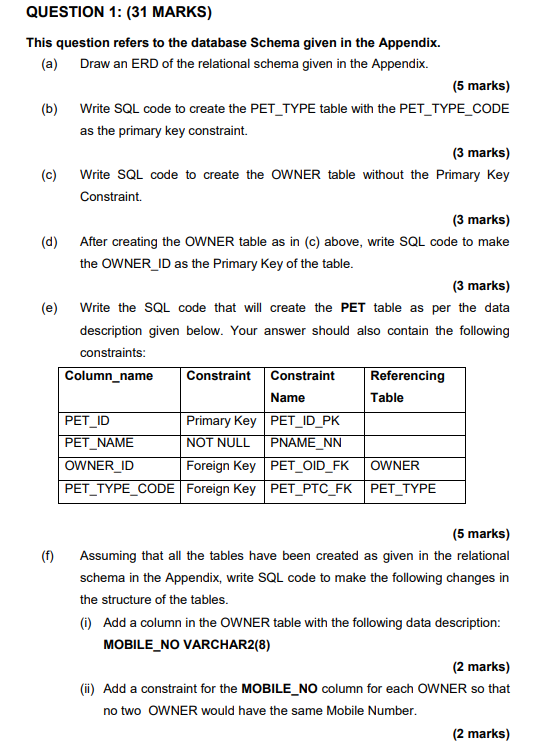
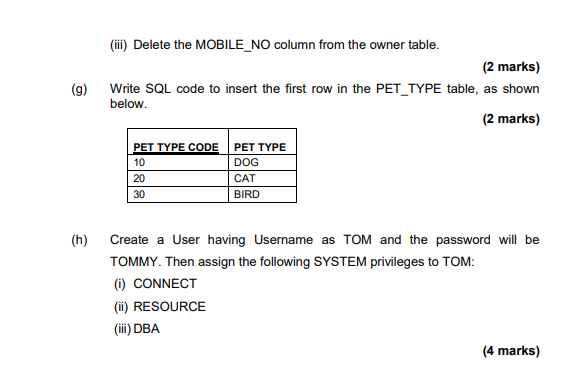
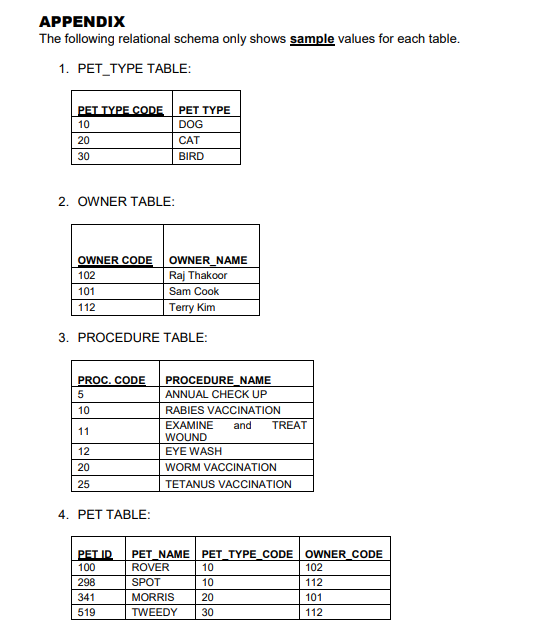
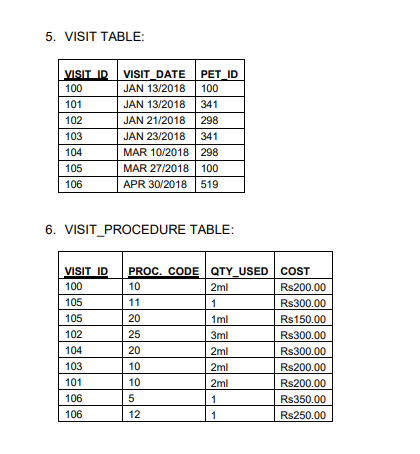
QUESTION 1: (31 MARKS) This question refers to the database Schema given in the Appendix. (a) Draw an ERD of the relational schema given in the Appendix. (5 marks) (b) Write SQL code to create the PET_TYPE table with the PET_TYPE_CODE as the primary key constraint. (3 marks) (c) Write SQL code to create the OWNER table without the Primary Key Constraint. (3 marks) (d) After creating the OWNER table as in (c) above, write SQL code to make the OWNER_ID as the Primary Key of the table. (3 marks) (e) Write the SQL code that will create the PET table as per the data description given below. Your answer should also contain the following constraints: (5 marks) (f) Assuming that all the tables have been created as given in the relational schema in the Appendix, write SQL code to make the following changes in the structure of the tables. (i) Add a column in the OWNER table with the following data description: MOBILE_NO VARCHAR2(8) (2 marks) (ii) Add a constraint for the MOBILE_NO column for each OWNER so that no two OWNER would have the same Mobile Number. (iii) Delete the MOBILE_NO column from the owner table. (2 marks) (g) Write SQL code to insert the first row in the PET_TYPE table, as shown below. ( 2 marks) (h) Create a User having Username as TOM and the password will be TOMMY. Then assign the following SYSTEM privileges to TOM: (i) CONNECT (ii) RESOURCE (iii) DBA APPENDIX The following relational schema only shows sample values for each table. 1. PET_TYPE TABLE: 2. OWNER TABLE: 3. PROCEDURE TABLE: 4. PET TABLE: 5. VISIT TABLE: 6. VISIT_PROCEDURE TABLE
Step by Step Solution
There are 3 Steps involved in it

Get step-by-step solutions from verified subject matter experts
 Study Help