







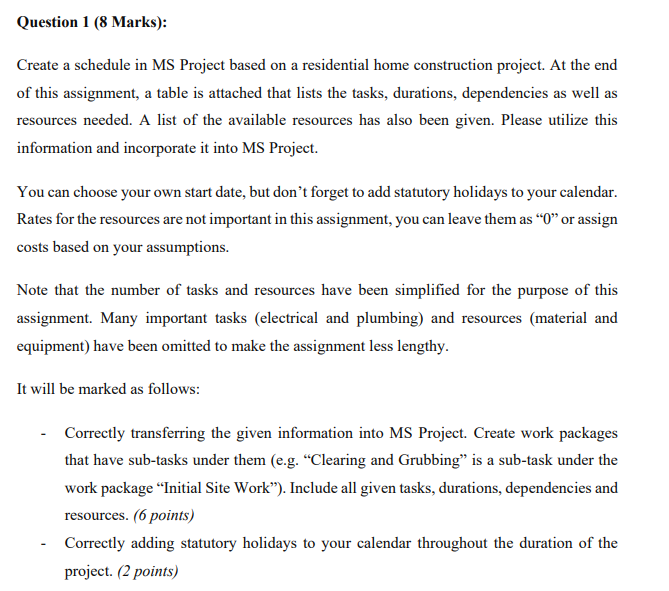
Question: Question 1 ( 8 Marks ) : Create a schedule in MS Project based on a residential home construction project. At the end of this
Question Marks:
Create a schedule in MS Project based on a residential home construction project. At the end of this assignment, a table is attached that lists the tasks, durations, dependencies as well as resources needed. A list of the available resources has also been given. Please utilize this information and incorporate it into MS Project.
You can choose your own start date, but don't forget to add statutory holidays to your calendar. Rates for the resources are not important in this assignment, you can leave them as or assign costs based on your assumptions.
Note that the number of tasks and resources have been simplified for the purpose of this assignment. Many important tasks electrical and plumbing and resources material and equipment have been omitted to make the assignment less lengthy.
It will be marked as follows:
Correctly transferring the given information into MS Project. Create work packages that have subtasks under them eg "Clearing and Grubbing" is a subtask under the work package "Initial Site Work" Include all given tasks, durations, dependencies and resources. points
Correctly adding statutory holidays to your calendar throughout the duration of the project. points Information to complete the schedule:
begintabularccccc
hline ID & Task Name & Duration days & Predecessors & Resources
hline & Milestone: Start & & &
hline & Work package: Initial Site work & & &
hline & Clearing and Grubbing & & & Excavation Contractor labour
hline & Work package: Foundation & & &
hline & Excavate for Foundations & & & Excavation Contractor labour
hline & Form basement & & & Concrete Contractor labour
hline & Pour concrete for foundations and basement & & & begintabularl
Concrete Contractor labour
endtabular
hline & Cure concrete for days & & &
hline & Backfill foundation & & & Excavation Contractor labour
hline & Work package: Framing & & &
hline & Install text st floor joists & & & Framing Contractor labour
hline & Lay text st floor decking & & & Framing Contractor labour
hline & Frame text st floor walls & & & Framing Contractor labour
hline & Frame text st floor corners & & & Framing Contractor labour
hline & Roof framing & & & Framing Contractor labour
hline & Work package: Dry In & & &
hline & Install text st floor sheathing & & & Framing Contractor labour
hline & Install roof decking & & & Framing Contractor labour
hline & Install felt, flashing and shingles & & & Roofing Contractor labour
hline & Install exterior doors & & & Framing Contractor labour
hline & Install windows & & & Framing Contractor labour
hline & Work package: Exterior Finishes & & &
hline & Finish exterior brick work & & & Masonry contractor labour
hline & Finish exterior siding & & & Framing Contractor labour
hline & Work package: Interior Finishes & & &
hline & Install Insulation & & & Insulation Contractor labour
hline & Install drywall & & & Drywall Contractor labour
hline & Milestone: Finish & & &
hline
endtabular Resources available:
Excavation Contractor labour
Concrete Contractor labour
Framing Contractor labour
Roofing Contractor labour
Masonry contractor labour
Insulation Contractor labour
Drywall Contractor labour
Step by Step Solution
There are 3 Steps involved in it
1 Expert Approved Answer
Step: 1 Unlock

Question Has Been Solved by an Expert!
Get step-by-step solutions from verified subject matter experts
Step: 2 Unlock
Step: 3 Unlock
 Study Help