







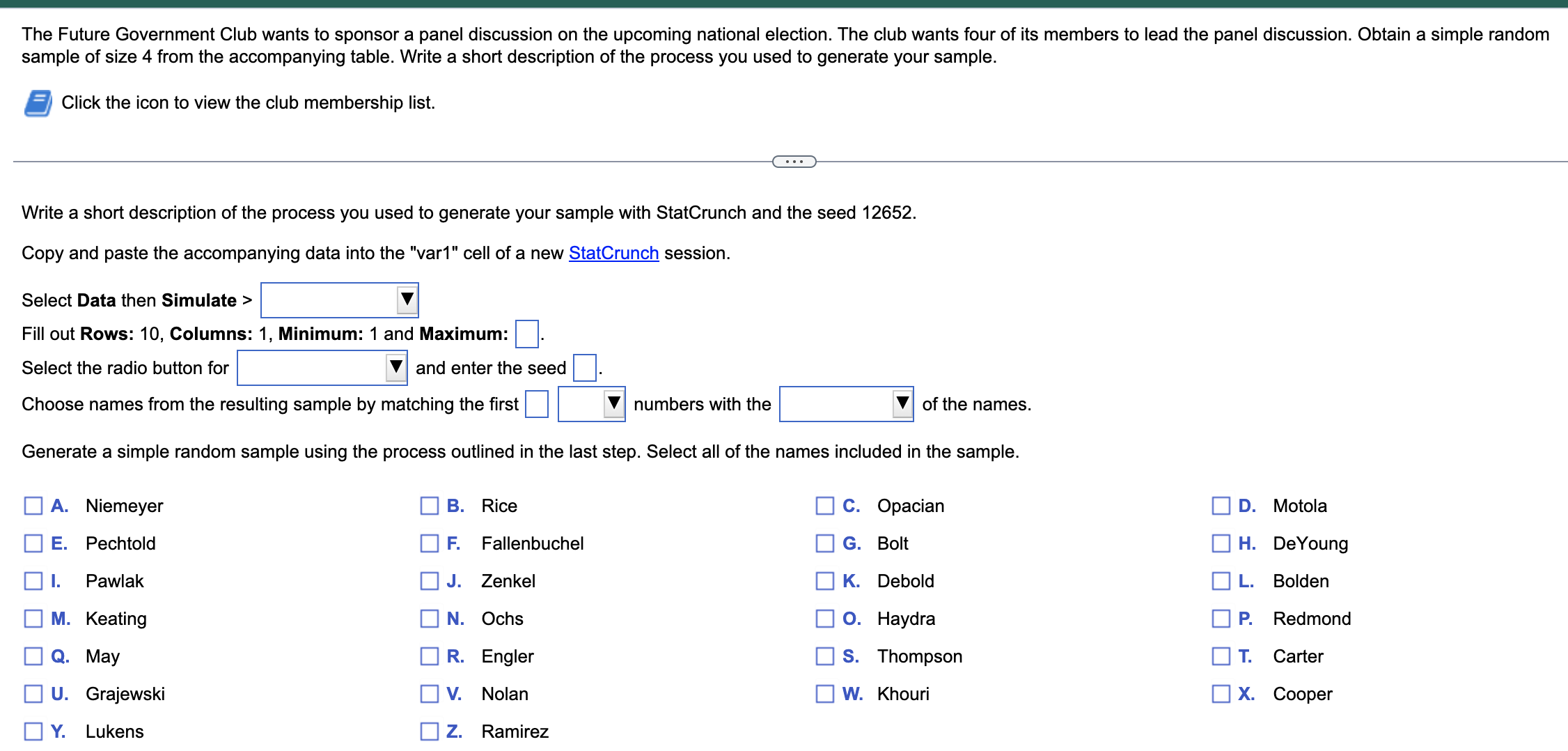
Question: Question 1 , Chapter 1 For the answer the blank section: ( 1 ) Select Data then Simulate > discrete uniform, F ,
Question Chapter For the answer the blank section: Select Data then Simulate discrete uniform, F gamma, hypergeometric choose one of the four Fill out Rows: Columns: Minimum: and Bold Maximum: Select the radio button for use dynamic seed OR use fixed seed, and enter the seed Choose names from the resulting sample by matching the first largest OR distinct, numbers with the row numbers OR length of letters, of the names. THEN, Generate a simple random sample using the process outlined in the last step. Select all of the names included in the sample.
Step by Step Solution
There are 3 Steps involved in it
1 Expert Approved Answer
Step: 1 Unlock

Question Has Been Solved by an Expert!
Get step-by-step solutions from verified subject matter experts
Step: 2 Unlock
Step: 3 Unlock
 Study Help