







Question: Question 1 . Create a user registration form for website called online book club. The form should include the following fields: Full Name Email Address
Question Create a user registration form for website called online book club. The form should include the following fields: Full Name Email Address Password Gender Preferred Genre Dropdown menu: Fiction, Nonfiction, Mystery, Fantasy, Romance, Biography Favorite Book Text Area Newsletter Subscription Checkbox Submit Button Requirements: Use HTML to create the form structure. The form should have appropriate labels for each input. Ensure that the "Full Name" and "Email Address" fields are required. Use the correct input types email for the email address, text for name, etc. You should copy and paste the HTML script" to answer this question. DONT take screenshots for your HTML script. It must be an editable script. Take a screenshot of your output web page and paste it as a part of your answer.
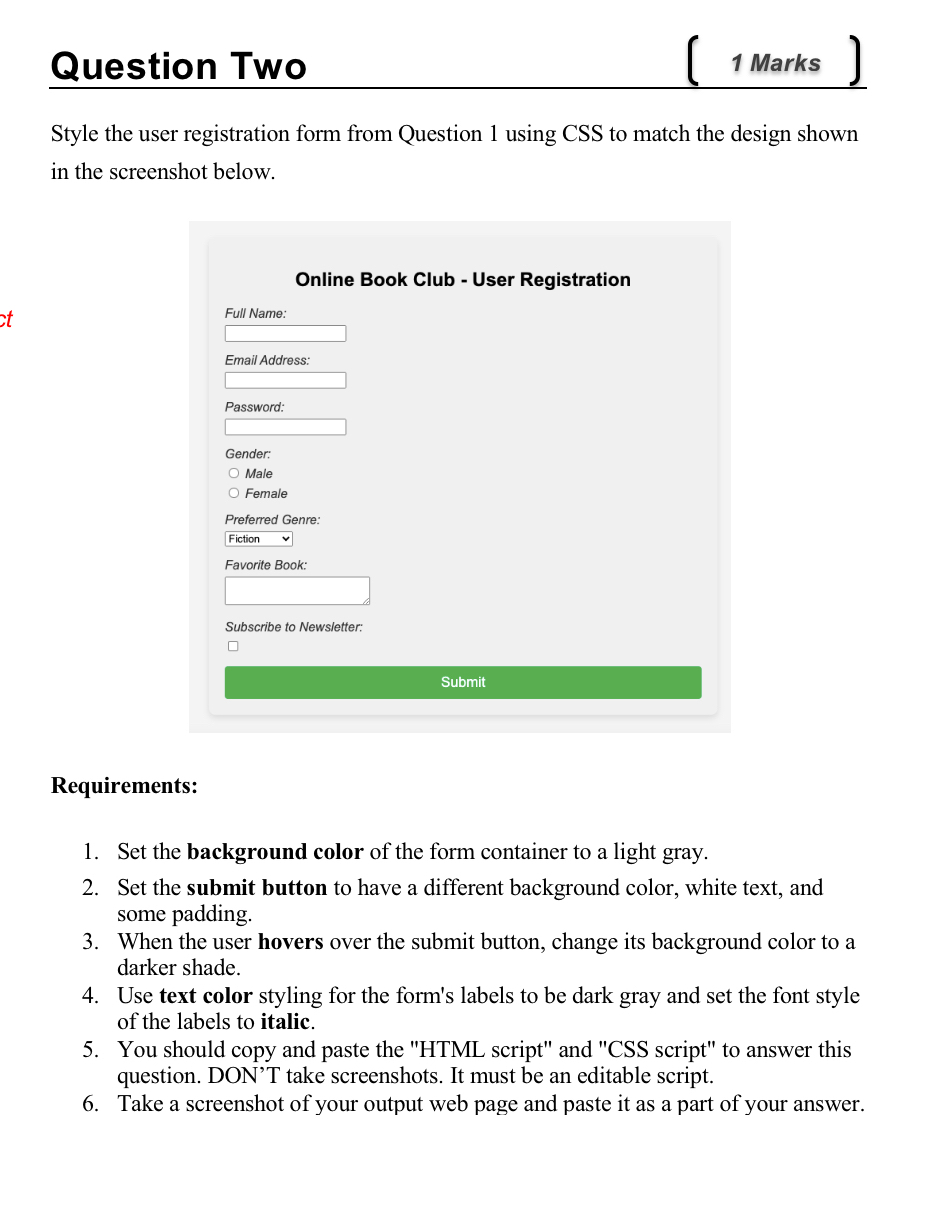
Question Style the user registration form from Question using CSS to match the design shown in the screenshot below. Requirements: Set the background color of the form container to a light gray. Set the submit button to have a different background color, white text, and some padding. When the user hovers over the submit button, change its background color to a darker shade. Use text color styling for the form's labels to be dark gray and set the font style of the labels to italic. You should copy and paste the HTML script" and CSS script" to answer this question. DONT take screenshots. It must be an editable script. Take a screenshot of your output web page and paste it as a part of your answer. Question Two
Marks
Style the user registration form from Question using CSS to match the design shown in the screenshot below.
Online Book Club User Registration
Full Name:
Email Address:
Password:
Gender:
Male
Female
Preferred Genre:
Fiction
Favorite Book:
Subscribe to Newsletter:
Submit
Requirements:
Set the background color of the form container to a light gray.
Set the submit button to have a different background color, white text, and some padding.
When the user hovers over the submit button, change its background color to a darker shade.
Use text color styling for the form's labels to be dark gray and set the font style of the labels to italic.
You should copy and paste the HTML script" and CSS script" to answer this question. DON'T take screenshots. It must be an editable script.
Take a screenshot of your output web page and paste it as a part of your answer.
Step by Step Solution
There are 3 Steps involved in it
1 Expert Approved Answer
Step: 1 Unlock

Question Has Been Solved by an Expert!
Get step-by-step solutions from verified subject matter experts
Step: 2 Unlock
Step: 3 Unlock
 Study Help