







Question: Question #1: Formatting a list and table/External style sheet Script the webpage in the following figure using an html file for the format and content
Question #1: Formatting a list and table/External style sheet
Script the webpage in the following figure using an html file for the format and content and an external CSS file for the presentation. You choose the topic; here are a few ideas: cars, animals, sports, foods . Here are the specifications:
1. The background of your page has a repeated image of your choice.
2. The header must be formatted using the box model. The image to the right illustrates the CSS box model. To accomplish this use the
3. The table must have 3 rows and 2 columns. a. Set the table margin the same as the header margin. b. Set the border of the table to be at least 15px, dotted and a different color from any other colors in the table. c. The 1st row is for headings. The background color must be different from any of the other cells in the table, and the text must be any color other than black. Add a padding of at least 10px for the heading cells. d. The cells in rows 2 and 3 must all have a different color background and a different colored border. e. The cells in the column 1 of row 2 and 3 each have an ordered list whose list style is upper roman. Notice that the numbering of the list items in the cell col 1/row 3 starts at 2 (and not 1). f. The cell in row 2/col 2 has an ordered list whose list type is uppercase letters. The 1st nested unordered list has bullets that are a 25px x 25px image of your choice. The second nested unordered lists bullets are the default circle. The color of the text in the 2nd unordered list is the same as the border of that cell. g. The cell in row 3/col 2 has an ordered list whose list type is Armenian numbering. The 1st nested unordered lists bullets are square. The 2nd nested unordered list has bullets that are a 25px x 25px image of your choice, different from the image used in cell Row 2/col 2. The color of the text in the 1st unordered list is the same as the border of that cell.
4. All style are to be entered in an external CSS.
5. Be sure to include your name in the page as well as the sources of your images with links to the pages at a location of your choice.
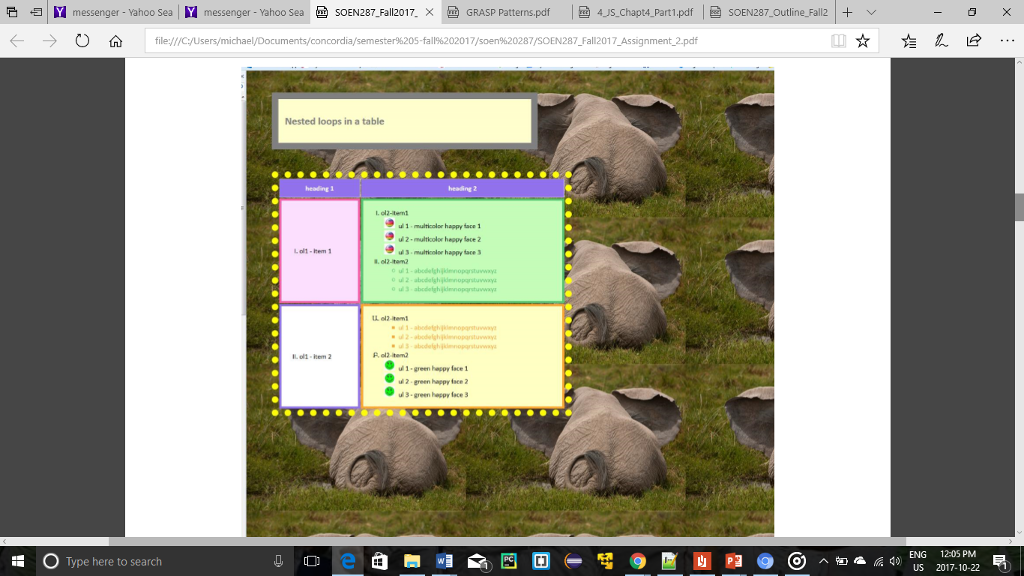 6. Validate your code using the HTML5 validator.
Step by Step Solution
There are 3 Steps involved in it

Get step-by-step solutions from verified subject matter experts
 Study Help