Question: Question 1 Here is the code from last weeks lab, which creates a small GUI that can be used to draw a sequence of red
Question 1 Here is the code from last weeks lab, which creates a small GUI that can be used to draw a sequence of red lines. This code follows the Model-View-Controller design pattern:
public interface ModelListener { public void update(); }
import java.awt.Point; import java.io.File; import java.util.ArrayList;
public class Model { private File file;
private ArrayList points; private ArrayList listeners; public Model() {
points = new ArrayList(); listeners = new ArrayList();
} public void addListener(ModelListener l) { listeners.add(l); } public ArrayList getPoints() { return points; } public void addPoint(Point p) { points.add(p); notifyListeners(); // points changed so notify the listeners. } public void clearAllPoints() { points.clear(); notifyListeners(); // points changed so notify the listeners. } public void deleteLastPoint() { if(points.size() > 0) { points.remove(points.size() - 1); notifyListeners(); // points changed so notify the listeners. } } private void notifyListeners() { for(ModelListener l: listeners) { l.update(); // Tell the listener that something changed. } } public int numberOfPoints() { return points.size(); } public static void testModel() { Model m = new Model(); m.addListener(new ModelListener() { @Override public void update() { System.out.println(true + " (listener)"); } }); System.out.println(m.getPoints() == m.points); Point p1 = new Point(1, 2); Point p2 = new Point(3, 4); m.addPoint(p1); // Listener called. m.addPoint(p2); // Listener called. System.out.println(m.numberOfPoints() == 2); System.out.println(m.points.get(0) == p1); System.out.println(m.points.get(1) == p2); m.deleteLastPoint(); // Listener called. System.out.println(m.numberOfPoints() == 1); System.out.println(m.points.get(0) == p1); m.clearAllPoints(); // Listener called. System.out.println(m.numberOfPoints() == 0); m.notifyListeners(); // Listener called. } }
public class Controller { protected Model m; public Controller(Model m) { this.m = m; } }
import java.awt.Point;
public class ControllerClicks extends Controller { public ControllerClicks(Model m) { super(m); } public void mouseClicked(Point p) { m.addPoint(p); } public void resetClicked() { m.clearAllPoints(); } public void undoClicked() { m.deleteLastPoint(); } }
import java.awt.Color; import java.awt.Graphics; import java.awt.Point; import java.awt.event.MouseAdapter; import java.awt.event.MouseEvent; import java.util.ArrayList; import javax.swing.JPanel;
public class MyPanel extends JPanel { private Model m; private ControllerClicks c; public MyPanel(Model m, ControllerClicks c) { this.m = m; this.c = c; this.addMouseListener(new MouseAdapter() { @Override public void mouseClicked(MouseEvent e) { if(e.getButton() == MouseEvent.BUTTON1) { c.mouseClicked(e.getPoint()); } } }); } @Override protected void paintComponent(Graphics g) { super.paintComponent(g); ArrayList points = m.getPoints(); g.setColor(Color.RED); if(points.size() == 1) { Point p = points.get(0); g.drawRect((int)p.getX(), (int)p.getY(), 1, 1); } else { for(int i = 1; i 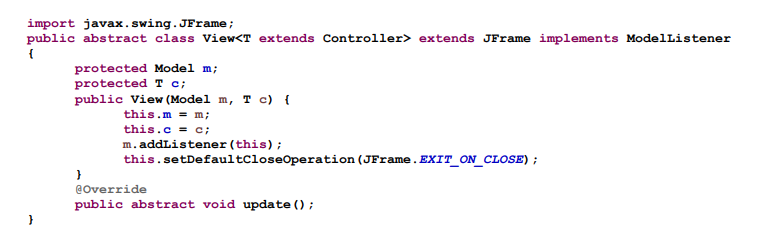
Use Java
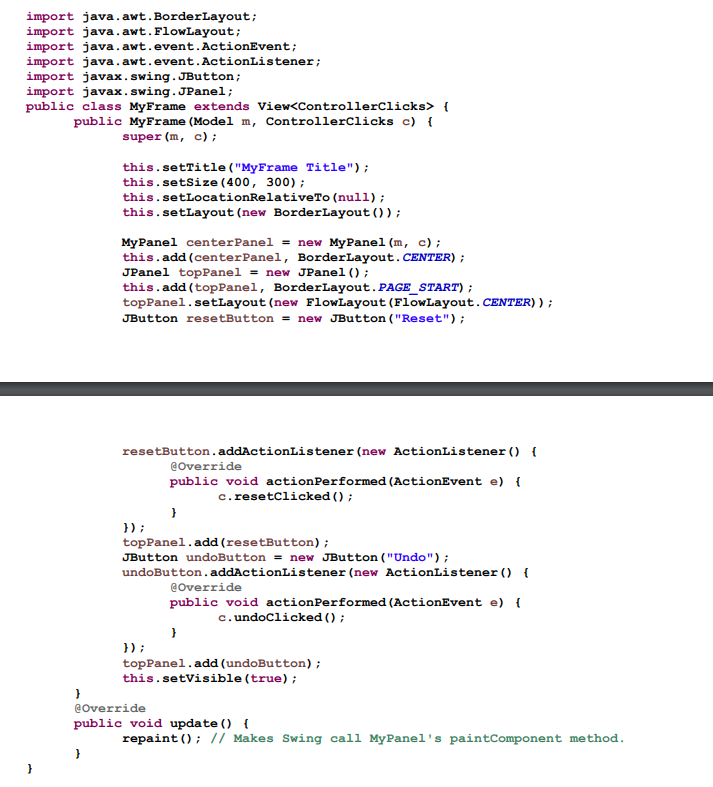
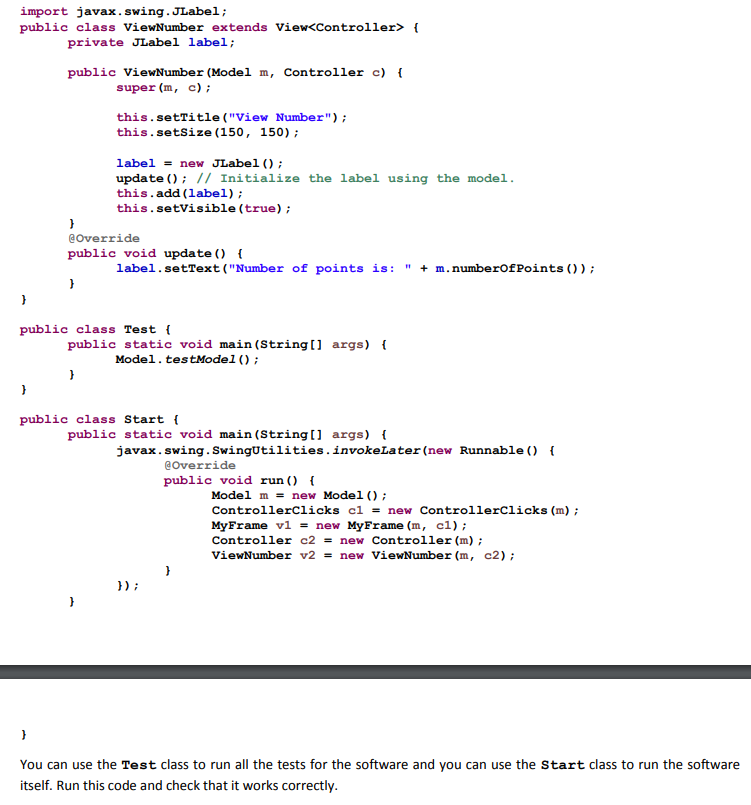
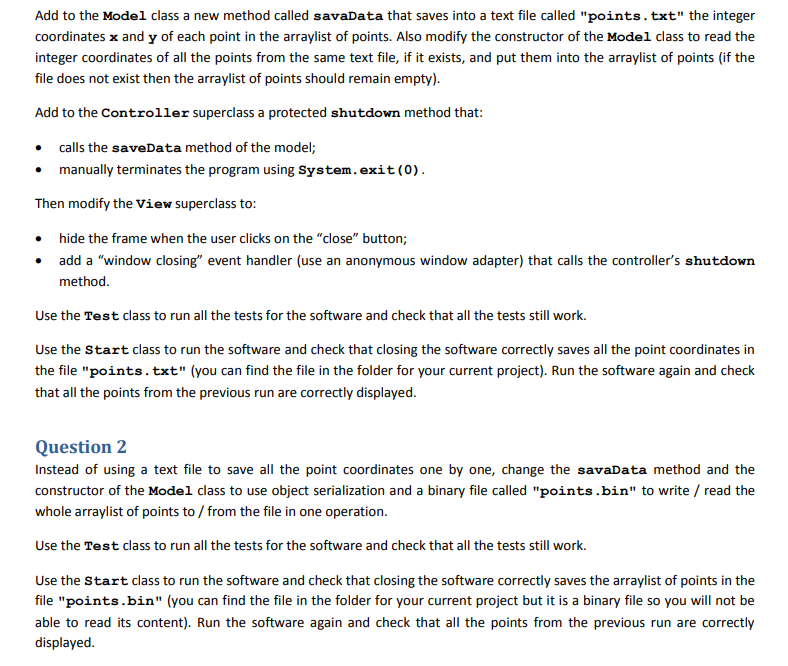
import javax.swing.JFrame; public abstract class View extends JFrame implements ModelListener { protected Model m; protected T c; public View (Model m, T c) { this.m = m; this.c = c; m.addListener(this); this.setDefaultCloseOperation(JFrame.EXIT_ON_CLOSE) ; } @Override public abstract void update(); } import java.awt.BorderLayout; import java.awt. FlowLayout; import java.awt.event. ActionEvent; import java.awt.event. ActionListener; import javax.swing. JButton; import javax.swing.JPanel; public class MyFrame extends View { public MyFrame (Model m, ControllerClicks c) { super (m, c); this.setTitle ("MyFrame Title"); this.setSize (400, 300); this.setLocationRelativeTo (null); this.setLayout (new BorderLayout()); MyPanel centerPanel = new MyPanel (m, c); this.add (centerPanel, BorderLayout. CENTER); JPanel topPanel = new JPanel(); this.add(topPanel, BorderLayout.PAGE_START) ; topPanel.setLayout(new FlowLayout (FlowLayout. CENTER)); JButton resetButton = new JButton ("Reset"); resetButton.addActionListener(new ActionListener() { @Override public void actionPerformed (ActionEvent e) { c.resetclicked(); } }); topPanel.add (resetButton); JButton undoButton = new JButton ("Undo"); undoButton.addActionListener(new ActionListener() { @Override public void actionPerformed (ActionEvent e) { c.undoclicked(); } }); topPanel.add (undoButton); this.setVisible(true); } @Override public void update() { repaint(); // Makes Swing call MyPanel's paint Component method. } } import javax.swing. JLabel; public class ViewNumber extends View { private JLabel label; public ViewNumber (Model m, Controller c) { super (m, c); this.setTitle ("View Number"); this.setSize (150, 150); label = new JLabel(); update(); // Initialize the label using the model. this.add(label); this.setVisible(true); } @Override public void update() { label.setText ("Number of points is: + m. numberOfPoints()); } } public class Test { public static void main(String[] args) { Model. testModel(); } } public class Start ! public static void main(String[] args) { javax.swing. SwingUtilities.invokelater(new Runnable() { @Override public void run() { Model m = new Model(); ControllerClicks cl = new ControllerClicks (m); MyFrame v1 = new MyFrame (m, cl); Controller c2 = new Controller (m); ViewNumber v2 = new ViewNumber (m, c2); }); } You can use the Test class to run all the tests for the software and you can use the Start class to run the software itself. Run this code and check that it works correctly. Add to the Model class a new method called savaData that saves into a text file called "points.txt" the integer coordinates x and y of each point in the arraylist of points. Also modify the constructor of the Model class to read the integer coordinates of all the points from the same text file, if it exists, and put them into the arraylist of points (if the file does not exist then the arraylist of points should remain empty). Add to the Controller superclass a protected shutdown method that: calls the saveData method of the model; manually terminates the program using System.exit(0). Then modify the View superclass to: hide the frame when the user clicks on the "close" button; add a "window closing" event handler (use an anonymous window adapter) that calls the controller's shutdown method. Use the Test class to run all the tests for the software and check that all the tests still work. Use the Start class to run the software and check that closing the software correctly saves all the point coordinates in the file "points.txt" (you can find the file in the folder for your current project). Run the software again and check that all the points from the previous run are correctly displayed. Question 2 Instead of using a text file to save all the point coordinates one by one, change the savaData method and the constructor of the Model class to use object serialization and a binary file called "points.bin" to write / read the whole arraylist of points to/from the file in one operation. Use the Test class to run all the tests for the software and check that all the tests still work. Use the Start class to run the software and check that closing the software correctly saves the arraylist of points in the file "points.bin" (you can find the file in the folder for your current project but it is a binary file so you will not be able to read its content). Run the software again and check that all the points from the previous run are correctly displayed. Question 3 (optional) Instead of using a binary file to save the arraylist of points, change the savaData method and the constructor of the Model class to use a database to write / read the coordinates of all the points. Use XAMPP and phpMyAdmin to create a database called "java" with a table called "points" that has two integer columns x and y (in addition to the ID primary key). Hint: make sure you delete all the old point coordinates from the database before inserting new ones. Hint: use phpMyAdmin to check what is stored in the database. Use the Test class to run all the tests for the software and check that all the tests still work. Use the Start class to run the software and check that closing the software correctly saves the point coordinates in the database (use phpMyAdmin to check the content of the database). Run the software again and check that all the points from the previous run are correctly displayed









 Study Help