



Question: Question 1: Read through the following segment of code and anywhere you see @TODO modify it accordingly. /** * To order our statements, we use
Question 1: Read through the following segment of code and anywhere you see "@TODO" modify it accordingly.
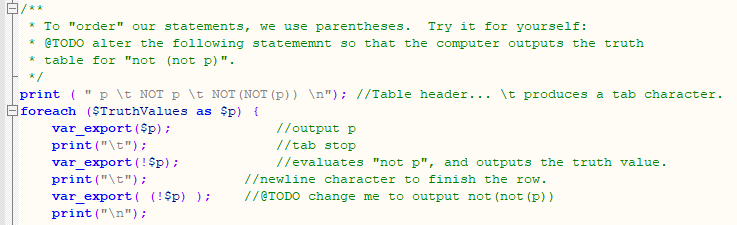
/** * To "order" our statements, we use parentheses. Try it for yourself: @TODO alter the following statememnt so that the computer outputs the truth * table for "not (not p)". */ print (" p \t NOT p \t NOT (NOT (P)) "); //Table header... It produces a tab character. foreach ($TruthValues as $p) { var_export($p); //output p print("\t"); //tab stop var_export(!$p); //evaluates "not p", and outputs the truth value. print("\t"); /ewline character to finish the row. var_export( (!$p) ); //@TODO change me to output not (not (P)) print(" ")
Step by Step Solution
There are 3 Steps involved in it

Get step-by-step solutions from verified subject matter experts