







Question: Question 114 points) Purpose: Familiarize yourself with Processing's interactive mode, colours, and shapes. Degree of Difficulty: Easy to Moderate You may recall that one of
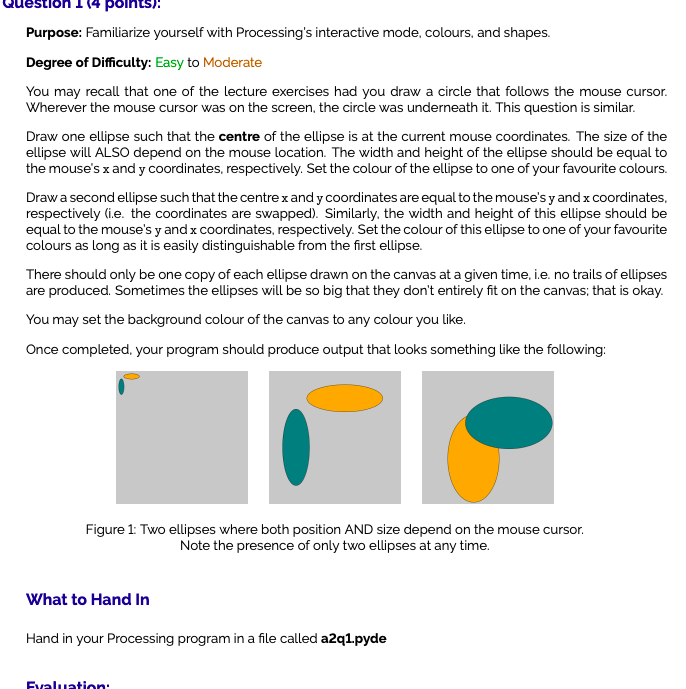
Question 114 points) Purpose: Familiarize yourself with Processing's interactive mode, colours, and shapes. Degree of Difficulty: Easy to Moderate You may recall that one of the lecture exercises had you draw a circle that follows the mouse cursor. Wherever the mouse cursor was on the screen, the circle was underneath it. This question is similar. Draw one ellipse such that the centre of the ellipse is at the current mouse coordinates. The size of the ellipse will ALSO depend on the mouse location. The width and height of the ellipse should be equal to the mouse's x and y coordinates, respectively. Set the colour of the ellipse to one of your favourite colours. Draw a second ellipse such that the centre x and y coordinates are equal to the mouse's y and x coordinates, respectively (i.e. the coordinates are swapped). Similarly, the width and height of this ellipse should be equal to the mouse's y and x coordinates, respectively. Set the colour of this ellipse to one of your favourite colours as long as it is easily distinguishable from the first ellipse. There should only be one copy of each ellipse drawn on the canvas at a given time, i.e. no trails of ellipses are produced. Sometimes the ellipses will be so big that they don't entirely fit on the canvas; that is okay. You may set the background colour of the canvas to any colour you like. Once completed, your program should produce output that looks something like the following: Figure 1: Two ellipses where both position AND size depend on the mouse cursor. Note the presence of only two ellipses at any time. What to Hand In Hand in your Processing program in a file called a2q1.pyde Evaluation: Question 114 points) Purpose: Familiarize yourself with Processing's interactive mode, colours, and shapes. Degree of Difficulty: Easy to Moderate You may recall that one of the lecture exercises had you draw a circle that follows the mouse cursor. Wherever the mouse cursor was on the screen, the circle was underneath it. This question is similar. Draw one ellipse such that the centre of the ellipse is at the current mouse coordinates. The size of the ellipse will ALSO depend on the mouse location. The width and height of the ellipse should be equal to the mouse's x and y coordinates, respectively. Set the colour of the ellipse to one of your favourite colours. Draw a second ellipse such that the centre x and y coordinates are equal to the mouse's y and x coordinates, respectively (i.e. the coordinates are swapped). Similarly, the width and height of this ellipse should be equal to the mouse's y and x coordinates, respectively. Set the colour of this ellipse to one of your favourite colours as long as it is easily distinguishable from the first ellipse. There should only be one copy of each ellipse drawn on the canvas at a given time, i.e. no trails of ellipses are produced. Sometimes the ellipses will be so big that they don't entirely fit on the canvas; that is okay. You may set the background colour of the canvas to any colour you like. Once completed, your program should produce output that looks something like the following: Figure 1: Two ellipses where both position AND size depend on the mouse cursor. Note the presence of only two ellipses at any time. What to Hand In Hand in your Processing program in a file called a2q1.pyde Evaluation
Step by Step Solution
There are 3 Steps involved in it

Get step-by-step solutions from verified subject matter experts
 Study Help