







Question: Question #16. Run the following code in MATLAB. There are bugs. Although the bugs can be found by just reading the program, set a break
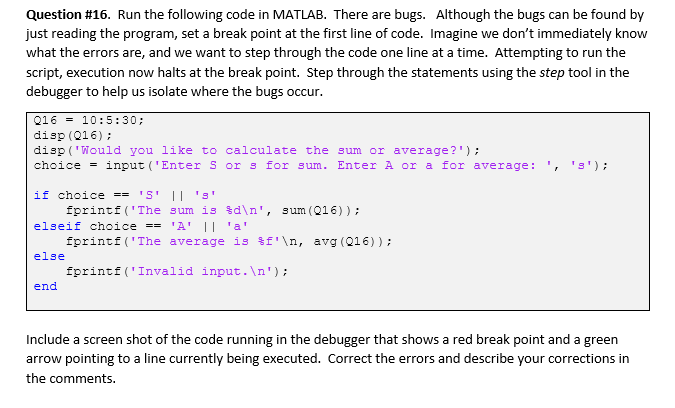
Question #16. Run the following code in MATLAB. There are bugs. Although the bugs can be found by just reading the program, set a break point at the first line of code. Imagine we don't immediately know what the errors are, and we want to step through the code one line at a time. Attempting to run the script, execution now halts at the break point. Step through the statements using the step tool in the debugger to help us isolate where the bugs occur. 016 = 10:5:30; disp (016); disp('Would you like to calculate the sum or average?'); choice = input ("Enter S or s for sum. Enter A or a for average: ', ''); if choice == 'S' || '3' fprintf('The sum is 3d ', sum (016)); elseif choice == 'A' || 'a' fprintf('The average is f' , avg (016)); else fprintf('Invalid input. '); end Include a screen shot of the code running in the debugger that shows a red break point and a green arrow pointing to a line currently being executed. Correct the errors and describe your corrections in the comments
Step by Step Solution
There are 3 Steps involved in it

Get step-by-step solutions from verified subject matter experts
 Study Help