







Question: Question 2 (13 points): Purpose: Practice with conditionals; practice with variables and good program design. Degree of Di culty: Tricky Your spaceship is being bombarded
Question 2 (13 points):
Purpose: Practice with conditionals; practice with variables and good program design.
Degree of Di culty: Tricky
Your spaceship is being bombarded by asteroids! To survive, you must shoot down each asteroid before it hits your ship. Luckily for you, the asteroids are not too close to each other, so you will never have to deal with more than one asteroid at a time.
Your job is to write a simple rst-person asteroid-shooting game in Processing. The rules for the game are as follows:
Setting up the game: The game should be played on an 800x800 black canvas (its in outer space, after all).
When the game starts: An asteroid appears at a random location on the canvas (see the note below on generating random numbers). We will use a simple circle to represent the asteroid. Initially, the asteroid has a diameter of 0, but it should continually get bigger and bigger over time (representing the asteroid getting closer to the player - its like the player is in the cockpit of the spaceship). Also, the players score should be displayed on the canvas, and should initially be 0.
If the asteroid gets too big: Pick a reasonable maximum size for the asteroids (our solution uses a diam- eter of 100). If the asteroid ever reaches this size, the players ship has been hit and the game is over. The asteroid should turn red and stop growing, and a Game Over message should appear on the canvas.
If the player clicks on the asteroid before it gets too big: The asteroid is destroyed. Add 1 to the players score, and immediately create a new asteroid with diameter 0 at a new random location.
If the player presses r on the keyboard at any time: The game is reset. The players score is set to 0 and a new asteroid is created at a random location. 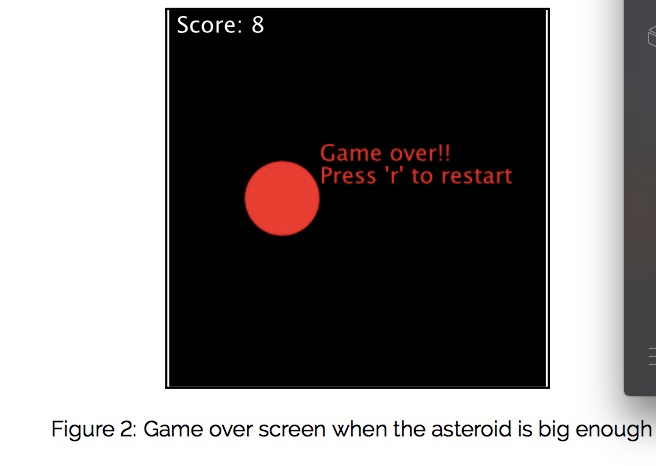
How to start
A central subtask for this problem is determining whether or not a given point (i.e. the point the user clicks with the mouse) is inside of a circle (i.e. the asteroid). You should tackle this task rst by writing the following function:
def inside_asteroid(x, y, ast_x, ast_y, ast_size)
This inputs to this function are:
x, y: The coordinates of the point that was clicked
ast_x, ast_y: The coordinates of the asteroids center
ast_size: The diameter of the asteroid. The function should return True if the point is inside the asteroid and False otherwise. Test this func-
tion before you go on! Once you are sure it is working, you can start adding the interactive parts of the program.
How to use random numbers
When setting up the coordinates of a new asteroid, you will need to generate random numers. Processing has a function called random() which can be used to do this. random() takes two numbers as arguments, and will return a random number in the given range. So for example, calling random(1, 5) will return a random number between 1 (inclusive) and 5 (exclusive). You can think of this like rolling a die: each time you call random(), its like you rolled the die once and got a single, random result. For this program, you should use the call random(50, 750) to generate asteroid coordinates that are still visible on the canvas.
What To Hand In: Your Processing sketch folder (named cmpt140_a5q2) compressed as a zip le (.zip). This folder should contain your Processing program as a .pyde le with the same name as the folder (i.e.cmpt140_a5q2.pyde) and a sketch.properties project le.
Evaluation:
0 marks for submitting nothing and/or les that cannot be opened. -1 mark for lack of identi cation in the solution. 2 marks for creating and initializing asteroids correctly. 2 marks for asteroids growing over time correctly.
2 marks for program ending correctly when an asteroid hits the player. 2 marks for correct program behaviour when asteroids are clicked. 2 marks for program correctly resets when r is pressed. 1 mark for documenting code using comments and docstrings.
2 marks for good Model-View-Controller design
Must use PYTHON in processing
Score: 8 Game over!! Press 'r' to restart Figure 2: Game over screen when the asteroid is big enough
Step by Step Solution
There are 3 Steps involved in it

Get step-by-step solutions from verified subject matter experts
 Study Help