







Question: Question 2 ( 2 0 marks ) Suppose the raw data file Sales.txt ( not provided ) has already been referred to by the FILENAME
Question marks
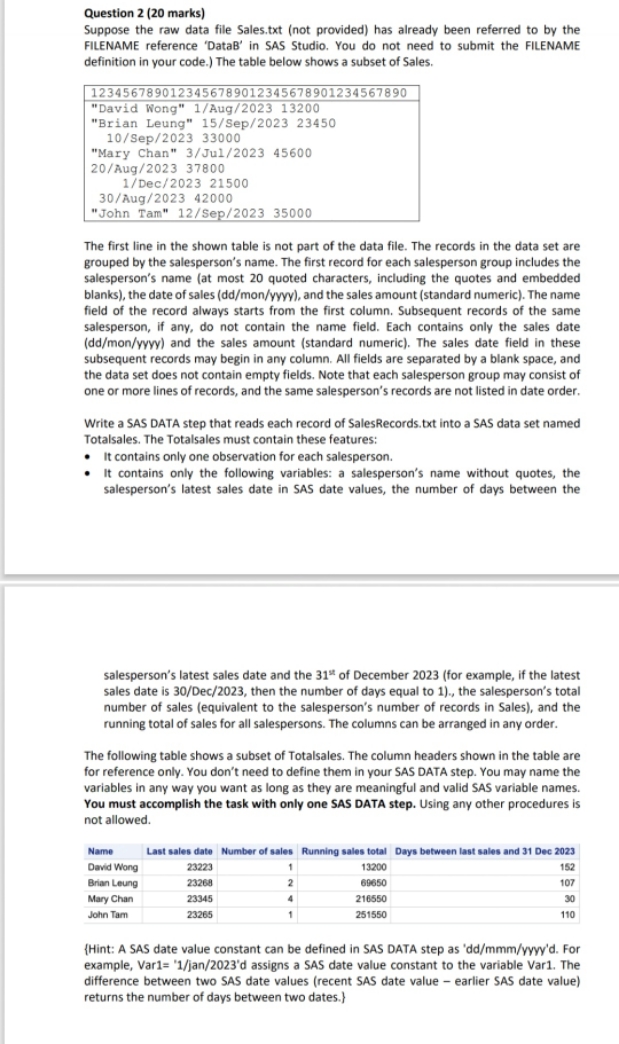
Suppose the raw data file Sales.txt not provided has already been referred to by the FILENAME reference 'DataB' in SAS Studio. You do not need to submit the FILENAME definition in your code. The table below shows a subset of Sales.
"David Wong" Aug
"Brian Leung" Sep
Sep
"Mary Chan" Jul
Aug
Dec
Aug
"John Tam" Sep
The first line in the shown table is not part of the data file. The records in the data set are grouped by the salesperson's name. The first record for each salesperson group includes the salesperson's name at most quoted characters, including the quotes and embedded blanks the date of sales ddmonyyyy and the sales amount standard numeric The name field of the record always starts from the first column. Subsequent records of the same salesperson, if any, do not contain the name field. Each contains only the sales date ddmonyyyy and the sales amount standard numeric The sales date field in these subsequent records may begin in any column. All fields are separated by a blank space, and the data set does not contain empty fields. Note that each salesperson group may consist of one or more lines of records, and the same salesperson's records are not listed in date order.
Write a SAS DATA step that reads each record of SalesRecords.txt into a SAS data set named Totalsales. The Totalsales must contain these features:
It contains only one observation for each salesperson.
It contains only the following variables: a salesperson's name without quotes, the salesperson's latest sales date in SAS date values, the number of days between the
salesperson's latest sales date and the text th of December for example, if the latest sales date is Dec then the number of days equal to the salesperson's total number of sales equivalent to the salesperson's number of records in Sales and the running total of sales for all salespersons. The columns can be arranged in any order.
The following table shows a subset of Totalsales. The column headers shown in the table are for reference only. You don't need to define them in your SAS DATA step. You may name the variables in any way you want as long as they are meaningful and valid SAS variable names. You must accomplish the task with only one SAS DATA step. Using any other procedures is not allowed.
Hint: A SAS date value constant can be defined in SAS DATA step as ddmmmyyyyd For example, Varmathrmj and assigns a SAS date value constant to the variable Var The difference between two SAS date values recent SAS date value earlier SAS date value returns the number of days between two dates.
Step by Step Solution
There are 3 Steps involved in it
1 Expert Approved Answer
Step: 1 Unlock

Question Has Been Solved by an Expert!
Get step-by-step solutions from verified subject matter experts
Step: 2 Unlock
Step: 3 Unlock
 Study Help