







Question: Question 2 (50 points & 10 extra points) In class we went through the manual process of interpreting the partition table (MBR) of the DOS
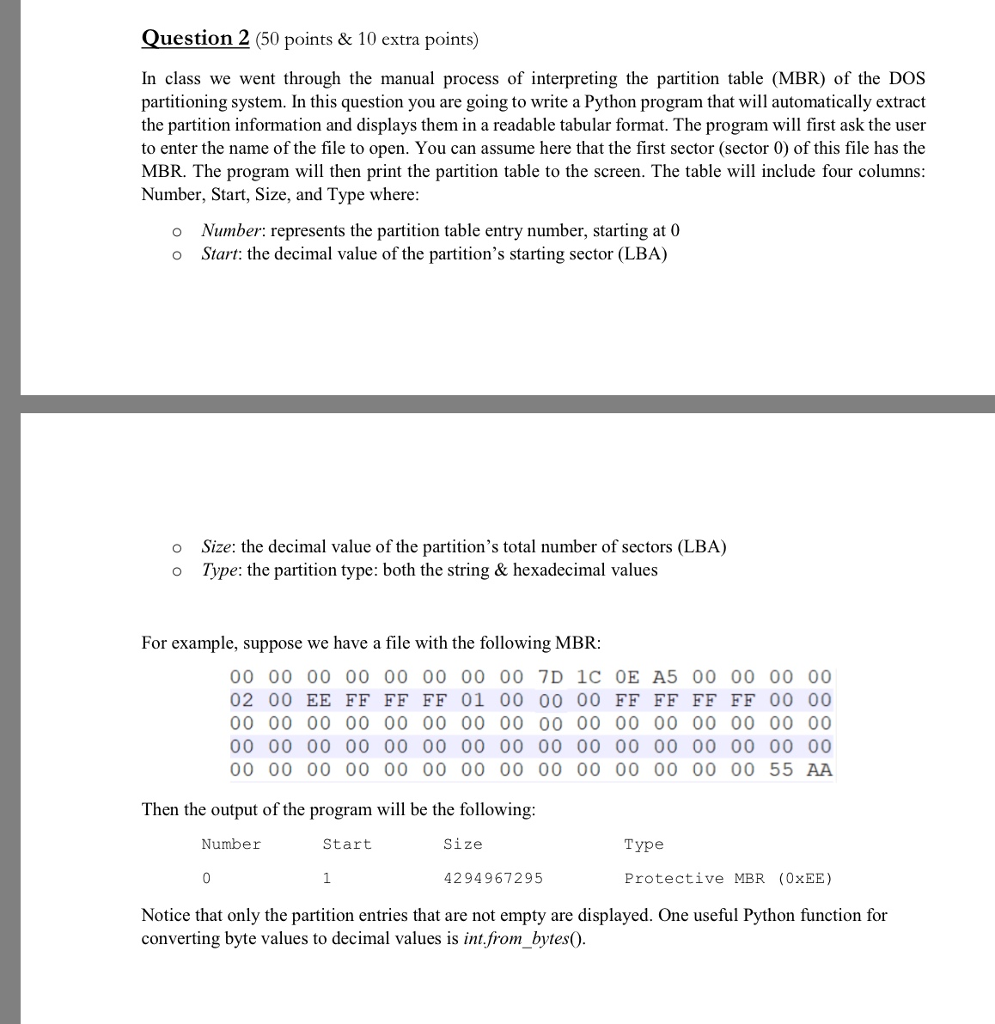
Question 2 (50 points & 10 extra points) In class we went through the manual process of interpreting the partition table (MBR) of the DOS partitioning system. In this question you are going to write a Python program that will automatically extract the partition information and displays them in a readable tabular format. The program will first ask the user to enter the name of the file to open. You can assume here that the first sector (sector 0) of this file has the MBR. The program will then print the partition table to the screen. The table will include four columns Number, Start, Size, and Type where o Number: represents the partition table entry number, starting at 0 o Start: the decimal value of the partition's starting sector (LBA) o Size: the decimal value of the partition's total number of sectors (LBA) o Type: the partition type: both the string & hexadecimal values For example, suppose we have a file with the following MBR: 00 00 00 00 00 00 00 00 7D 1c OE A5 00 00 00 00 02 00 EE FF FF FF 01 00 00 00 FF FF FF FF 00 00 00 00 00 00 00 00 00 00 00 00 00 00 00 00 55 AA Then the output of the program will be the following Number Start Size Type 4294967295 Protective MBR (0xEE) Notice that only the partition entries that are not empty are displayed. One useful Python function for converting byte values to decimal values is int.from bytes) Question 2 (50 points & 10 extra points) In class we went through the manual process of interpreting the partition table (MBR) of the DOS partitioning system. In this question you are going to write a Python program that will automatically extract the partition information and displays them in a readable tabular format. The program will first ask the user to enter the name of the file to open. You can assume here that the first sector (sector 0) of this file has the MBR. The program will then print the partition table to the screen. The table will include four columns Number, Start, Size, and Type where o Number: represents the partition table entry number, starting at 0 o Start: the decimal value of the partition's starting sector (LBA) o Size: the decimal value of the partition's total number of sectors (LBA) o Type: the partition type: both the string & hexadecimal values For example, suppose we have a file with the following MBR: 00 00 00 00 00 00 00 00 7D 1c OE A5 00 00 00 00 02 00 EE FF FF FF 01 00 00 00 FF FF FF FF 00 00 00 00 00 00 00 00 00 00 00 00 00 00 00 00 55 AA Then the output of the program will be the following Number Start Size Type 4294967295 Protective MBR (0xEE) Notice that only the partition entries that are not empty are displayed. One useful Python function for converting byte values to decimal values is int.from bytes)
Step by Step Solution
There are 3 Steps involved in it

Get step-by-step solutions from verified subject matter experts
 Study Help