







Question: Question 2: Grade Calculator (Use switch and if) Write a program that takes a student's score (out of 100) as input and prints out
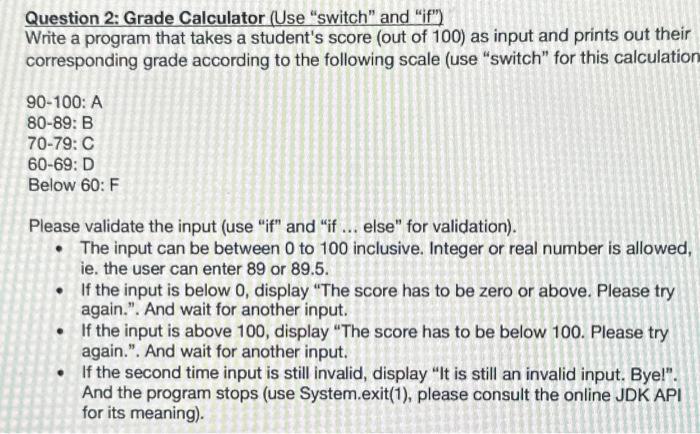

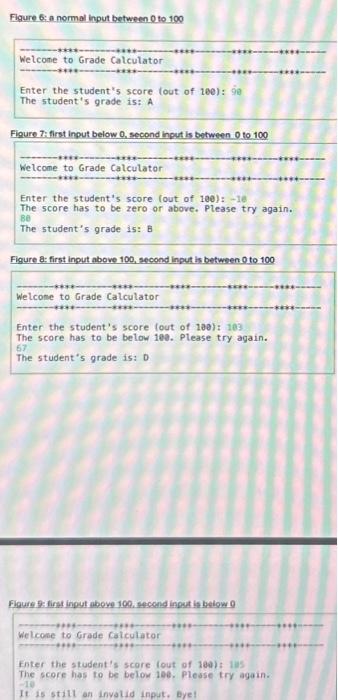
Question 2: Grade Calculator (Use "switch" and "if") Write a program that takes a student's score (out of 100) as input and prints out their corresponding grade according to the following scale (use "switch" for this calculation 90-100: A 80-89: B 70-79: C 60-69: D Below 60: F Please validate the input (use "if" and "if ... else" for validation). The input can be between 0 to 100 inclusive. Integer or real number is allowed, ie. the user can enter 89 or 89.5. If the input is below 0, display "The score has to be zero or above. Please try again.". And wait for another input. If the input is above 100, display "The score has to be below 100. Please try again.". And wait for another input. If the second time input is still invalid, display "It is still an invalid input. Bye!". And the program stops (use System.exit(1), please consult the online JDK API for its meaning). NOTE 2: (i) Neither use nor import any other library/package aside from: java.util.Scanner; (ii) Neither implement nor use any custom/user-defined function(s) for any task herein. (iii) With reference to each task herein, do NOT implement or use any of the following constructs: iterations/loops (for (), while {}, etc.). 4 Figure 6: a normal input between 0 to 100 Welcome to Grade Calculator Enter the student's score (out of 100): 90 The student's grade is: A Figure 7: first input below 0. second input is between 0 to 100 Welcome to Grade Calculator Enter the student's score (out of 100): -18 The score has to be zero or above. Please try again. The student's grade is: B Figure &: first input above 100, second input is between 0 to 100 Welcome to Grade Calculator Enter the student's score (out of 100): 103 The score has to be below 108. Please try again. 67 The student's grade is: D Figure 9: first input above 100, second input is below 0 -****- **** Welcome to Grade Calculator -**** Enter the student's score (out of 100): 185 The score has to be below 100. Please try again. -10 It is still an invalid input. Bye!
Step by Step Solution
There are 3 Steps involved in it
import javautilScanner public class GradeCalculator public static void mainString args create a Scan... View full answer

Get step-by-step solutions from verified subject matter experts
 Study Help