







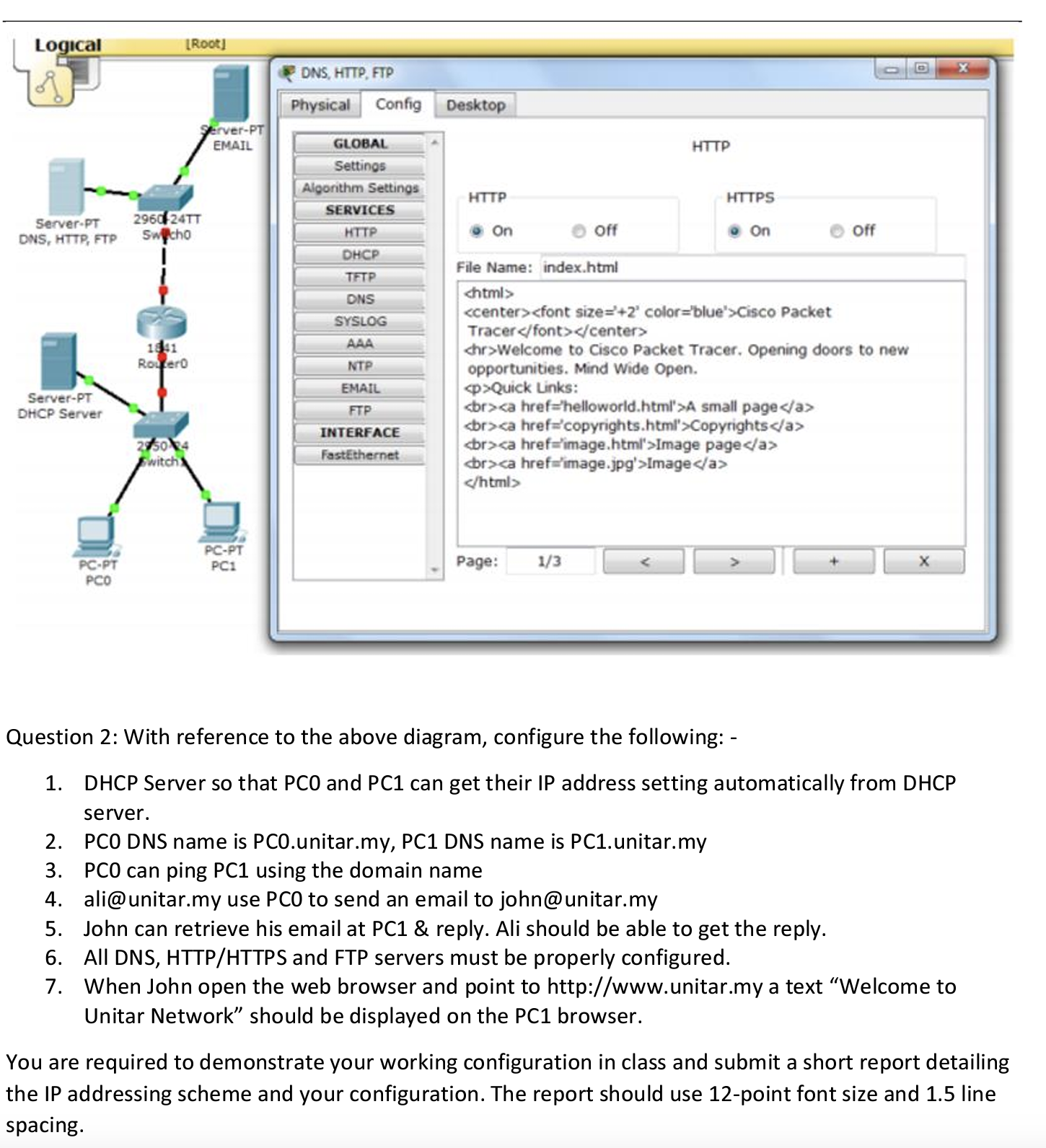
Question: Question 2 : With reference to the above diagram, configure the following: - DHCP Server so that PCO and PC 1 can get their IP
Question : With reference to the above diagram, configure the following:
DHCP Server so that PCO and PC can get their IP address setting automatically from DHCP
server.
PCO DNS name is
PCunitar.my PC DNS name is
PCunitar.my
PC can ping PC using the domain name
ali@unitar.my use PCO to send an email to
john@unitar.my
John can retrieve his email at PC & reply. Ali should be able to get the reply.
All DNS HTTPHTTPS and FTP servers must be properly configured.
When John open the web browser and point to
http:wwwunitar.my a text "Welcome to
Unitar Network" should be displayed on the PC browser.
You are required to demonstrate your working configuration in class and submit a short report detailing
the IP addressing scheme and your configuration. The report should use point font size and line
spacing.
Step by Step Solution
There are 3 Steps involved in it
1 Expert Approved Answer
Step: 1 Unlock

Question Has Been Solved by an Expert!
Get step-by-step solutions from verified subject matter experts
Step: 2 Unlock
Step: 3 Unlock
 Study Help