





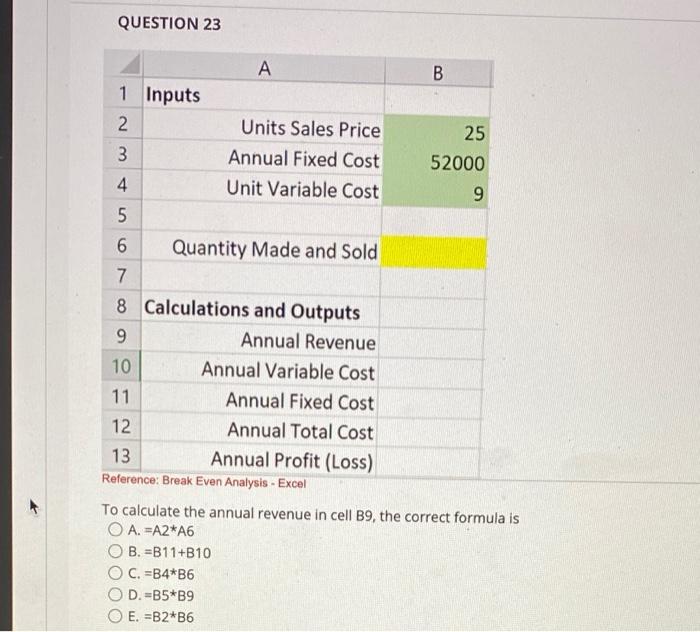
Question: QUESTION 23 B 25 52000 9 A 1 Inputs 2 Units Sales Price 3 Annual Fixed Cost 4 Unit Variable Cost 5 6 Quantity Made
QUESTION 23 B 25 52000 9 A 1 Inputs 2 Units Sales
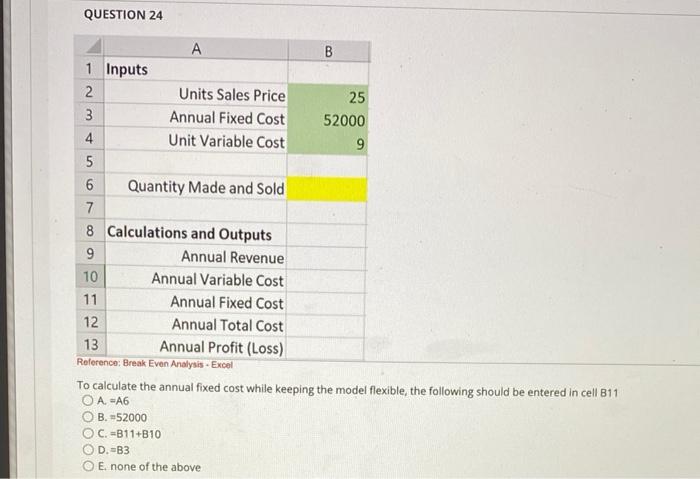
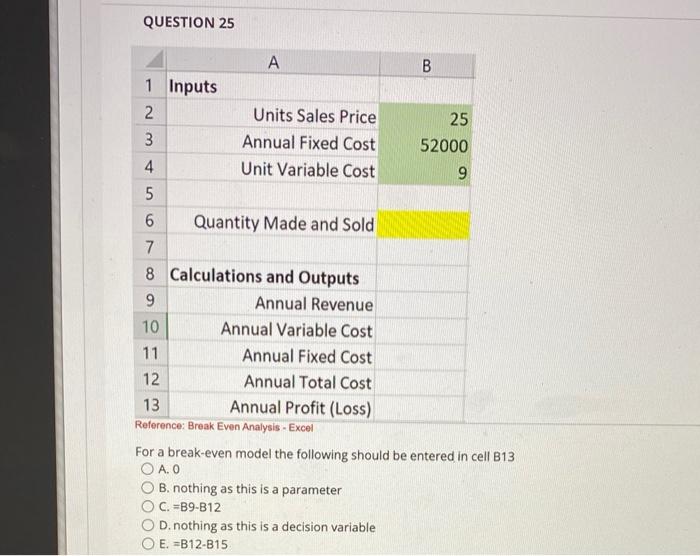
QUESTION 23 B 25 52000 9 A 1 Inputs 2 Units Sales Price 3 Annual Fixed Cost 4 Unit Variable Cost 5 6 Quantity Made and Sold 7 8 Calculations and Outputs 9 Annual Revenue 10 Annual Variable Cost 11 Annual Fixed Cost Annual Total Cost 13 Annual Profit (Loss) Reference: Break Even Analysis - Excel 12 To calculate the annual revenue in cell B9, the correct formula is O A. EA2*A6 B. =B11+B10 C. =B4*B6 D.-B5*B9 O E. =B2*B6 QUESTION 24 A B 1 Inputs 2 Units Sales Price 25 3 Annual Fixed Cost 52000 4. Unit Variable Cost 9 5 6 Quantity Made and Sold 7 8 Calculations and Outputs 9 Annual Revenue 10 Annual Variable Cost 11 Annual Fixed Cost 12 Annual Total Cost 13 Annual Profit (Loss) Reference: Break Even Analysis - Excel To calculate the annual fixed cost while keeping the model flexible, the following should be entered in cell B11 O A =A6 B. 52000 OC.-311+B10 OD-B3 E none of the above QUESTION 25 A B 1 Inputs 2 Units Sales Price 25 3 Annual Fixed Cost 52000 4 Unit Variable Cost 9 5 6 Quantity Made and Sold 7 8 Calculations and Outputs 9 Annual Revenue 10 Annual Variable Cost 11 Annual Fixed Cost 12 Annual Total Cost 13 Annual Profit (Loss) Reference: Break Even Analysis - Excel For a break-even model the following should be entered in cell B13 O AO O B. nothing as this is a parameter C. =B9-B12 D.nothing as this is a decision variable E. =B12-815
Step by Step Solution

There are 3 Steps involved in it

1 Expert Approved Answer
Step: 1 Unlock blur-text-image

Question Has Been Solved by an Expert!

Get step-by-step solutions from verified subject matter experts

Step: 2 Unlock
Step: 3 Unlock

Students Have Also Explored These Related General Management Questions!