







Question: Question 3 (10 marks) Develop a GUI (using javafx or javax ) with the following interactions: You can see that a frame has three image
 Question 3 (10 marks)
Develop a GUI (using javafx or javax) with the following interactions:
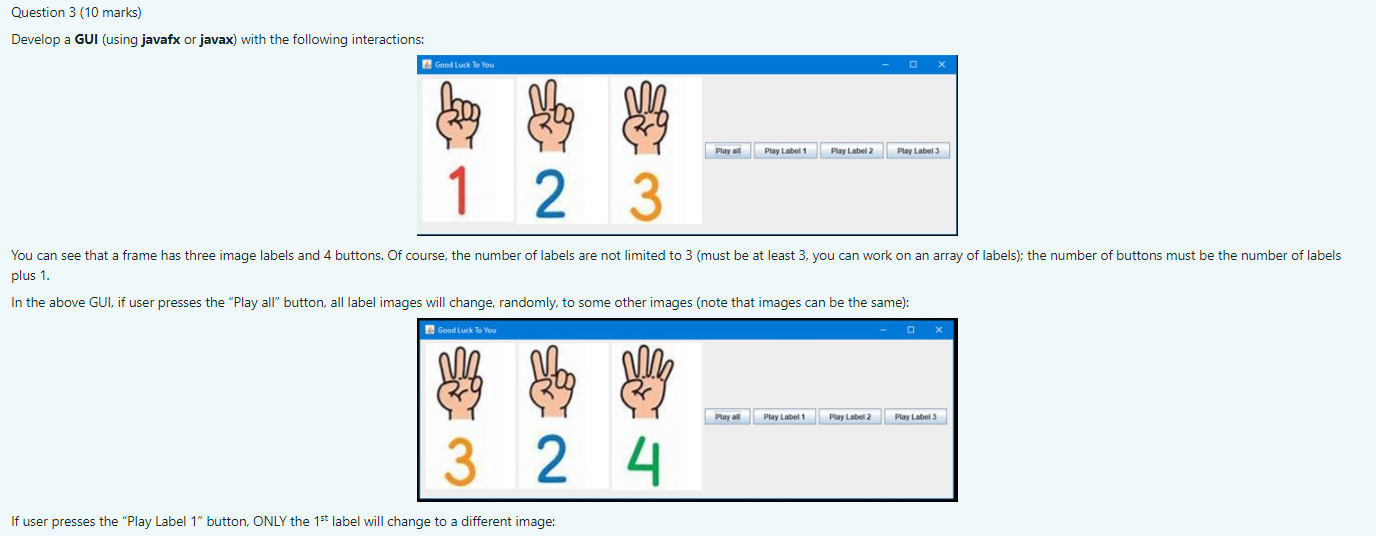
You can see that a frame has three image labels and 4 buttons. Of course, the number of labels are not limited to 3 (must be at least 3, you can work on an array of labels); the number of buttons must be the number of labels plus 1.
In the above GUI, if user presses the Play all button, all label images will change, randomly, to some other images (note that images can be the same):
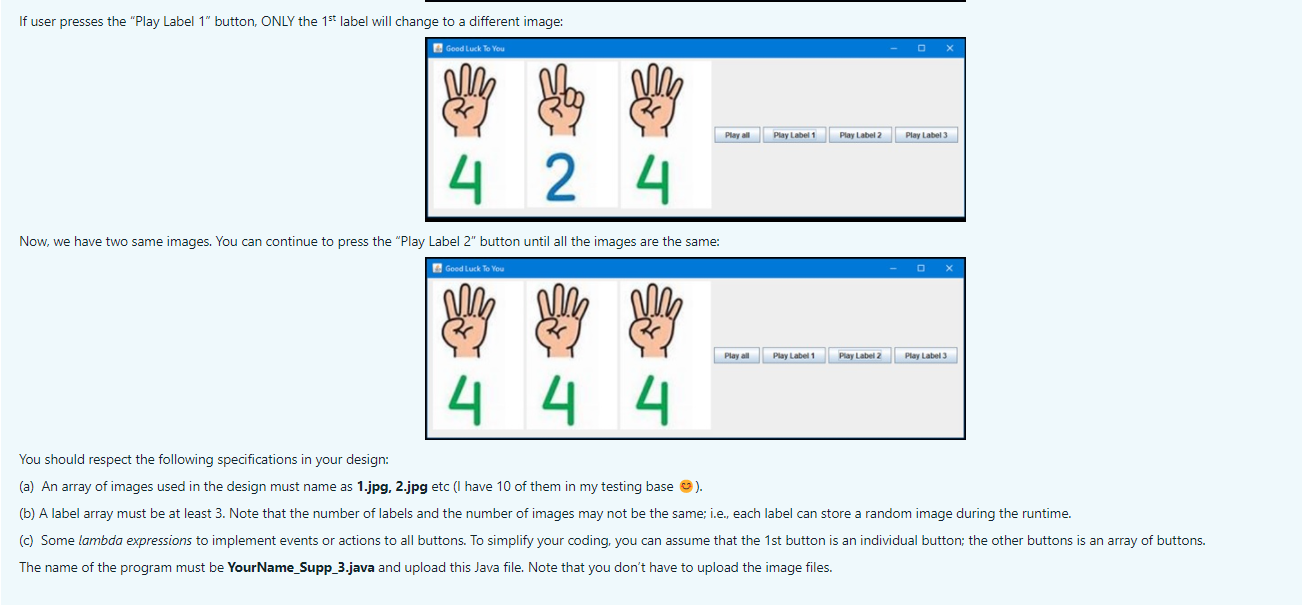
If user presses the Play Label 1 button, ONLY the 1st label will change to a different image:
Now, we have two same images. You can continue to press the Play Label 2 button until all the images are the same:
You should respect the following specifications in your design:
(a) An array of images used in the design must name as 1.jpg, 2.jpg etc (I have 10 of them in my testing base ).
(b) A label array must be at least 3. Note that the number of labels and the number of images may not be the same; i.e., each label can store a random image during the runtime.
(c) Some lambda expressions to implement events or actions to all buttons. To simplify your coding, you can assume that the 1st button is an individual button; the other buttons is an array of buttons.
The name of the program must be YourName_Supp_3.java and upload this Java file. Note that you dont have to upload the image files.
Question 3 (10 marks) Develop a GUI (using javafx or javax) with the following interactions: Good Luck To You X ne Play all Play Label 1 Play Label 2 Play Label 3 1 2 3 You can see that a frame has three image labels and 4 buttons. Of course, the number of labels are not limited to 3 (must be at least 3, you can work on an array of labels); the number of buttons must be the number of labels plus 1. In the above GUI, if user presses the "Play all" button, all label images will change, randomly, to some other images (note that images can be the same): Good Luck To You X hon ein by ering 3 2 4 Playa Play Label 1 Play Label 2 Play Label 3 If user presses the "Play Label 1" button, ONLY the 1st label will change to a different image: If user presses the "Play Label 1" button, ONLY the 1st label will change to a different image: Good Luck To You Play all Play Label 1 Play Label 2 Play Label 3 4 2 4 Now, we have two same images. You can continue to press the "Play Label 2" button until all the images are the same: E Good Luck To You us Play all Play Label 1 Play Label 2 | Play Label 3 4 4 4 You should respect the following specifications in your design: (a) An array of images used in the design must name as 1.jpg, 2.jpg etc (I have 10 of them in my testing base ). (b) A label array must be at least 3. Note that the number of labels and the number of images may not be the same; i.e., each label can store a random image during the runtime. (c) Some lambda expressions to implement events or actions to all buttons. To simplify your coding, you can assume that the 1st button is an individual button; the other buttons is an array of buttons. The name of the program must be Your Name_Supp_3.java and upload this Java file. Note that you don't have to upload the image files
Step by Step Solution
There are 3 Steps involved in it

Get step-by-step solutions from verified subject matter experts
 Study Help