







Question: Question 3 ( 4 0 marks ) Develop a Python application for managing product inventory using Tkinter for the graphical user interface and SQLite for
Question
marks
Develop a Python application for managing product inventory using Tkinter for the graphical user
interface and SQLite for database storage.
Requirements:
Database Setup:
Use SQLite to create a database named "inventory.db
Create a table named "products" with the following columns:
id Integer Primary Key
name Text
description Text
quantity Integer
price Real
Graphical User Interface:
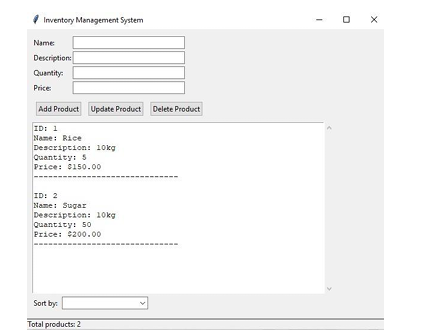
Create a main window with the title "Inventory Management System"
Implement the following Tkinter widgets:
Entry widgets for product details name description, quantity, price
Buttons for Add, Update, and Delete operations
A Text widget to display all product details
A Scrollbar for the Text widget
A Combobox for sorting options
A Label to show the total number of products status bar
Functionality:
Implement functions to perform the following operations:
Add a new product to the database.
Update an existing product's details.
Delete a product from the database.
View all products in the Text widget.
Sort products by name, price, or quantity ascending and descending
Ensure proper input validation for all entry fields.
Implement error handling with appropriate message boxes.Name
Description:
Quentity:
Price:
ID:
Name: Rice
Descripeion: kg
Ouantity:
Pxice:
ID:
Name: Sugar
Deberipeion: kg
Quanticy:
Price: $
Sort by:
Total products:
the picture is to show u how my program should be when i run it and how it should work pls do it correctly for me pls
Step by Step Solution
There are 3 Steps involved in it
1 Expert Approved Answer
Step: 1 Unlock

Question Has Been Solved by an Expert!
Get step-by-step solutions from verified subject matter experts
Step: 2 Unlock
Step: 3 Unlock
 Study Help