







Question: Question 3 (8 points): Purpose: Practice using variables and expressions for interactive drawing Degree of Difficulty: Moderate. For this question, you will write a program
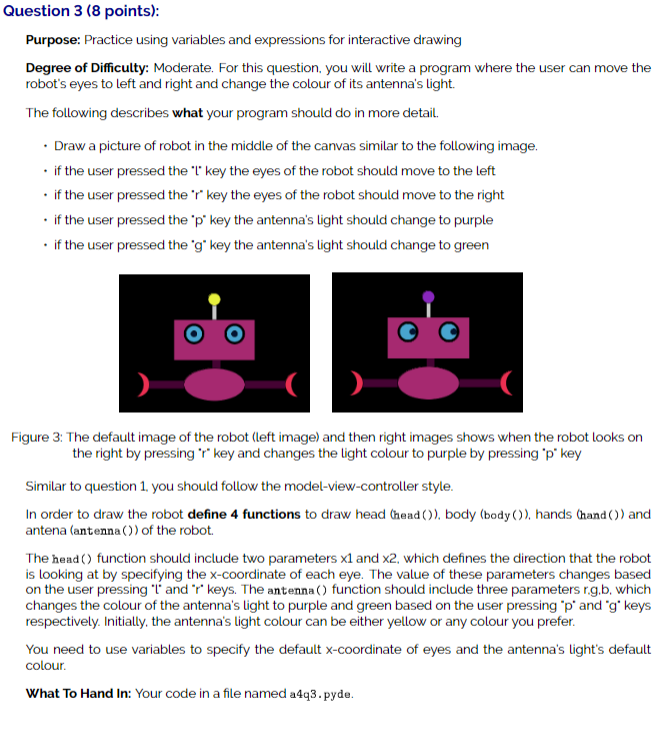
Question 3 (8 points): Purpose: Practice using variables and expressions for interactive drawing Degree of Difficulty: Moderate. For this question, you will write a program where the user can move the robot's eyes to left and right and change the colour of its antenna's light. The following describes what your program should do in more detail. . Draw a picture of robot in the middle of the canvas similar to the following image. . if the user pressed the "I' key the eyes of the robot should move to the left . if the user pressed the 'r key the eyes of the robot should move to the right . if the user pressed the 'p' key the antenna's light should change to purple . if the user pressed the *g" key the antenna's light should change to green Figure 3: The default image of the robot (left image) and then right images shows when the robot looks on the right by pressing 'r' key and changes the light colour to purple by pressing "p" key Similar to question 1, you should follow the model-view-controller style. In order to draw the robot define 4 functions to draw head (head ()), body (body ()), hands (hand ()) and antena (antenna () ) of the robot. The head () function should include two parameters x1 and x2, which defines the direction that the robot is looking at by specifying the x-coordinate of each eye. The value of these parameters changes based on the user pressing "I' and "r" keys. The antenna () function should include three parameters r.g.b, which changes the colour of the antenna's light to purple and green based on the user pressing "p' and "g" keys respectively. Initially, the antenna's light colour can be either yellow or any colour you prefer. You need to use variables to specify the default x-coordinate of eyes and the antenna's light's default colour. What To Hand In: Your code in a file named a4q3. pyde
Step by Step Solution
There are 3 Steps involved in it

Get step-by-step solutions from verified subject matter experts
 Study Help