







Question: Question 3 a ) Based on the specifications given below, use HTML code and Embedded Styles Sheet to create a Bubble Tea Menu as shown
Question
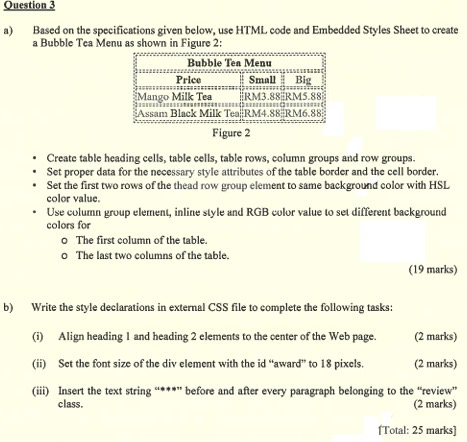
a Based on the specifications given below, use HTML code and Embedded Styles Sheet to create a Bubble Tea Menu as shown in Figure :
tableBubble Ten MenuPriceSmall,BigMango Milk Tea,tableRMRMssam Black Milk Teaf,RMRM
Figure
Create table heading cells, table cells, table rows, column groups and row groups.
Set proper data for the necessary style attributes of the table border and the cell border.
Set the first two rows of the thead row group element to same background color with HSL color value.
Use column group element, inline style and RGB color value to set different background colors for
The first column of the table.
The last two columns of the table.
marks
b Write the style declarations in external CSS file to complete the following tasks:
i Align heading and heading elements to the center of the Web page.
marks
ii Set the font size of the div element with the id "award" to pixels.
marks
iii Insert the text string before and after every paragraph belonging to the "review" class.
marks
Total: marks
Step by Step Solution
There are 3 Steps involved in it
1 Expert Approved Answer
Step: 1 Unlock

Question Has Been Solved by an Expert!
Get step-by-step solutions from verified subject matter experts
Step: 2 Unlock
Step: 3 Unlock
 Study Help