







Question: Question 3 : Create a program that a user can use to manage notes for the experiment. ( 2 5 pts . ) ` `
Question : Create a program that a user can use to manage notes for the experiment. pts
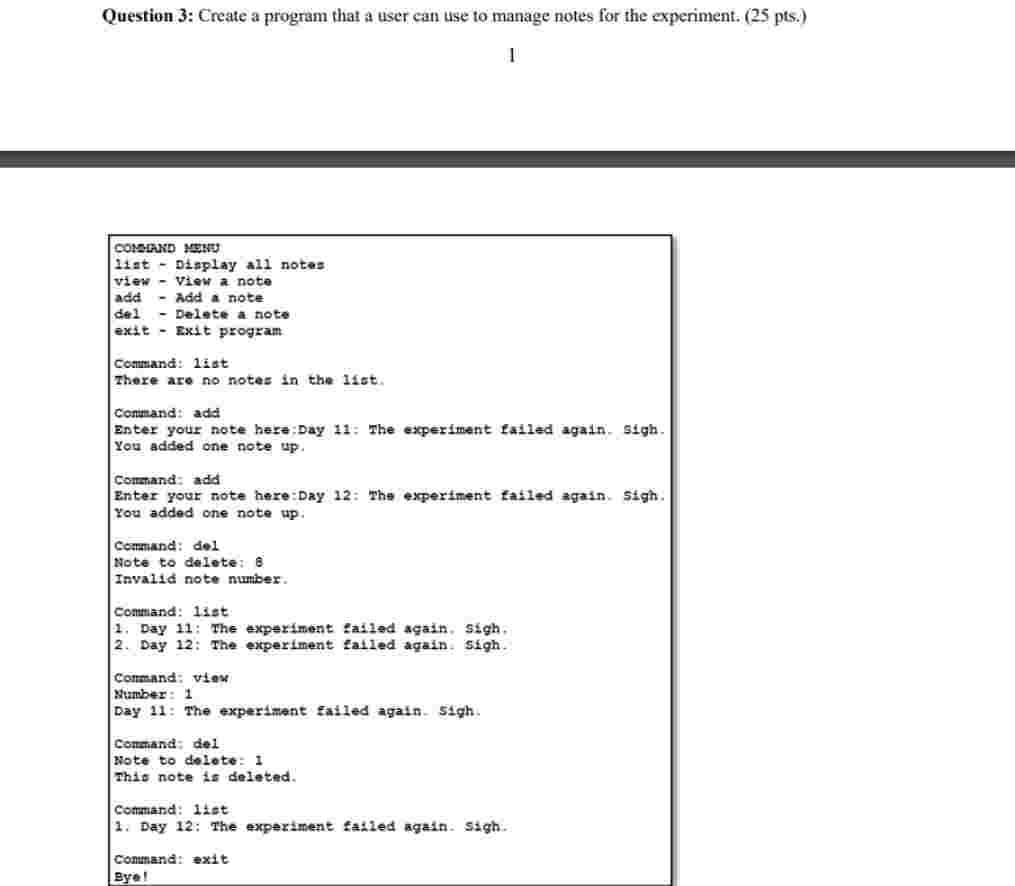
CORSmRE stNU
at DLaplay all notes
view View a note
add Add a note
de Delete a note
exit Exit program
Command: iat
There are no notes in the list.
Conimand: add
Enter your note here;Day : The experiment failed again. Sigh.
You added one note up
Command: add
Enter your note here:Day : The experiment failed again. igh.
You added one note up
Command: del
Note to delete: B
Invalld note number.
Command: iet
Day : The experiment Eailed again. Sigh.
Day : The experiment Eailled again. Sigh.
Command: Viow
number:
Day : The experiment failed againigh.
Command: del
Note to delete:
This note is deleted.
Command: :et
Day : The experiment failed again. Sigh.
Command: exit
Bye!
a Follow the logical structure shown in the screenshot. You should create a text file named notes.txt to store all current notes of the experiment. pts
b For the list and view commands, if the file notes.txt is blank, display: There are no notes in the list. pts
c For the view and del commands, display an error message if the user enters an invalid note number. pts
d When you add or delete a note, the change should be saved to the file notes.txt immediately. That way, no changes are lost, even if the program crashes later. pts
e When appropriate, use fstring to format output messages. ptsf Be mindful of small details. For example, keep all input commands in lowercase or at least be consistent deal with invalid values, add newline characters, format, etc. pts
Step by Step Solution
There are 3 Steps involved in it
1 Expert Approved Answer
Step: 1 Unlock

Question Has Been Solved by an Expert!
Get step-by-step solutions from verified subject matter experts
Step: 2 Unlock
Step: 3 Unlock
 Study Help