







Question: Question 3 Question 5 Your QuickBooks Online Essentials client wants to start using Customer types to track 1 0 0 types of customers. What do
Question Question
Your QuickBooks Online Essentials client wants to start using Customer
types to track types of customers. What do you tell them? Select all
that apply.
Customer types must be enabled in Account and settings
Customer types are only available in Plus and Advanced
Customer types are available in all subscription levels
Customer types can be imported using Excel
Customer types can be used in Price rules Question
Your client wants to offer a fixed percentage discount to their wholesale
customers.
Which feature or features of QuickBooks Online should they need to use
to set this up Select all that apply.
Locations
Classes
Sales reps
Price Levels
Customer Types
Price Rules
Supplier Types
Projects Question
Your client wants to use Timesheets to record employee andor
subcontractor hours. The client also wants to transfer those hours to a
customer's invoice.
Which of the following would they need to do in QuickBooks Online?
Select all that apply.
The customer must be assigned a billable Customer Type
Enable "Allow time to be billable"
Enter the hours worked in one of QBO's two timesheet forms, choose the
employee or subcontractor, record the hours worked, check the billable box,
and make sure that QBO displays an hourly rate
Record the subcontractor's bill and enter the number of hours worked in the
Time column
Be aware that QBO only tracks time for employees, and not for
supplierssubcontractorsQuestion
Which of these is a good use case for Delayed charges in QuickBooks
Online?
Proposals sent to customers
Mileage and photocopies to be invoiced to a customer
Unmatched transactions in the bank feed
Copies of one customer's invoice to be sent to others
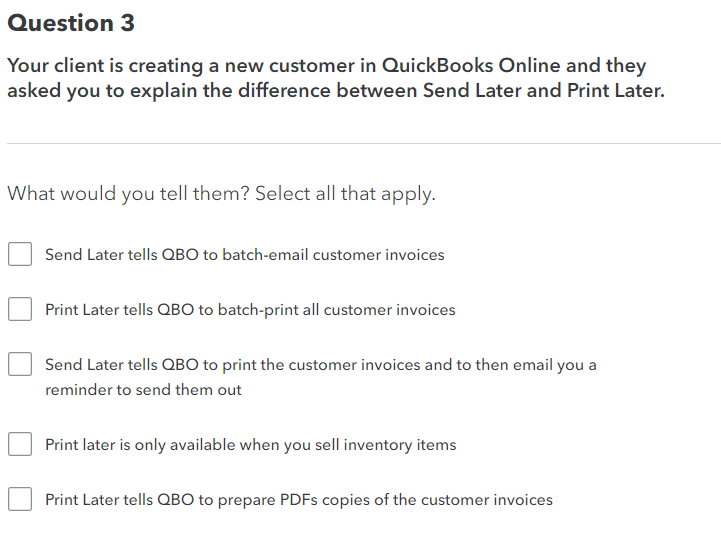
Your client is creating a new customer in QuickBooks Online and they
asked you to explain the difference between Send Later and Print Later.
What would you tell them? Select all that apply.
Send Later tells QBO to batchemail customer invoices
Print Later tells QBO to batchprint all customer invoices
Send Later tells QBO to print the customer invoices and to then email you a
reminder to send them out
Print later is only available when you sell inventory items
Print Later tells QBO to prepare PDFs copies of the customer invoices
Step by Step Solution
There are 3 Steps involved in it
1 Expert Approved Answer
Step: 1 Unlock

Question Has Been Solved by an Expert!
Get step-by-step solutions from verified subject matter experts
Step: 2 Unlock
Step: 3 Unlock
 Study Help