







Question: Question 3 You are required to complete a simple inventory management system. The system will allow users to input a product's ID , check if
Question
You are required to complete a simple inventory management system. The system will allow users to input a product's ID check if the product is in stock, and manage the application's state using the provided GUI elements. The application is divided into several components, and the code is modular, with each class handling specific responsibilities.
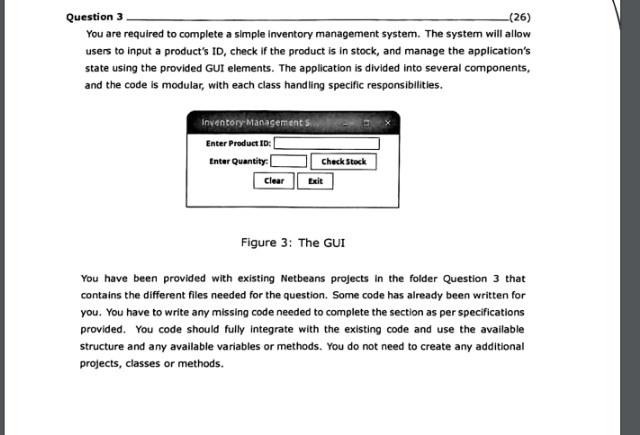
Figure : The GUI
You have been provided with existing Netbeans projects in the folder Question that contains the different files needed for the question. Some code has already been written for you. You have to write any missing code needed to complete the section as per specifications provided. You code should fully integrate with the existing code and use the available structure and any available variables or methods. You do not need to create any additional projects, classes or methods. Figure : Enter Caption
The GUI has already been partially implemented, and your task includes completing the functionality that checks if a product is in stock and handles the corresponding user interaction. You must integrate the provided logic with the GUI components.
Product Class:
The Product class is a model class that represents a product with an ID and quantity in stock. You need to:
Create a constructor that accepts a String for the product ID and an int for the quantity in stock.
Provide getter methods for both productID and quantity.
StockCheck Class:
The StockCheck class is a utility class that:
On instantiation, accepts a File object representing the inventory.txt file and reads all product IDs and their quantities from this file.
Before reading the file, checks whether the file exists and can be read using the File.exists and File.canRead methods. If the file cannot be read, an appropriate error message should be printed. InventoryAppGUI Class:
The InventoryAppGUI class is responsible for handling user interaction. The GUI includes text fields and buttons, but the functionality that checks if a product is in stock still needs to be completed.
You need to:
Complete the "Check Stock" button's functionality in the InventoryAppGUI class.
When the "Check Stock" button is clicked, retrieve the entered product ID and quantity, create a Product object, and use the StockCheck class to check if the product is in stock.
Display the appropriate message in a dialog box, either indicating that the product is in stock or out of stock and showing the restock amount if needed.
Product Class: Complete the Product class by implementing the
constructor and getter methods.
StockCheck Class: Complete the StockCheck class by:
Accepting a File object as a parameter in the constructor.
Checking if the file exists and can be read before loading data.
Reading from the file and storing product IDs and quantities in a list.
Implementing the isProductInStock and getRestockAmount methods.
InventoryAppGUI Class: Complete the functionality for the "Check Stock" button
by:
Retrieving the entered product ID and quantity from the user input.
Creating a Product object with the provided information.
Using the StockCheck class to verify if the product is in stock.
Displaying the appropriate message in stock, out of stock, restock needed in a dialog box.
Step by Step Solution
There are 3 Steps involved in it
1 Expert Approved Answer
Step: 1 Unlock

Question Has Been Solved by an Expert!
Get step-by-step solutions from verified subject matter experts
Step: 2 Unlock
Step: 3 Unlock
 Study Help