







Question: - Question 4 Coding drop-down menu (Unit 6, 10 marks) In the previous two assignments, you should have completed your version of the Lychee Cafe
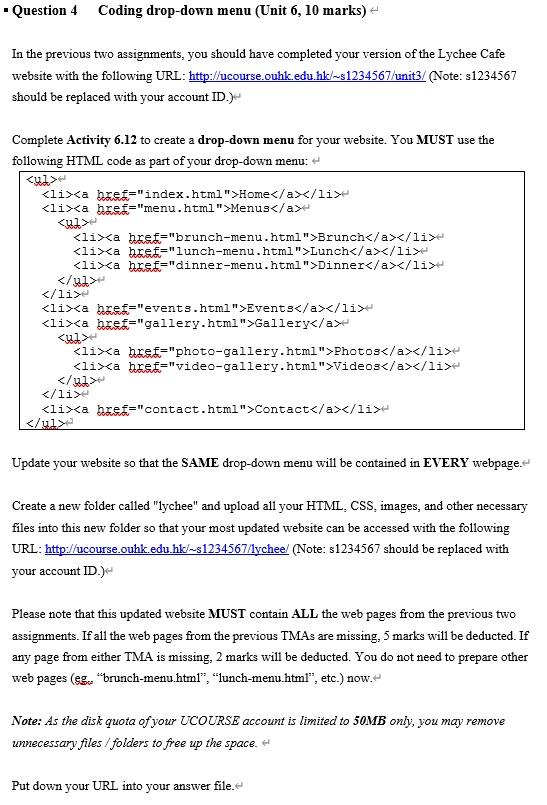
- Question 4 Coding drop-down menu (Unit 6, 10 marks) In the previous two assignments, you should have completed your version of the Lychee Cafe website with the following URL: http://ucourse.ouhk.edu.hk/ s1234567/unit3/ (Note: s1234567 should be replaced with your account ID.) Complete Activity 6.12 to create a drop-down menu for your website. You MUST use the following HTML code as part of your drop-down menu: Update your website so that the SAME drop-down menu will be contained in EVERY webpage. Create a new folder called "lychee" and upload all your HTML, CSS, images, and other necessary files into this new folder so that your most updated website can be accessed with the following URL: http://ucourse.ouhk.edu.hk/ / s1234567/lychee/ (Note: s1234567 should be replaced with your account ID.) Please note that this updated website MUST contain ALL the web pages from the previous two assignments. If all the web pages from the previous TMAs are missing, 5 marks will be deducted. If any page from either TMA is missing, 2 marks will be deducted. You do not need to prepare other web pages ( gg, "brunch-menu.html", "lunch-menu.html", etc.) now. Note: As the disk quota of your UCOURSE account is limited to 50MB only, you may remove unnecessary files / folders to free up the space. Put down your URL into your answer file
Step by Step Solution
There are 3 Steps involved in it

Get step-by-step solutions from verified subject matter experts
 Study Help