







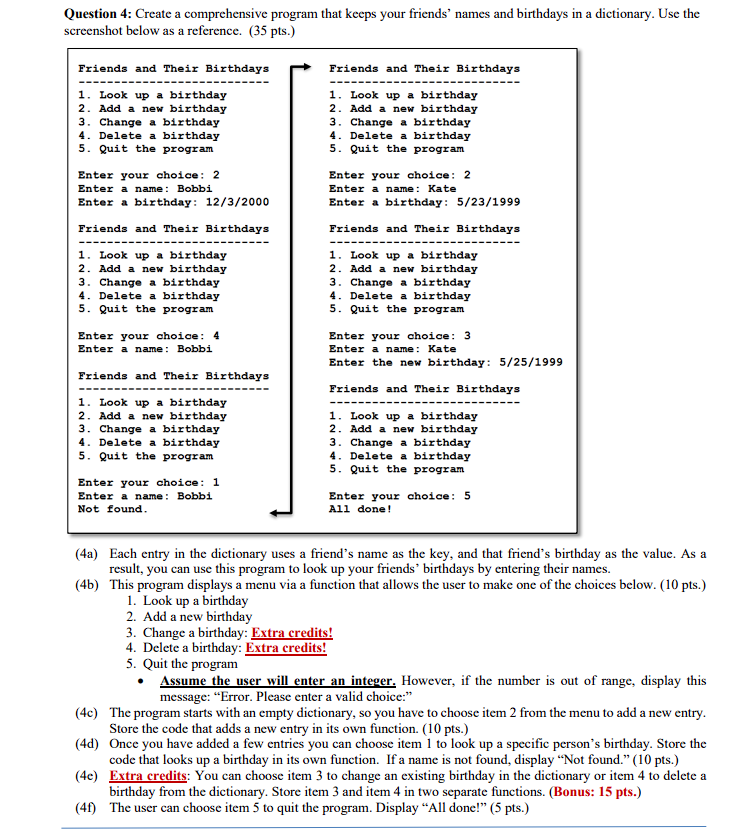
Question: Question 4 : Create a comprehensive program that keeps your friends' names and birthdays in a dictionary. Use the screenshot below as a reference. (
Question : Create a comprehensive program that keeps your friends' names and birthdays in a dictionary. Use the screenshot below as a reference. pts
Friends and Their Birthdays squaremathrm Friends and Their Birthdays
Look up a birthday
Add a new birthday
Change a birthday
Delete a birthday
Quit the program
Enter your choice:
Enter a name: Bobbi
Enter a birthday:
Friends and Their Birthdays
Look up a birthday
Add a new birthday
Change a birthday
Delete a birthday
Quit the program
Enter your choice:
Enter a name: Bobbi
Friends and Their Birthdays
Look up a birthday
Add a new birthday
Change a birthday
Delete a birthday
Quit the program
Enter your choice:
Enter a name: Bobbi
Not found.
Look up a birthday
Add a new birthday
Change a birthday
Delete a birthday
Quit the program
Enter your choice:
Enter a name: Kate
Enter a birthday:
Friends and Their Birthdays
Look up a birthday
Add a new birthday
Change a birthday
Delete a birthday
Quit the program
Enter your choice:
Enter a name: Kate
Enter the new birthday:
Friends and Their Birthdays
Look up a birthday
Add a new birthday
Change a birthday
Delete a birthday
Quit the program
Enter your choice:
All done!
a Each entry in the dictionary uses a friend's name as the key, and that friend's birthday as the value. As a result, you can use this program to look up your friends' birthdays by entering their names.
b This program displays a menu via a function that allows the user to make one of the choices below. pts
Look up a birthday
Add a new birthday
Change a birthday: Extra credits!
Delete a birthday: Extra credits!
Quit the program
Assume the user will enter an integer. However, if the number is out of range, display this message: "Error. Please enter a valid choice:"
c The program starts with an empty dictionary, so you have to choose item from the menu to add a new entry. Store the code that adds a new entry in its own function. pts
d Once you have added a few entries you can choose item to look up a specific person's birthday. Store the code that looks up a birthday in its own function. If a name is not found, display "Not found." pts
e Extra credits: You can choose item to change an existing birthday in the dictionary or item to delete a birthday from the dictionary. Store item and item in two separate functions. Bonus: mathbf pts
f The user can choose item to quit the program. Display "All done!" pts
Step by Step Solution
There are 3 Steps involved in it
1 Expert Approved Answer
Step: 1 Unlock

Question Has Been Solved by an Expert!
Get step-by-step solutions from verified subject matter experts
Step: 2 Unlock
Step: 3 Unlock
 Study Help