







Question: Question 5 4 pts Pippin Michell View Developer Help Share 3 AutoSave OLA-A Times New R - 12 Q Document. File Home Insert Draw Design
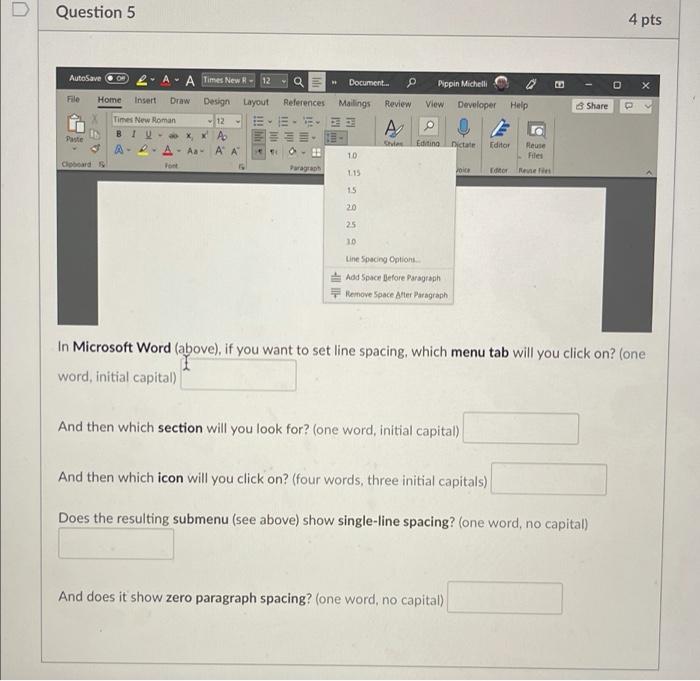
Question 5 4 pts Pippin Michell View Developer Help Share 3 AutoSave OLA-A Times New R - 12 Q Document. File Home Insert Draw Design Layout References Mailings Review Times New Roman 12 E A BI-XX A Paste Chat APA - A A A 2 10 Coboard Font 115 Editing Dictate Editor Reuse Files Editor Reven 1.5 20 25 10 Line Spacing Options Add Space Before Paragraph Remove Space After Paragraph In Microsoft Word (above), if you want to set line spacing, which menu tab will you click on? (one word, initial capital) And then which section will you look for? (one word, initial capital) And then which icon will you click on? (four words, three initial capitals) Does the resulting submenu (see above) show single-line spacing? (one word, no capital) And does it show zero paragraph spacing? (one word, no capital)
Step by Step Solution
There are 3 Steps involved in it

Get step-by-step solutions from verified subject matter experts
 Study Help