







Question: Question 6 The screenshot below depicts running programs and processes for a Windows system. How many programs and processes are running? Task Manager File
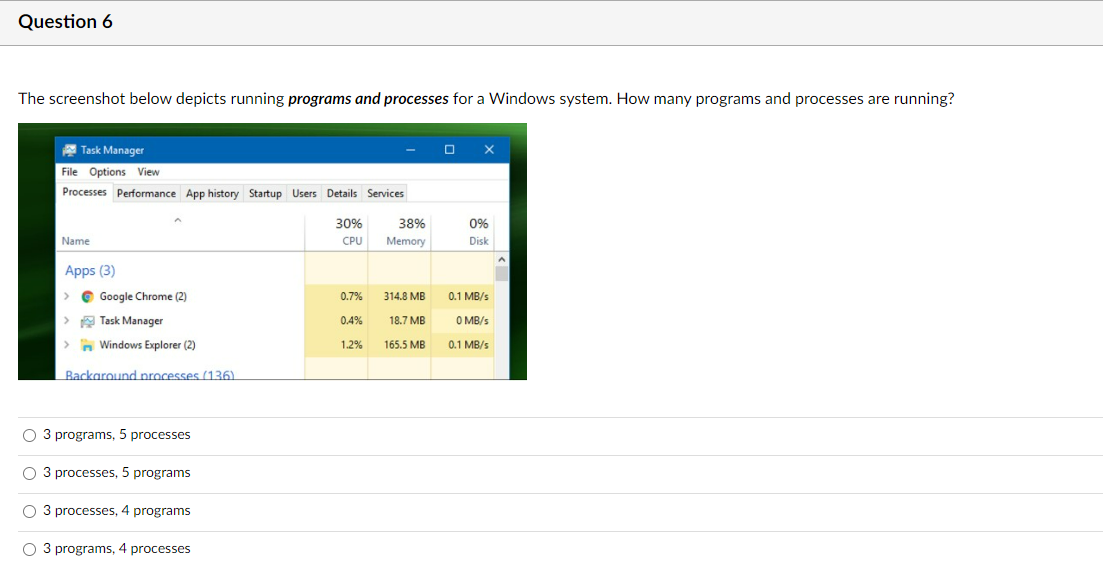
Question 6 The screenshot below depicts running programs and processes for a Windows system. How many programs and processes are running? Task Manager File Options View Processes Performance App history Startup Users Details Services Name 30% 38% 0% CPU Memory Disk Apps (3) Google Chrome (2) 0.7% 314.8 MB 0.1 MB/s Task Manager 0.4% 18.7 MB Windows Explorer (2) 1.2% 165.5 MB 0 MB/s 0.1 MB/s Background processes (136) 3 programs, 5 processes 3 processes, 5 programs 3 processes, 4 programs 3 programs, 4 processes
Step by Step Solution
There are 3 Steps involved in it
1 Expert Approved Answer
Step: 1 Unlock

Question Has Been Solved by an Expert!
Get step-by-step solutions from verified subject matter experts
Step: 2 Unlock
Step: 3 Unlock
 Study Help