







Question: Question 7 1 pts (Lesson 5.6: The Process Module.) As in the previous problem, drag-and-drop Create- Process-Dispose modules in that order, so that you obtain
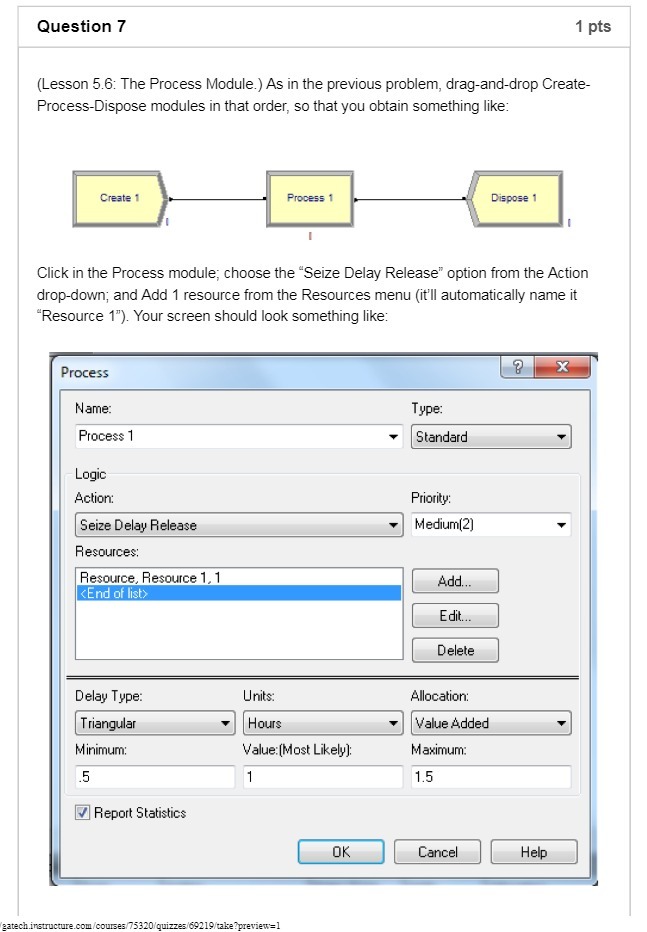
Question 7 1 pts (Lesson 5.6: The Process Module.) As in the previous problem, drag-and-drop Create- Process-Dispose modules in that order, so that you obtain something like: Create 1 Process 1 Dispose 1 Click in the Process module; choose the "Seize Delay Release" option from the Action drop-down; and Add 1 resource from the Resources menu (it'll automatically name it "Resource 1"). Your screen should look something like: Process ? X Name: Type: Process 1 Standard Logic Action: Priority: Seize Delay Release Medium(2) Resources: Resource, Resource 1, 1 Add...
Step by Step Solution
There are 3 Steps involved in it

Get step-by-step solutions from verified subject matter experts
 Study Help