







Question: question 9 help needed The following Excel Solver Results show capital projects selected for investment. When constructing the Solver parameters, the subject to the constraints
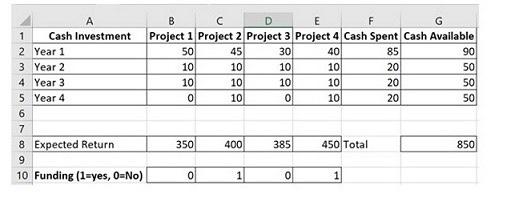
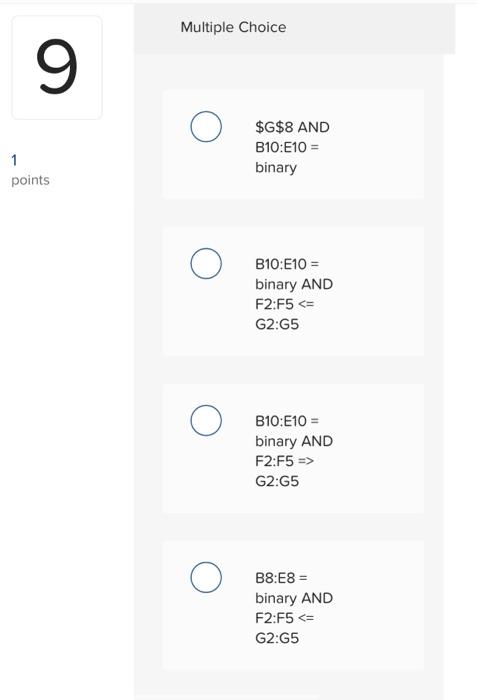
The following Excel Solver Results show capital projects selected for investment. When constructing the Solver parameters, the "subject to the constraints" need to be set. What two constraints are required? \begin{tabular}{|l|l|r|r|r|r|r|r|} \hline & \multicolumn{1}{|c|}{ A } & \multicolumn{1}{c}{ B } & \multicolumn{1}{c|}{ C } & \multicolumn{1}{c|}{ D } & \multicolumn{1}{c|}{ E } & \multicolumn{1}{|c|}{ F } & \multicolumn{1}{c|}{G} \\ \hline 1 & Cash Investment & Project 1 & Project 2 & Project 3 & Project 4 & Cash Spent & Cash Available \\ \hline 2 & Year 1 & 50 & 45 & 30 & 40 & 85 & 90 \\ \hline 3 & Year 2 & 10 & 10 & 10 & 10 & 20 & 50 \\ \hline 4 & Year 3 & 10 & 10 & 10 & 10 & 20 & 50 \\ \hline 5 & Year 4 & 0 & 10 & 0 & 10 & 20 & 50 \\ \hline \end{tabular} 6 7 \begin{tabular}{c|l|r|r|r|r|r|} \hline 8 & Expected Return & 350 & 400 & 385 & 450 & Total \\ 9 & & & & & \\ \hline 10 & Funding (1=yes, 0= No) ) & 0 & 1 & 0 & 1 \\ \hline \end{tabular} Multiple Choice \$G\$8 AND B10:E10 = binary B10:E10 = binary AND F2:F5 G2:G5 B8:E8 = binary AND F2:F5
Step by Step Solution
There are 3 Steps involved in it

Get step-by-step solutions from verified subject matter experts
 Study Help