







Question: Question 9 - Reading Malformed . csv Files Note: The only kinds of issues you need your function to handle are comma and quote misplacements;
Question Reading Malformed csv Files Note:
The only kinds of issues you need your function to handle are comma and quote misplacements; don't try and find any other issues with the CSV
With that said, you should assume that datamalformedcsv is a sample of a larger file that has the same sorts of errors, but potentially in different lines. For example,
datamalformedcsv has an unnecessary quote in line but your function may be called on another CSV that has a perfectly fine line but an unnecessary quote
on some other line.
So don't implement parsemalformed assuming that the commas and quotes are mispositioned on specific lines; rather, implement parsemalformed such that it
can handle these issues on every single line they appear in
A good way to proceed is to open datamalformedcsv and look carefully at the comma and quote placements.
The first few rows of parsemalformeddatamalformedcsv should be: fp Pathdata 'malformed.csv
cols first 'last', 'weight', 'height', 'geo'
df parsemalformedfp
dg pdreadcsvfp nrows skiprows namescols
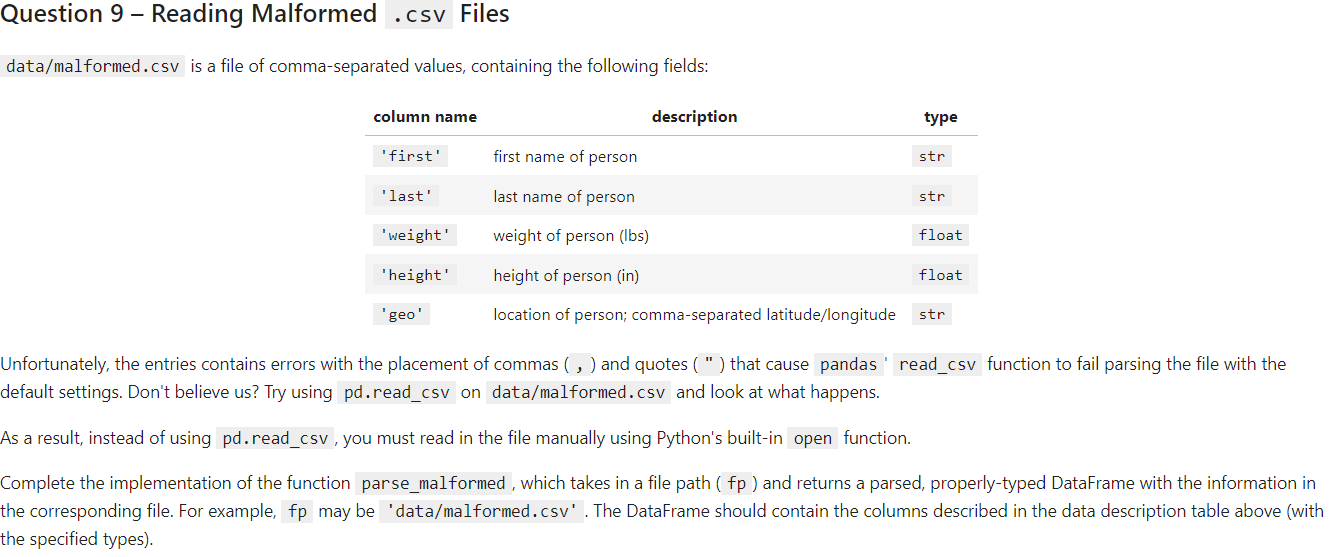
datamalformedcsv is a file of commaseparated values, containing the following fields:
Unfortunately, the entries contains errors with the placement of commas and quotes that cause pandas readcsv function to fail parsing the file with the
default settings. Don't believe us Try using pdreadcsv on datamalformedcsv and look at what happens.
As a result, instead of using pdreadcsv you must read in the file manually using Python's builtin open function.
Complete the implementation of the function parsemalformed, which takes in a file path and returns a parsed, properlytyped DataFrame with the information in
the corresponding file. For example, fp may be 'datamalformedcsv The DataFrame should contain the columns described in the data description table above with
the specified types
Step by Step Solution
There are 3 Steps involved in it
1 Expert Approved Answer
Step: 1 Unlock

Question Has Been Solved by an Expert!
Get step-by-step solutions from verified subject matter experts
Step: 2 Unlock
Step: 3 Unlock
 Study Help