







Question: Question: After run the command hping3..., where can I see the transmission time and message payload bytes? I already run it as in 2nd Picture.
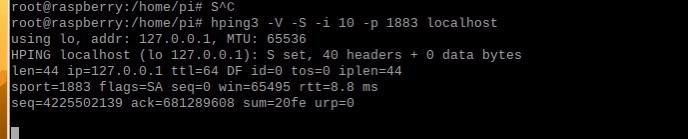
Question: After run the command "hping3...", where can I see the transmission time and message payload bytes? I already run it as in 2nd Picture. Seems the data bytes (payload) is 0?
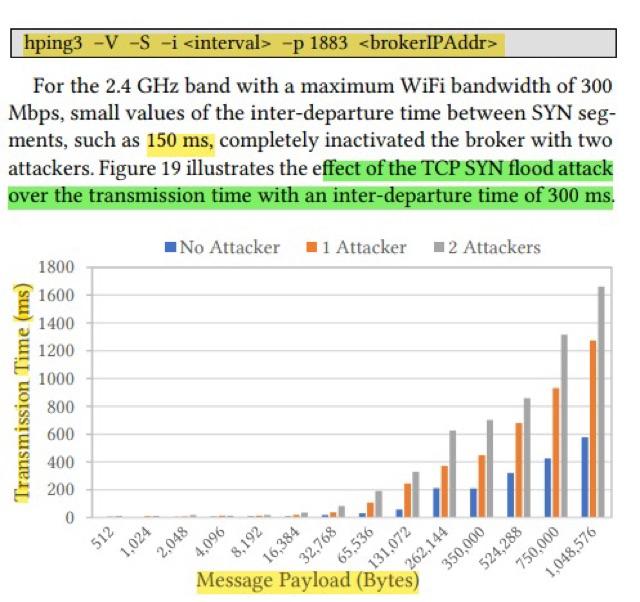
For the 2.4GHz band with a maximum WiFi bandwidth of 300 Mbps, small values of the inter-departure time between SYN segments, such as 150ms, completely inactivated the broker with two attackers. Figure 19 illustrates the effect of the TCP SYN flood attack over the transmission time with an inter-departure time of 300ms. root@raspberry:/home/pi\# S^C root@raspberry:/home/pi\# hping3 VSi1-p 1883 localhost using lo, addr: 127...1, MTU: 65536 HPING localhost (Lo 127...1 ) S set, 4 headers + data bytes len =44 ip =127...1 ttl=64 DF id = tos = iplen=44 sport=1883 flags=SA seq = win =65495rtt=8.8ms seq =4225502139 ack =681289608 sum =2fe urp =
Step by Step Solution
There are 3 Steps involved in it

Get step-by-step solutions from verified subject matter experts
 Study Help