







Question: QUESTION: CREATE A DATABASE FROM PHPMYADMIN(MYSQL) PLEASE DO NOT GIVE SOMETHING ELSE LIKE ERD. DO THE DATABASE MYSQL. EVERYTHING IN DATABASE MYSQL. EXAMPLE OF CHEGG
QUESTION: CREATE A DATABASE FROM PHPMYADMIN(MYSQL)
PLEASE DO NOT GIVE SOMETHING ELSE LIKE ERD. DO THE DATABASE MYSQL. EVERYTHING IN DATABASE MYSQL.
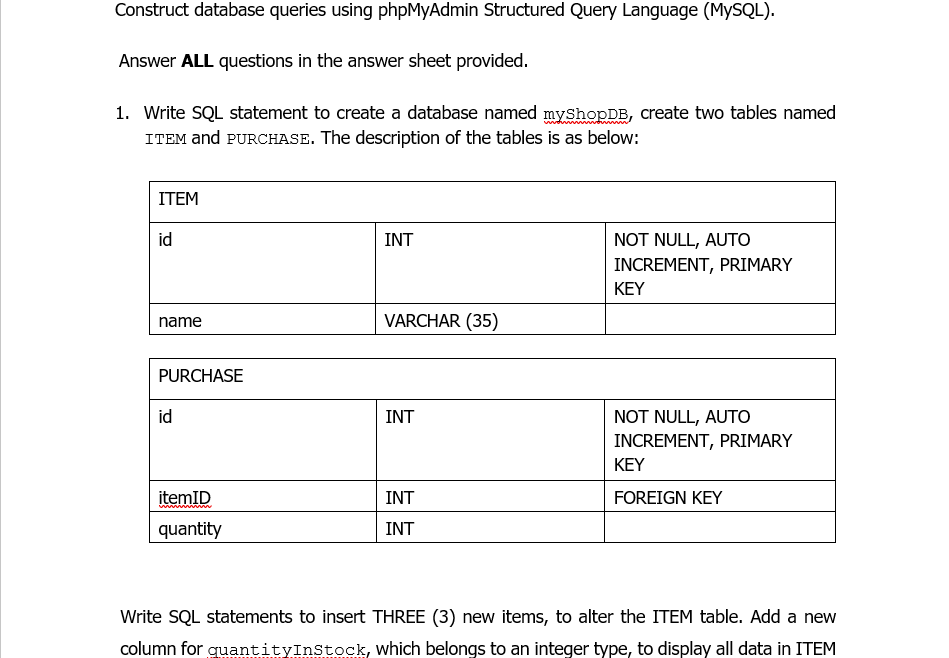
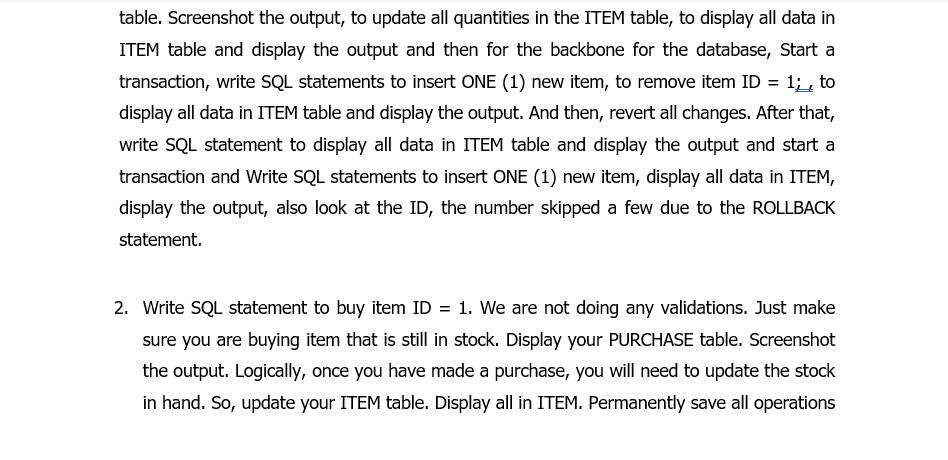
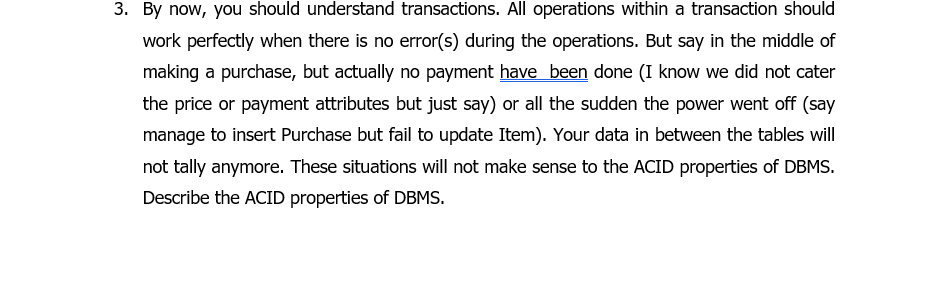
EXAMPLE OF CHEGG ANSWER.
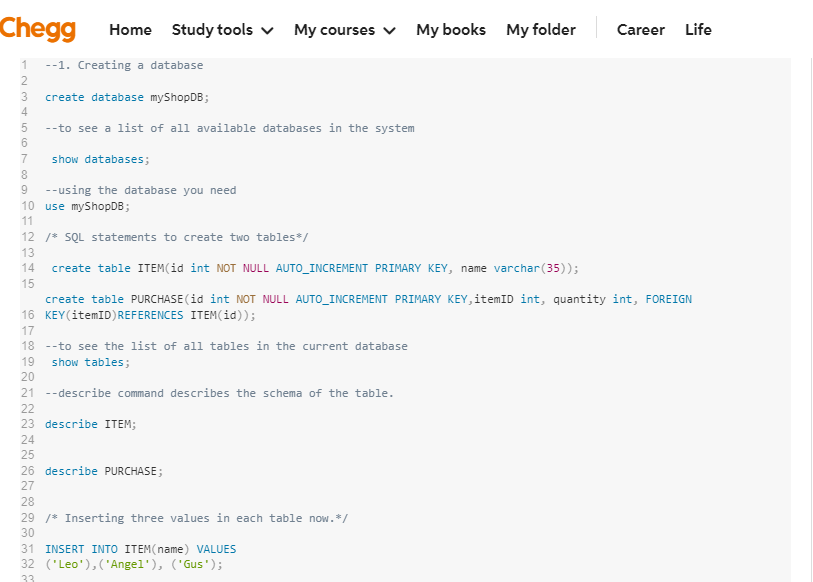
Construct database queries using phpMyAdmin Structured Query Language (MySQL). Answer ALL questions in the answer sheet provided. 1. Write SQL statement to create a database named myShopDB, create two tables named ITEM and PURCHASE. The description of the tables is as below: ITEM id INT NOT NULL, AUTO INCREMENT, PRIMARY KEY name VARCHAR (35) PURCHASE id INT NOT NULL, AUTO INCREMENT, PRIMARY KEY FOREIGN KEY itemID quantity INT INT Write SQL statements to insert THREE (3) new items, to alter the ITEM table. Add a new column for quantityInStock, which belongs to an integer type, to display all data in ITEM = table. Screenshot the output, to update all quantities in the ITEM table, to display all data in ITEM table and display the output and then for the backbone for the database, Start a transaction, write SQL statements to insert ONE (1) new item, to remove item ID 1% to display all data in ITEM table and display the output. And then, revert all changes. After that, write SQL statement to display all data in ITEM table and display the output and start a transaction and Write SQL statements to insert ONE (1) new item, display all data in ITEM, display the output, also look at the ID, the number skipped a few due to the ROLLBACK statement. 2. Write SQL statement to buy item ID = 1. We are not doing any validations. Just make sure you are buying item that is still in stock. Display your PURCHASE table. Screenshot the output. Logically, once you have made a purchase, you will need to update the stock in hand. So, update your ITEM table. Display all in ITEM. Permanently save all operations 3. By now, you should understand transactions. All operations within a transaction should work perfectly when there is no error(s) during the operations. But say in the middle of making a purchase, but actually no payment have been done (I know we did not cater the price or payment attributes but just say) or all the sudden the power went off (say manage to insert Purchase but fail to update Item). Your data in between the tables will not tally anymore. These situations will not make sense to the ACID properties of DBMS. Describe the ACID properties of DBMS. O MAN Chegg Home Study tools My courses My books My folder Career Life 1--1. Creating a database 2 3 create database myShopDB; 4 5 --to see a list of all available databases in the system 6 7 show databases; 8 9 --using the database you need 10 use myShopDB; 11 12 /* SQL statements to create two tables/ 13 14 create table ITEM(id int NOT NULL AUTO_INCREMENT PRIMARY KEY, name varchar(35)); 15 create table PURCHASE (id int NOT NULL AUTO_INCREMENT PRIMARY KEY, itemID int, quantity int, FOREIGN 16 KEY(itemID REFERENCES ITEM(id)); 17 18 --to see the list of all tables in the current database 19 show tables; 20 21 --describe command describes the schema of the table. 22 23 describe ITEM; 24 25 26 describe PURCHASE; 27 28 29 /* Inserting three values in each table now. */ 30 31 INSERT INTO ITEM(name) VALUES 32 ("Leo'), ('Angel'), ('Gus'); 33
Step by Step Solution
There are 3 Steps involved in it

Get step-by-step solutions from verified subject matter experts
 Study Help