







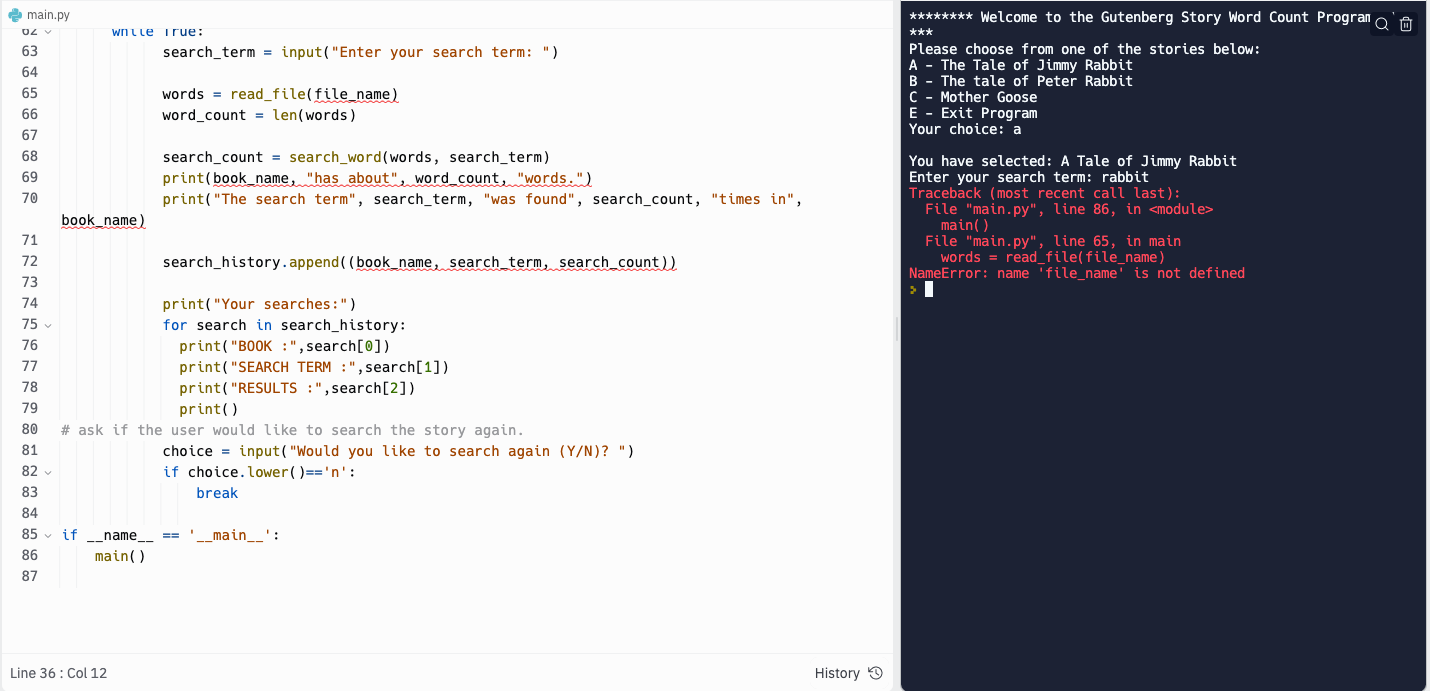
Question: question: help resolving error codes on line 86 and 65 code: # import texts import sys # read file and return list of words, break
question: help resolving error codes on line 86 and 65
code:
# import texts import sys
# read file and return list of words, break string into lists def read_file(file_name): try: with open (file_name, 'r', encoding='utf-8') as file: words = file.read().split() return words except FileNotFoundError: print("File not found in library. Please try again.") # count number of occurrences of term serched in list def search_word(words, search_term): count = 0 for word in words: if word.lower() == search_term.lower(): count += 1 return count
#main function def main(): print("******** Welcome to the Gutenberg Story Word Count Program*******") while(True): #option to pick between stories print("Please choose from one of the stories below:") print("A - The Tale of Jimmy Rabbit") print("B - The tale of Peter Rabbit") print("C - Mother Goose") print("E - Exit Program") story = input("Your choice: ") print() if story.lower() == "a": print("You have selected: A Tale of Jimmy Rabbit") bname = 'Jimmy' fname = 'jimmy_rabbit.txt' elif story.lower() == "b": print("You have selected: A Tale of Peter Rabbit") bname = 'peter' fname = 'peter_rabbit.txt' elif story.lower() == "c": print("You have selected: Mother Goose") bname = 'mother' fname = 'mother_goose.txt' elif story.lower() == "e": print("Thank You for using the Word Count program, Goodbye!") sys.exit() # validate user input else: print("Invalid entry. Please try again") continue search_history = []
# Ask user for search term, output number of occurances while True: search_term = input("Enter your search term: ")
words = read_file(file_name) word_count = len(words)
search_count = search_word(words, search_term) print(book_name, "has about", word_count, "words.") print("The search term", search_term, "was found", search_count, "times in", book_name)
search_history.append((book_name, search_term, search_count)) print("Your searches:") for search in search_history: print("BOOK :",search[0]) print("SEARCH TERM :",search[1]) print("RESULTS :",search[2]) print() # ask if the user would like to search the story again. choice = input("Would you like to search again (Y/N)? ") if choice.lower()=='n': break
if __name__ == '__main__': main()
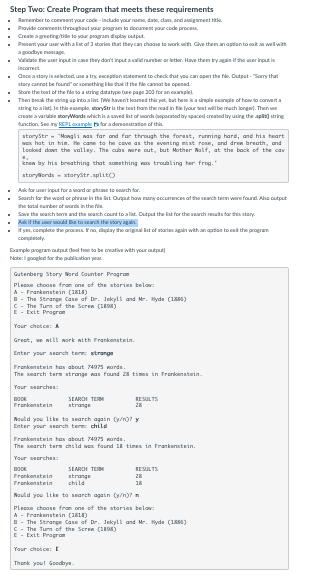
instructions from teacher:
Step Twoc Create Program that meets these requirements - Crese a gretinquila is yau pagan d yolw cutput. a pooltye noura incomect. - Once a dary is un weted, un a try cecupden viterent to check tut yeu con apen the file. Dutpat - "Gory that storystr = -Mangti was far and for through the forsut, rurning hard, and his heart wex hat in him. Ho case to he ceve as the eventing mat roas, end dren breath, and leoked down the vallay. The aud mere out, but Mother Matf, at the back of the car krew lay his breathing that somathing was troubting her frog.' storyards - starystr-aplito the tatal narker of worti in the fle. conplesily. Guterbare Stery Mard Countar Pragran Plecue choose fron on of the starien beler: A - Trarkenstein (1is) E. - The Strange Case af De. Jekyplt and Mr. Hyde (13se) C - The Tun of the Seren (1iss) E - Exit Pragra Yaur chosce: 4 Greet, w witt wark with Vrarkenstein. Liter your seerch terme stranga Trerkenstein has about 74975 mards. The search term strangu was found is times in Irenkenatein. Yaur suerches: Nautd you tike to wearch agatn (w ing y Enter your aeerch tern: dhild Trenkenstein has about 74975 mards. The search term dhs ld wex faund 1e tires in Vrankenstein. Your suerches: Nauld you tike ta wearch agati ( frnj)? n Plesue choose from ons of the staries belor: A - Trarkenstein (181.) D. - The Strange Case of De. lekylt and Mr. Hyd (13se) C. The Tun of the Seren (1ios) E. Exit Pragrom Yaur chosce: t Therk youl Gesdbyn
Step by Step Solution
There are 3 Steps involved in it

Get step-by-step solutions from verified subject matter experts
 Study Help